EasyManua.ls Logo

Sony PS-FL1 - Bottom Plate Installation; Bottom Plate Installation Notes

Sony PS-FL1
39 pages
Print Icon
To Next Page IconTo Next Page
To Previous Page IconTo Previous Page
Loading...
PS-FL1/FL1C
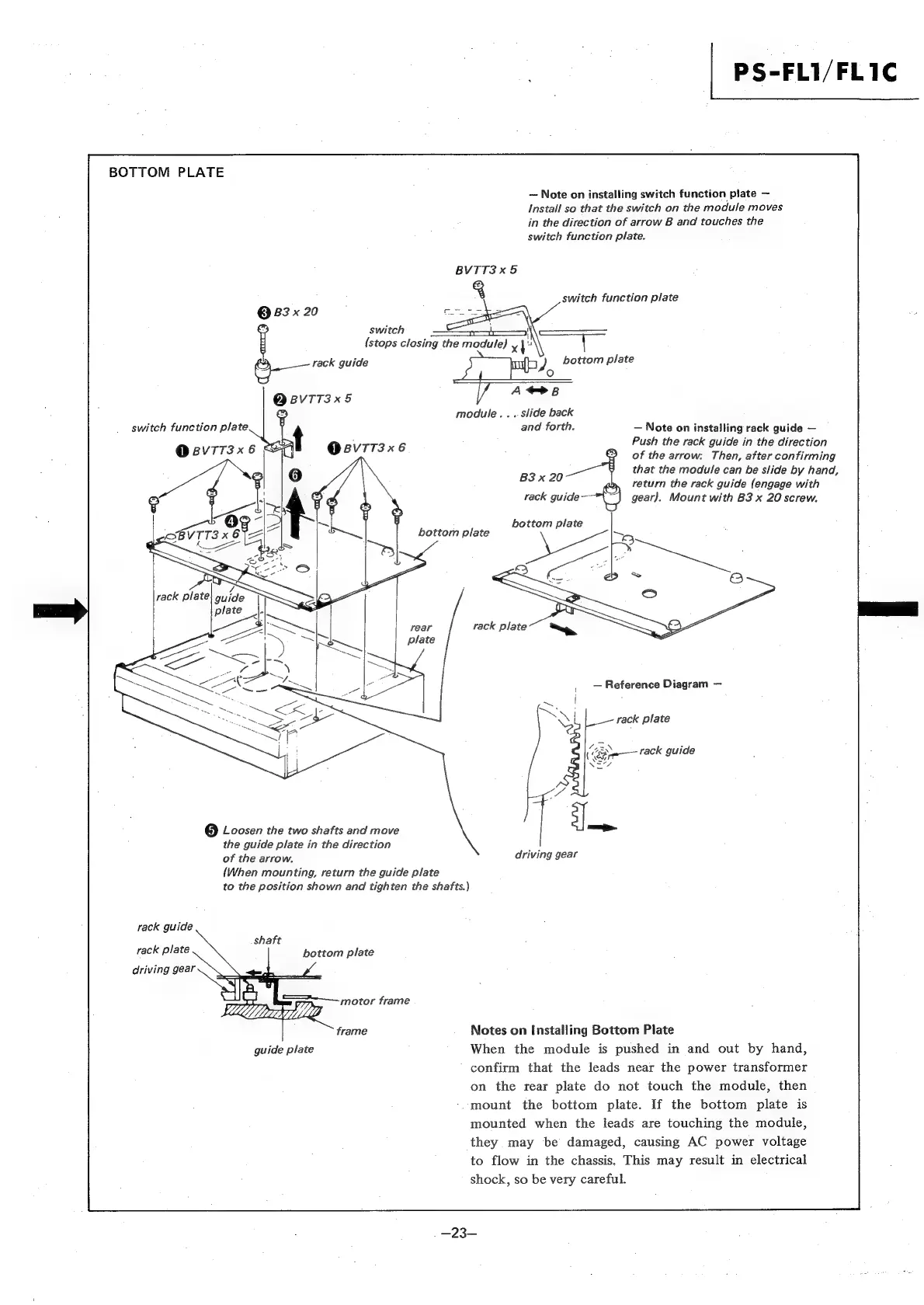
BOTTOM
PLATE
~
Note
on
installing
switch
function
plate
-
Install
so
that
the
switch
on
the
module
moves
in
the
direction
of
arrow
B
and
touches
the
switch
function
plate.
BVTT3x5
switch
function
plate
@
83
x
20
:
switch
rt"
(stops
closing
the
module)
x
ie
e—
rack
guide
J
bottom
plate
°
QBvIT3x5
module...
slide
back
+
and
forth.
Note
on
installing
rack
guide
.
Push
the
rack
guide
in
the
direction
@
BvTT3x
6
@Bv7T3x6
of
the
arrow:
Then,
after
confirming
B3x
20
that
the
module
can
be
slide
by
hand,
return
the
rack
guide
(engage
with
rack
guide—-
gear).
Mount
with
B3
x
20
screw.
switch
function
plate
bottom
plate
bottom
plate
Reference
Diagram
rack
plate
rack
guide
@
Loosen
the
two
shafts
and
move
the
guide
plate
in
the
direction
of
the
arrow.
{When
mounting,
return
the
guide
plate
to
the
position
shown
and
tighten
the
shafts.)
driving
gear
rack
guide
shaft
rack
plate
bottom
plate
driving
gear
——
motor
frame
frame
Notes
on
Installing
Bottom
Plate
guide
plate
When
the
module
is
pushed
in
and
out
by
hand,
confirm
that
the
leads
near
the
power
transformer
on
the
rear
plate
do
not
touch
the
module,
then
-mount
the
bottom
plate.
If
the
bottom
plate
is
mounted
when
the
leads
are
touching
the
module,
they
may
be
damaged,
causing
AC
power
voltage
to
flow
in
the
chassis.
This
may
result
in
electrical
shock,
so
be
very
careful.

Other manuals for Sony PS-FL1

Related product manuals