EasyManua.ls Logo

Sony RM-E700 - Page 14

Sony RM-E700
86 pages
Print Icon
To Next Page IconTo Next Page
To Previous Page IconTo Previous Page
Loading...
i
i
Program
Editing—To
Edit
Scenes
in
Succession
[Operation
4]
ty
Repeat
Operations
2
and
3
to
designate
the
other
Cuts.
ePTelieley
Finish
the
designation
of
the
Cuts.
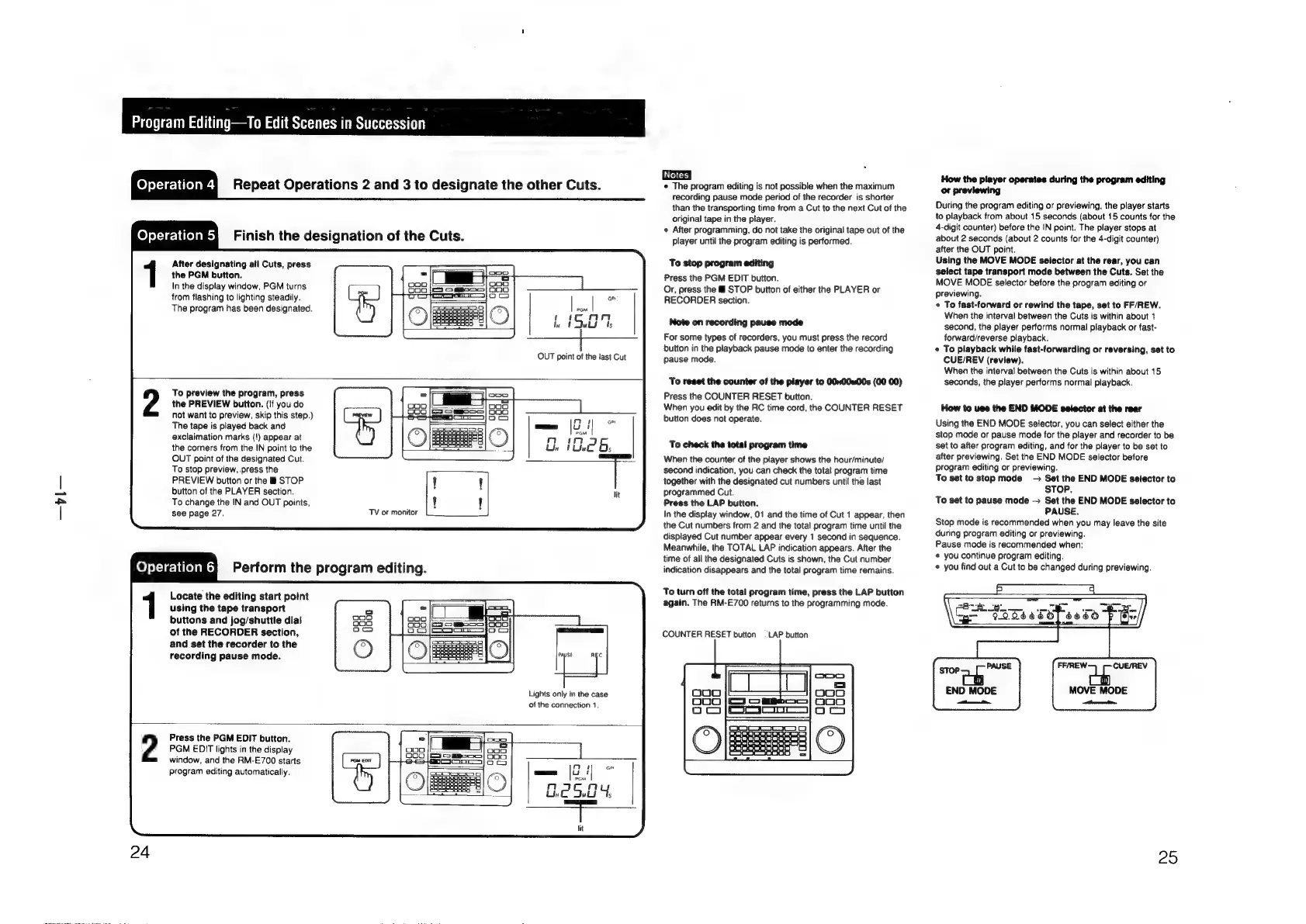
After
designating
all
Cuts,
press
the
PGM
button.
In
the
display
window,
PGM
turns
from
flashing
to
lighting
steadily.
The
program
has
been
designated.
OUT
point
of
the
last
Cut
To
preview
the
program,
press
the
PREVIEW
button.
(if
you
do
not
want
to
preview,
skip
this
step.)
The
tape
is
played
back
and
exclaimation
marks
(!)
appear
at
the
corners
from
the
IN
point
to
the
OUT
point
of
the
designated
Cut.
To
stop
preview,
press
the
PREVIEW
button
or
the
&
STOP
button
of
the
PLAYER
section.
To
change
the
IN
and
OUT
points,
see
page
27.
TV
or
monitor
els
elielees
Perform
the
program
editing.
Locate
the
editing
start
point
using
the
tape
transport
buttons
and
jog/shuttle
dial
of
the
RECORDER
section,
and
set
the
recorder
to
the
recording
pause mode.
Lights
only
in
the
case
of
the
connection
1
2
Press
the
PGM
EDIT
button.
PGM
EDIT
lights
in
the
display
window,
and
the
RM-E700
starts
program
editing
automatically.
[ers
¢
The
program
editing
is
not
possible
when
the
maximum
recording
pause
mode
period
of
the
recorder
is
shorter
than
the
transporting
time
from
a
Cut
to
the
next
Cut
of
the
original
tape
in
the
player.
«
After
programming,
do
not
take
the
original
tape
out
of
the
player
until
the
program
editing
is
performed.
To
stop
program
editing
Press
the
PGM
EDIT
button.
Or,
press
the
STOP
button
of
either
the
PLAYER
or
RECORDER
section.
Note
on
recording
pause
mode
For
some
types
of
recorders,
you
must
press
the
record
button
in
the
playback
pause
mode
to
enter
the
recording
pause
mode.
To
reset
the
counter
of
the
player
to
001w00w00s
(00 00)
Press
the
COUNTER
RESET
button.
When
you
edit
by
the
RC
time
cord,
the
COUNTER
RESET
button
does
not
operate.
To
check
the
total
program
time
When
the
counter
of
the
player
shows
the
hour/minute/
second
indication,
you
can
check
the
total
program
time
together
with
the
designated
cut
numbers
until
the
last
programmed
Cut.
Press
the
LAP
button.
In
the
display
window,
01
and
the
time
of
Cut
1
appear,
then
the
Cut
numbers
from
2
and
the
total
program
time
until
the
displayed
Cut
number
appear
every
1
second
in
sequence.
Meanwhile,
the
TOTAL
LAP
indication
appears.
After
the
time
of
all
the
designated
Cuts
is
shown,
the
Cut
number
indication
disappears
and
the
total
program
time
remains.
To
turn
off
the
total
program
time,
press
the
LAP
button
again.
The
RM-E700
returns
to
the
programming
mode.
COUNTER
RESET
button
—_
LAP
button
How
the
player
operates
during
the
program
editing
or
previewing
During
the
program
editing
or
previewing,
the
player
starts
to
playback
from
about
15
seconds
(about
15
counts
for
the
4-digit
counter)
before
the
iN
point.
The
player
stops
at
about
2
seconds
(about
2
counts
for
the
4-digit
counter)
after
the
OUT
point.
Using
the
MOVE
MODE
setector
at
the
rear,
you
can
select
tape
transport
mode
between
the
Cuts.
Set
the
MOVE
MODE
selector
before
the
program
editing
or
previewing.
¢
To
fast-forward
or
rewind
the
tape,
set
to
FF/REW.
When
the
interval
between
the
Cuts
is
within
about
1
second,
the
player
performs
normal
playback
or
fast-
forward/reverse
playback.
©
To
playback
while
fast-forwarding
or
reversing,
set
to
CUE/REV
(review).
When
the
interval
between
the
Cuts
is
within
about
15
seconds,
the
player
performs
normal
playback.
How
to
use
the
END
MODE
selector
at
the
rear
Using
the
END
MODE
selector,
you
can
select
either
the
stop
mode
or
pause
mode
for
the
player
and
recorder
to
be
set
to
after
program
editing,
and
for
the
player
to
be
set
to
after
previewing.
Set
the
END
MODE
selector
before
program
editing
or
previewing.
To
set
to
stop
mode
-
Set
the
END
MODE
selector
to
STOP.
To
set
to
pause
mode
Set the
END
MODE
selector
to
PAUSE.
Stop
mode
is
recommended
when
you
may
leave
the
site
during
program
editing
or
previewing.
Pause
mode
is
recommended
when:
*
you
continue
program
editing.
you
find
out
a
Cut
to
be
changed
during
previewing.
io
GER
Top
a0ds
FF/REW.
CUE/REV
MOVE
MODE
enti
25

Other manuals for Sony RM-E700

Related product manuals