EasyManua.ls Logo

Sony RM-E700 - Page 13

Sony RM-E700
86 pages
Print Icon
To Next Page IconTo Next Page
To Previous Page IconTo Previous Page
Loading...
Program
Editing—To
Edit
Scenes
in
Succession
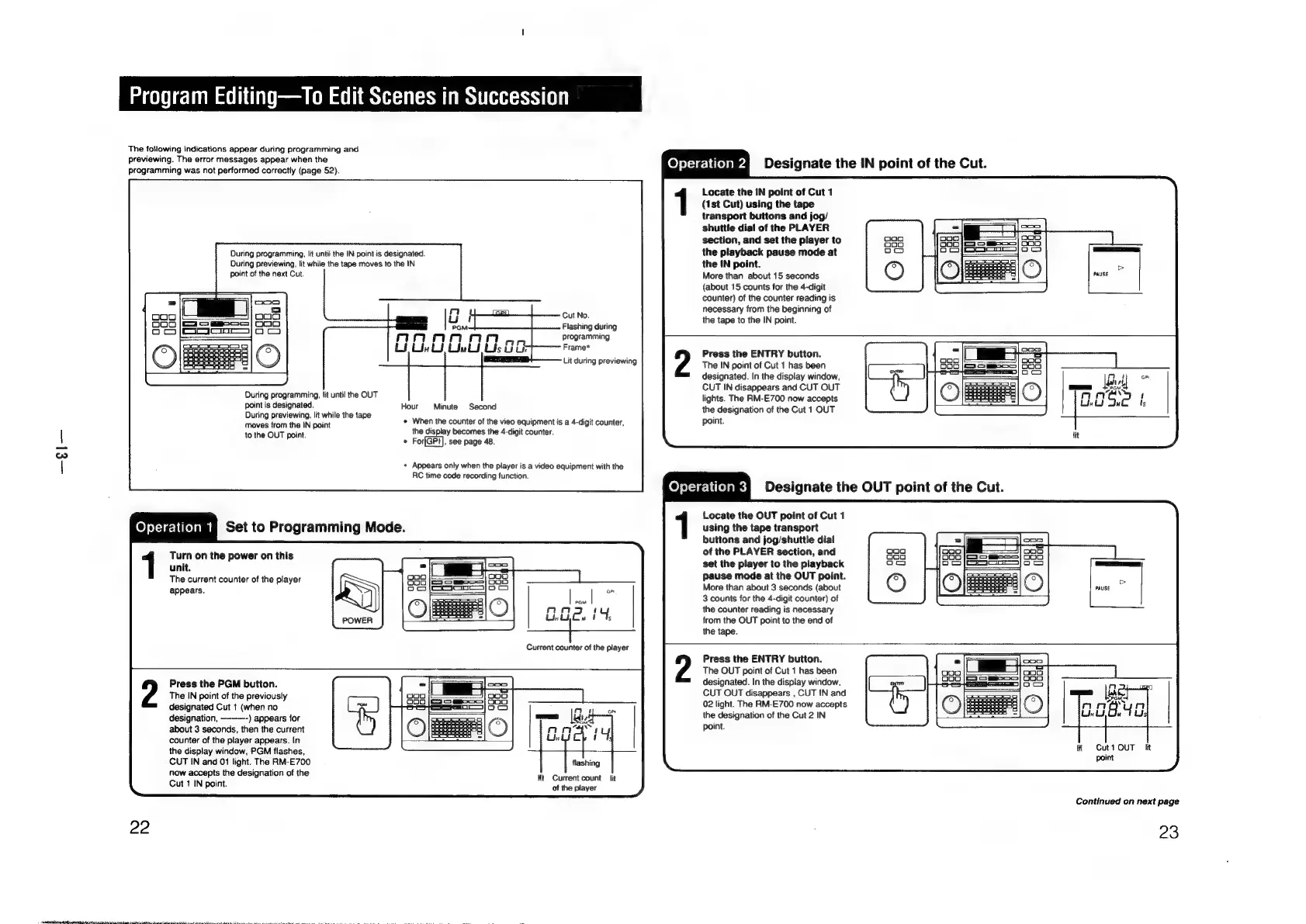
The
following
indications
appear
during
programming
and
previewing.
The
error
messages
appear
when
the
programming
was
not
performed
correctly
(page
52).
eres
Designate
the
IN
point
of
the
Cut.
During
programming,
lit
until
the
IN
point
is
designated.
During
previewing,
lit
while
the
tape
moves
to
the
IN
point
of
the
next
Cut.
During
programming,
{it
until
the
OUT
point
is
designated.
Hour
Minute
Second
During
previewing,
lit
while
the
tape
moves
from
the
IN
point
to
the
OUT
point.
©
For
,
See
page
48.
Cut
No.
Flashing
during
programming
Frame*
Lit
during
previewing
*
When
the
counter
of
the
vieo
equipment
is
a
4-digit
counter,
the
display
becomes
the
4-digit
counter.
*
Appears
only
when
the
player
is
a
video
equipment
with
the
RC
time
code
recording
function.
eyteieme
set
to
Programming
Mode.
Turn
on
the
power
on
this
unit.
The
current
counter
of
the
player
appears.
oP
PGM
G.Gcu
1%
Current
counter
of
the
player
Locate
the
IN
point
of
Cut
1
(1st
Cut)
using
the
tape
transport
buttons
and
jog/
shuttle
dial
of
the
PLAYER
section,
and
set
the
player
to
the
playback
pause
mode
at
the
IN
point.
More
than
about
15
seconds
(about
15
counts
for
the
4-digit
counter)
of
the
counter
reading
is
necessary
from
the
beginning
of
the
tape
to
the
IN
point.
Press
the
ENTRY
button.
The
IN
point
of
Cut
1
has
been
designated.
In
the
display
window,
CUT
IN
disappears
and
CUT
OUT
lights.
The
RM-E700
now
accepts
the
designation
of
the
Cut
1
OUT
point.
Locate
the
OUT
point
of
Cut
1
using
the
tape transport
buttons
and
jog/shuttle
dial
of
the
PLAYER
section,
and
set
the
player
to
the
playback
Pause
mode
at
the
OUT
point.
More
than
about
3
seconds
(about
3
counts
for
the
4-digit
counter)
of
the
counter
reading
is
necessary
from
the
OUT
point
to
the
end
of
the
tape.
22
PI
Re
a
TET
ee
RT
Ta
NT
ee
a
Le
Press
the
PGM
button.
The
IN
point
of
the
previously
designated
Cut
t
(when
no
designation,
-)
appears
for
about
3
seconds,
then
the
current
counter
of
the
player
appears.
In
the
display
window,
PGM
flashes,
CUT
IN
and
01
light.
The
RM-E700
now
accepts
the
designation
of
the
Cut
1
IN
point.
lit
Current
count
lit
of
the
player
Press
the
ENTRY
button.
The
OUT
point
of
Cut
1
has
been
designated.
In
the
display
window,
CUT
OUT
disappears
,
CUT
IN
and
02
light.
The
RM-E700
now
accepts
the
designation
of
the
Cut
2
IN
point.
it
Cut1
OUT
iit
point
Continued
on
next
page
23

Other manuals for Sony RM-E700

Related product manuals