EasyManua.ls Logo

Sony RM-E700 - Page 12

Sony RM-E700
86 pages
Print Icon
To Next Page IconTo Next Page
To Previous Page IconTo Previous Page
Loading...
Step
2
Program
Editing
Before
You
Begin
What
is
Program
Editing?
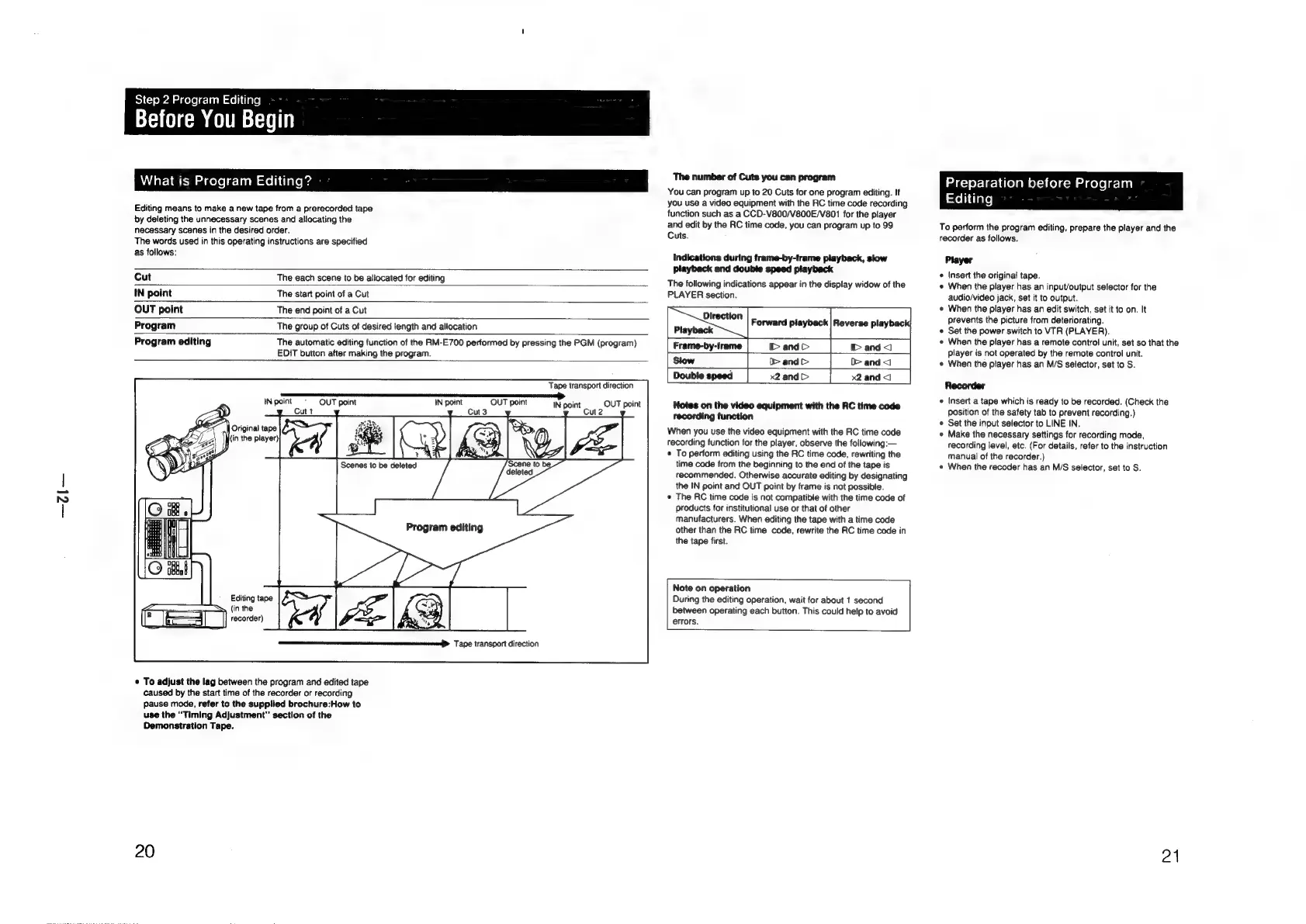
Editing
means
to
make
a
new
tape
from
a
prerecorded
tape
by
deleting
the
unnecessary
scenes
and
allocating
the
necessary
scenes
in
the
desired
order.
The
words
used
in
this
operating
instructions
are
specified
as
follows:
Cut
The
each
scene
to
be
allocated
for
editing
IN
point
The
start
point
of
a
Cut
OUT
point
The
end
point
of
a
Cut
Program
The
group
of
Cuts
of
desired
iength
and
allocation
Program
editing
The
automatic
editing
function
of
the
RM-E700
performed
by
pressing
the
PGM
(program)
EDIT
button
after
making
the
program.
INpoint
-
OUT
point
IN
point
OUT
point
nes
to
be
del
bas
ereted
deleted
Program
editing
Editing
tape
(in
the
recorder)
Tape
transport
direction
©
To
adjust
the
lag
between
the
program
and
edited
tape
caused
by
the
start
time
of
the
recorder
or
recording
pause
mode,
refer
to
the
supplied
brochure:How
to
use
the
“Timing
Adjustment”
section
of
the
Demonstration
Tape.
20
Tape
transport
direction
The
number
of
Cuts
you can
program
You
can
program
up
to
20
Cuts
for
one
program
editing.
If
you
use
a
video
equipment
with
the
RC
time
code
recording
function
such
as
a
CCD-V800/V800E/V801
for
the
player
and
edit
by
the
RC
time
code,
you
can
program
up
to
99
Cuts.
Indications
during
frame-by-frame
playback,
slow
playback
and
double
speed
playback
The
following
indications
appear
in
the
display
widow
of
the
PLAYER
section.
Forward
playback
|
Reverse
playback
Frame-by-frame
i>
and
I>
and
<)
|
Slow
|
>
and>
D>
and
<1
|
Double
speed
|
x2
and>
x2and<1
|
Notes
on
the
video
equipment
with
the
RC
time
code
recording
function
When
you
use
the
video
equipment
with
the
RC
time
code
recording
function
for
the
player,
observe
the
following:—
¢
To
perform
editing
using
the
RC
time
code,
rewriting
the
time
code
from
the
beginning
to
the
end
of
the
tape
is
recommended.
Otherwise
accurate
editing
by
designating
the
IN
point
and
OUT
point
by
frame
is
not
possible.
*
The
RC
time
code
is
not
compatible
with
the
time
code
of
products
for
institutional
use
or
that
of
other
manufacturers.
When
editing
the
tape
with
a
time
code
other
than
the
RC
time
code,
rewrite
the
RC
time
code
in
the
tape
first.
Note
on
operation
During
the
editing
operation,
wait
for
about
1
second
between
operating
each
button.
This
could
help
to
avoid
errors.
Preparation
before
Program
=o}
Clare]
To
perform
the
program
editing,
prepare
the
player
and
the
recorder
as
follows.
Player
¢
Insert
the
original
tape.
«
When
the
player
has
an
input/output
selector
for
the
audio/video
jack,
set
it
to
output.
«
When
the
player
has
an
edit
switch,
set
it
to
on.
It
prevents
the
picture
from
deteriorating.
«
Set
the
power
switch
to
VTR
(PLAYER).
e
When
the
player
has
a
remote
control
unit,
set
so
that
the
player
is
not
operated
by
the
remote
control
unit.
e
When
the
player
has
an
M/S
selector,
set
to
S.
Recorder
e
Insert
a
tape
which
is
ready
to
be
recorded.
(Check
the
position
of
the
safety
tab
to
prevent
recording.)
Set
the
input
selector
to
LINE
IN.
«
Make
the
necessary
settings
for
recording
mode,
recording
level,
etc.
(For
details,
refer
to
the
instruction
manual
of
the
recorder.)
«
When
the
recoder
has
an
M/S
selector,
set
to
S.
21

Other manuals for Sony RM-E700

Related product manuals