EasyManua.ls Logo

Sony RM-E700 - Page 11

Sony RM-E700
86 pages
Print Icon
To Next Page IconTo Next Page
To Previous Page IconTo Previous Page
Loading...
Connection
4
5)
Col
glare
Mdat-
Mal
Ulaled
(Col
al-Mel
Ml
lal-mat-uile)
(=m
Ore)
When
you
use
an
other
manufacturer’s
recorder,
store
the
control
signal
of
the
tape
transport,
so
that
the
RM-E700
can
operate
the
recorder.
However,
you
cannot
use
the
jog/shuttle
dial
to
operate
the
recorder.
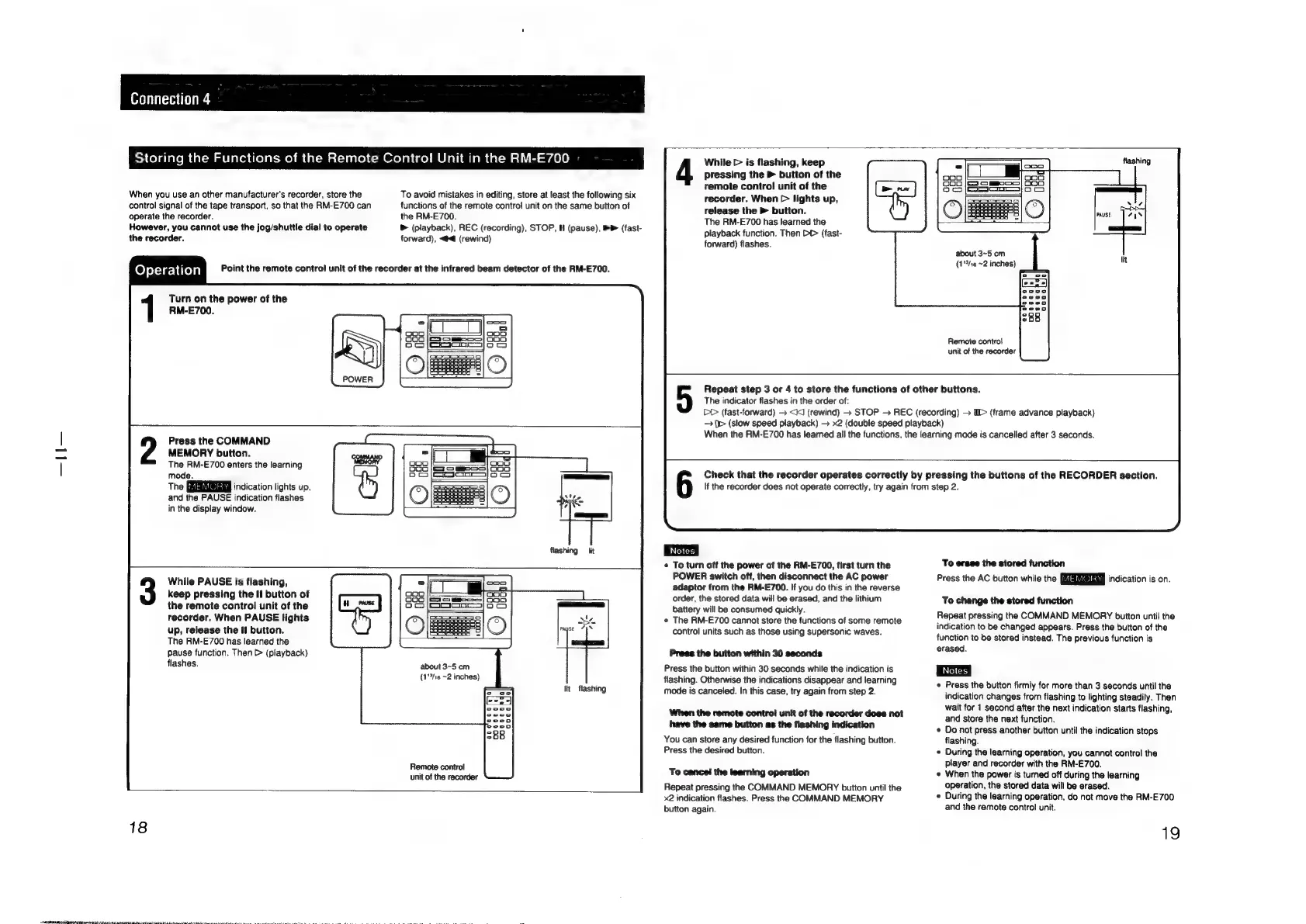
Operation
Turn
on
the
power
of
the
RM-E700.
ol
Unit
in
the
RM-E700
To
avoid
mistakes
in
editing,
store
at
least
the
following
six
functions
of
the
remote
control
unit
on
the
same
button
of
the
RM-E700.
®
(playback),
REC
(recording),
STOP,
H
(pause),
&
(fast-
forward),
<<
(rewind)
Point
the
remote
control
unit
of
the
recorder
at
the
infrared
beam
detector
of
the
RM-E700.
Press
the
COMMAND
MEMORY
button.
The
RM-E700
enters
the
learning
mode.
The
ERISEd@iaag
‘ndication
lights
up,
and
the
PAUSE
indication
flashes
in
the
display
window.
flashing
lit
While
PAUSE
is
flashing,
keep
pressing
the
Il
button
of
the
remote
control
unit
of
the
recorder.
When
PAUSE
lights
up,
release
the
fl
button.
The
RM-E700
has
learned
the
pause
function.
Then
>
(playback)
flashes.
about
3~5
cm
(1/16
~2
inches)
lit
flashing
Remote
control
unit
of
the
recorder
18
While
>
is
flashing,
keep
pressing
the
>
button
of
the
remote
control
unit
of
the
recorder.
When
>
lights
up,
release
the
>
button.
The
RM-E700
has
learned
the
playback
function.
Then
>>
(fast-
forward)
flashes.
about
3~5
cm
(1°he
~2
inches)
Remote
control
unit
of
the
recorder
Repeat
step
3
or
4
to
store
the
functions
of
other
buttons.
The
indicator
flashes
in
the
order
of:
CO
(fast-forward)
<kKJ
(rewind)
+
STOP
>
REC
(recording)
D>
(frame
advance
playback)
[>
(slow
speed
playback)
x2
(double
speed
playback)
When
the
RM-E700
has
learned
all
the
functions,
the
learning
mode
is
cancelled
after
3
seconds.
Check
that
the
recorder
operates
correctly
by
pressing
the
buttons
of
the
RECORDER
section.
If
the
recorder
does
not
operate
correctly,
try
again
from
step
2.
¢
To
turn
off
the
power
of
the
RM-E700,
first
turn
the
POWER
switch
off,
then
disconnect
the
AC
power
adaptor
from
the
RM-E700.
If
you
do
this
in
the
reverse
order,
the
stored
data
will
be
erased,
and
the
lithium
battery
will
be
consumed
quickly.
*
The
RM-E700
cannot
store
the
functions
of
some
remote
control
units
such
as
those
using
supersonic
waves.
Press
the
button
within
30
seconds
Press
the
button
within
30
seconds
while
the
indication
is
flashing.
Otherwise
the
indications
disappear
and
learning
mode
is
canceled.
In
this
case,
try
again
from
step
2.
When
the
remote
control
unit
of
the
recorder
does
not
have
the
same
button
as
the
flashing
indication
You
can
store
any
desired
function
for
the
flashing
button.
Press
the
desired
button.
To
cancel
the
learning
operation
Repeat
pressing
the
COMMAND
MEMORY
button
until
the
x2
indication
flashes.
Press
the
COMMAND
MEMORY
button
again.
To
erase
the
stored
function
Press
the
AC
button
while
the
indication
is
on.
To
change
the
stored
function
Repeat
pressing
the
COMMAND
MEMORY
button
until
the
indication
to
be
changed
appears.
Press
the
button
of
the
function
to
be
stored
instead.
The
previous
function
is
erased.
Press
the
button
firmly
for
more
than
3
seconds
until
the
indication
changes
from
flashing
to
lighting
steadily.
Then
wait
for
1
second
after
the
next
indication
starts
flashing,
and
store
the
next
function.
¢
Do
not
press
another
button
until
the
indication
stops
flashing.
©
During
the
learning
operation,
you
cannot
control
the
player
and
recorder
with
the
RM-E700.
¢
When
the
power
is
turned
off
during
the
learning
operation,
the
stored
data
will
be
erased.
During
the
learning
operation,
do
not
move
the
RM-E700
and
the
remote
contro}
unit.
19

Other manuals for Sony RM-E700

Related product manuals