EasyManua.ls Logo

Sony RM-E700 - Page 20

Sony RM-E700
86 pages
Print Icon
To Next Page IconTo Next Page
To Previous Page IconTo Previous Page
Loading...
Creating
a
Character
Title
eerie
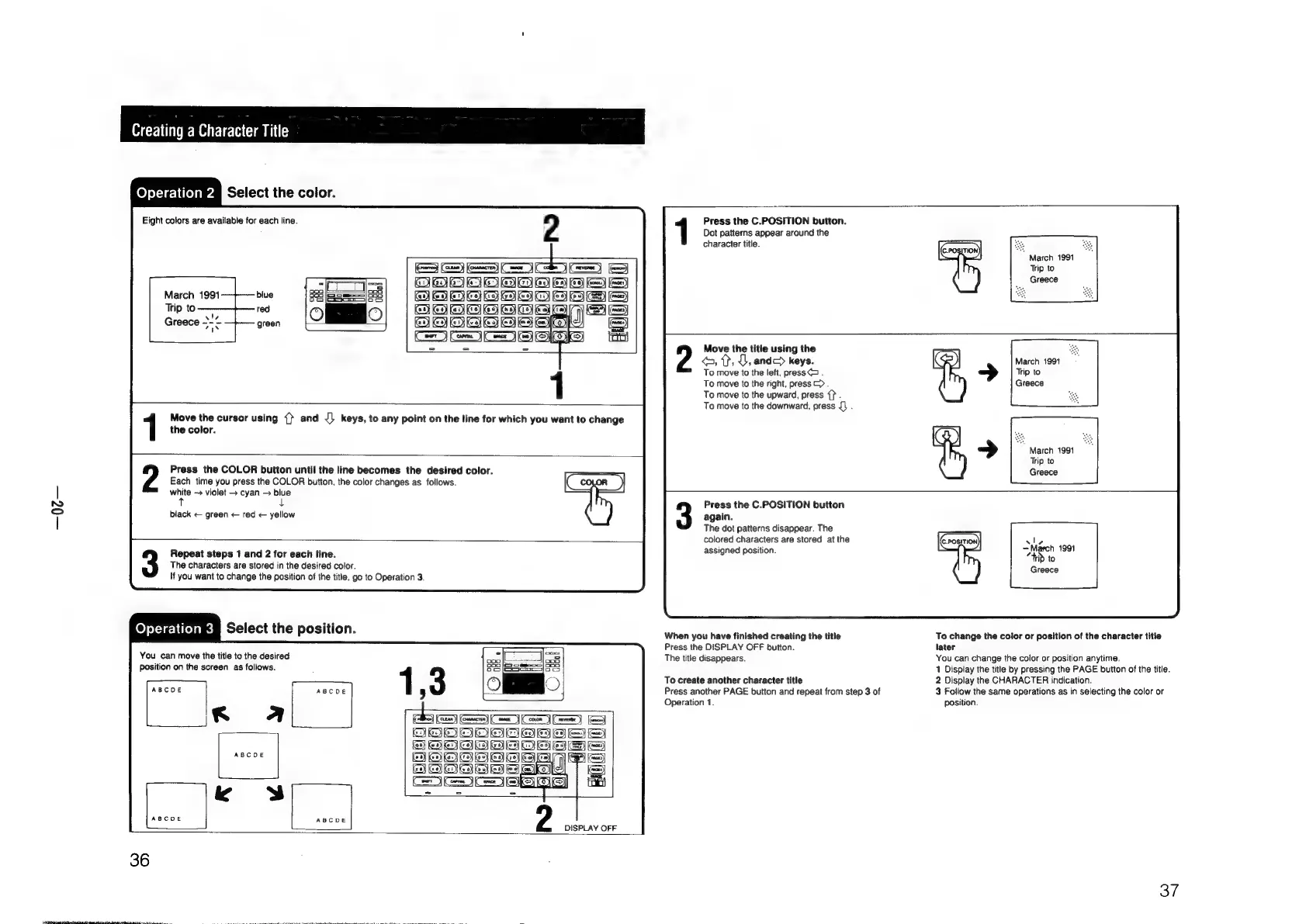
elect
the
color.
Dot
patterns
appear
around
the
Eight
colors
are
available
for
each
line.
2
Press
the
C.POSITION
button.
character
title.
March
1991
SSS
SS
Trip
to
|
olalolmlalcsica
Greece
March
1991
BHO
HOOOWOOOO
EE
Trip
to—
OODOO
OOO
Greece
--~
ODD
©,
?,
J,
andc
keys.
March
1991
To
move
to
the
left,
press
.
Trip
to
To
move
to
the
right,
press
>>.
Greece
To
move
to
the
upward,
press
{}
.
To
move
to
the
downward,
press
{}
.
2
Move
the
title
using
the
Move
the
cursor
using
{}
and
J)
keys,
to
any
point
on
the
line
for
which
you
want
to
change
the
color.
March
1991
Trip
to
Greece
Press
the
COLOR
button
until
the
line
becomes
the
desired
color.
Each
time
you
press
the
COLOR
button,
the
color
changes
as
follows.
white
-
violet
>
cyan
>
blue
tT
L
Press
the
C.POSITION
button
black
green
<
red
<
yellow
again.
The
dot
patterns
disappear.
The
colored
characters
are
stored
at
the
alo
Repeat
steps
1
and
2
for
each
line.
assigned|position:
a
bas
The
characters
are
stored
in
the
desired
color.
Greece
lf
you
want
to
change
the
position
of
the
title,
go
to
Operation
3.
ey
elie
Select
the
position.
When
you
have
finished
creating
the
title
To
change
the
color
or
position
of
the
character
title
Press
the
DISPLAY
OFF
button.
later
You
can
move
the
title
to
the
desired
The
title
disappears.
You
can
change
the
color
or
position
anytime.
Position
on
the
screen
as
follows.
1
Display
the
title
by
pressing
the
PAGE
button
of
the
title.
To
create
another
character
title
2
Display
the
CHARACTER
indication.
ABCDE
ABCDE
:
Press
another
PAGE
button
and
repeat
from
step
3
of
3
Follow
the
same
operations
as
in
selecting
the
color
or
Operation
1.
position.
aon
|
PRES
2
DISPLAY
OFF
36
37

Other manuals for Sony RM-E700

Related product manuals