EasyManua.ls Logo

Sony RM-E700 - Page 8

Sony RM-E700
86 pages
Print Icon
To Next Page IconTo Next Page
To Previous Page IconTo Previous Page
Loading...
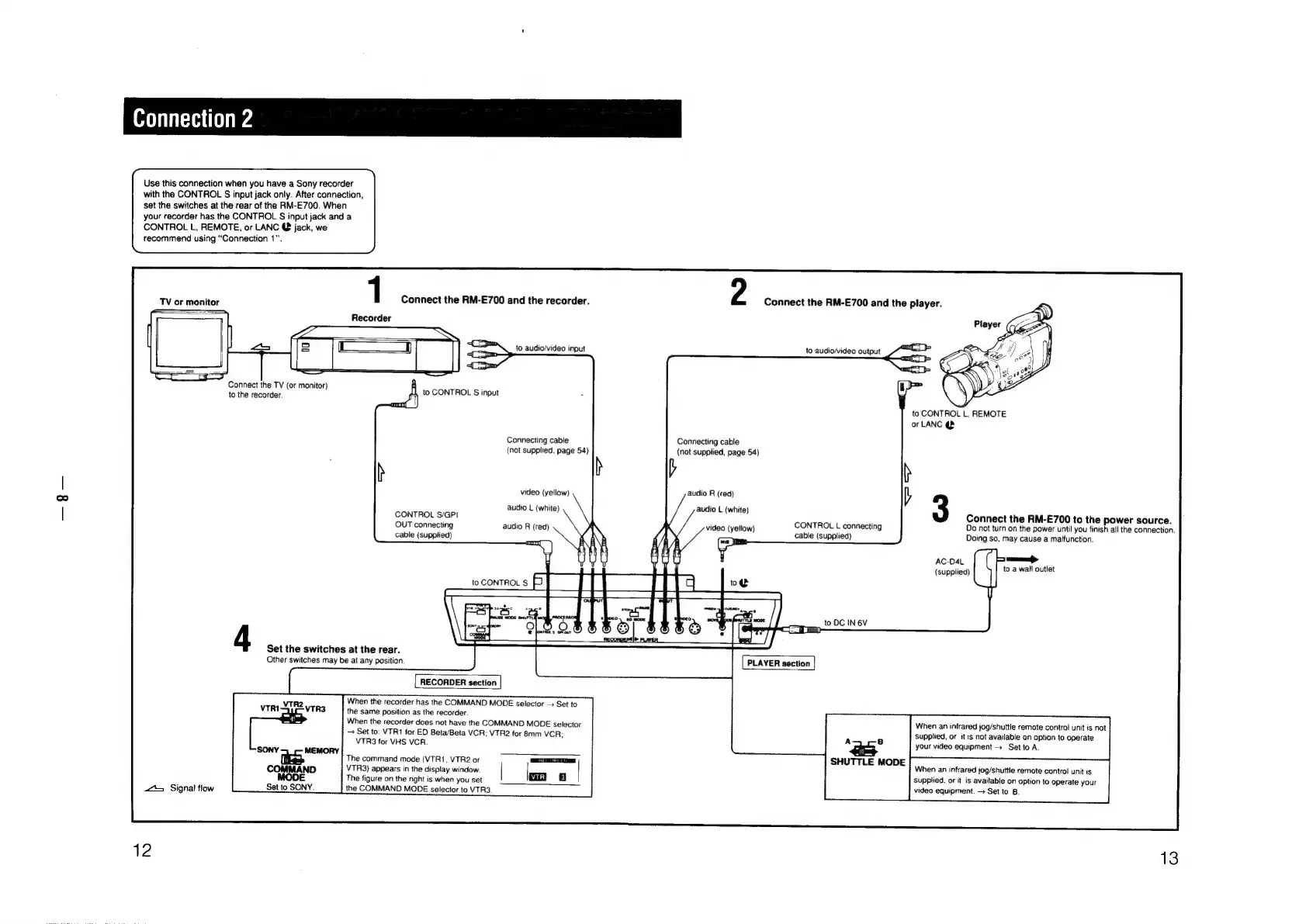
Use
this
connection
when
you
have
a
Sony
recorder
with
the
CONTROL
S
input
jack
only.
After
connection,
set
the
switches
at
the
rear
of
the
RM-E700.
When
your
recorder
has
the
CONTROL
S
input
jack
and
a
CONTROL
L,
REMOTE,
or
LANC
@
jack,
we
recommend
using
“Connection
1".
1
Connect
the
RM-E700
Recorder
TV
or
monitor
Connect
the
TV
(or
monitor)
to
the
recorder.
f)
to
CONTROL
§
input
CONTROL
S/GPI
OUT
connecting
cable
(supplied)
and
the
recorder.
to
audio/video
input
Connecting
cable
(not
supplied,
page
54)
video
(yellow)
audio
L
(white)
audio
R
(red)
ant)
b
Connecting
cable
(not
supplied,
page
54)
audio
R
(red)
audio
L
(white)
video
(yellow)
4
Set
the
switches
at
the
rear.
Other
switches
may
be
at
any
position.
RECORDER
section
VTR2
VTRI
VTR3
the
same
position
as
the
recorder.
When
the
recorder
has
the
COMMAND
MODE
selector
>
Set
to
When
the
recorder
does
not
have
the
COMMAND
MODE
selector
Set
to:
VTR1
for
ED
Beta/Beta
VCR;
VT!
VTR3
for
VHS
VCR.
SONY
MEMORY
The
command
mode
(VTR1,
VTR2
or
COMMAND
VTR3)
appears
in
the
display
window.
MODE
The
figure
on
the
right
is
when
you
set
Set
to
SONY.
t
Signal
flow
the
COMMAND
MODE
selector
to
VTR3
R2
for
8mm
VCR;
=a
ua
Connect
the
RM-E700
and
the
player.
to
audio/video
output
to
CONTROL
L,
REMOTE
or
LANC
@
b
3
Connect
the
RM-E700
to
the
power
source.
Do
not
turn
on
the
power
until
you
finish
all
the
connection.
Doing
so,
may
cause
a
matfunction.
CONTROL
L
connecting
cable
(supplied)
AC-O04L
i
(supplied)
to
a
wall
outlet
to
DC
IN
6V
i
fi
PLAYER
section
When
an
infrared
jog/shuttle
remote
control
unit
is
not
Supplied,
or
it
is
not
available
on
option
to
operate
A 8
your
video
equipment >
Setto
A.
SHUTTLE
MODE
;
When
an
infrared
jog/shuttle
remote
control
unit
is
supplied,
or
it
is
available
on
option
to
operate
your
video
equipment.
>
Set
to
B.

Other manuals for Sony RM-E700

Related product manuals