EasyManua.ls Logo

Sony RM-E700 - Page 9

Sony RM-E700
86 pages
Print Icon
To Next Page IconTo Next Page
To Previous Page IconTo Previous Page
Loading...
Caution
When
the
player
is
a
video
camera
recorder
or
a
video
When
the
player
has
the
infrared
beam
detector:
i i
cassette recorder
controlled
by
an
infrared
remote
e
Set
the
command
mode
selector
on
the
player
to
OFF,
cn
reg
peruies
sidtepid
teat
ry
cs
tae
el
control
unit,
the
player
may
detect
the
control
signal
or
to
a
different
position
from
that
of
the
recorder.
CONTROL
L,
REMOTE, LANC
@
oF
CONTROL
S
from
the
RM-E700
to
the
recorder,
resulting
in
faulty
Or,
input
jack
Control
the
fosorder
b
transmitting
the
operation.
(At
worst,
the
recorded
contents
in
the
tape
«
When
the
player
does
not
have
the
command
mode
jereied
signal
from
the
RIM-E700
to
the
infrared
beam
may
be
erased.*)
selector,
cover
its
infrared
beam
detector
with
thick
i
black
paper.
detector
of
the
recorder.
After
connection,
set
the
i
5
f
it
switches
at
the
rear
of
the
RM-E700.
*
To
protect
the
recorded
contents,
set
the
safety
tab
to
preven
recording
or
break
off
the
tab.
TV
or
monitor
Connect
the
TV
(or
monitor)
to
the
recorder.
to
CONTROL
L,
REMOTE
or
LANC
@
Connecting
Connecting
cable
cable
(not
(not
supplied,
page
54)
supplied,
page
54)
i,
hs
|
/
co
audio
R
(red)
}
|
audio
L
(white)
3
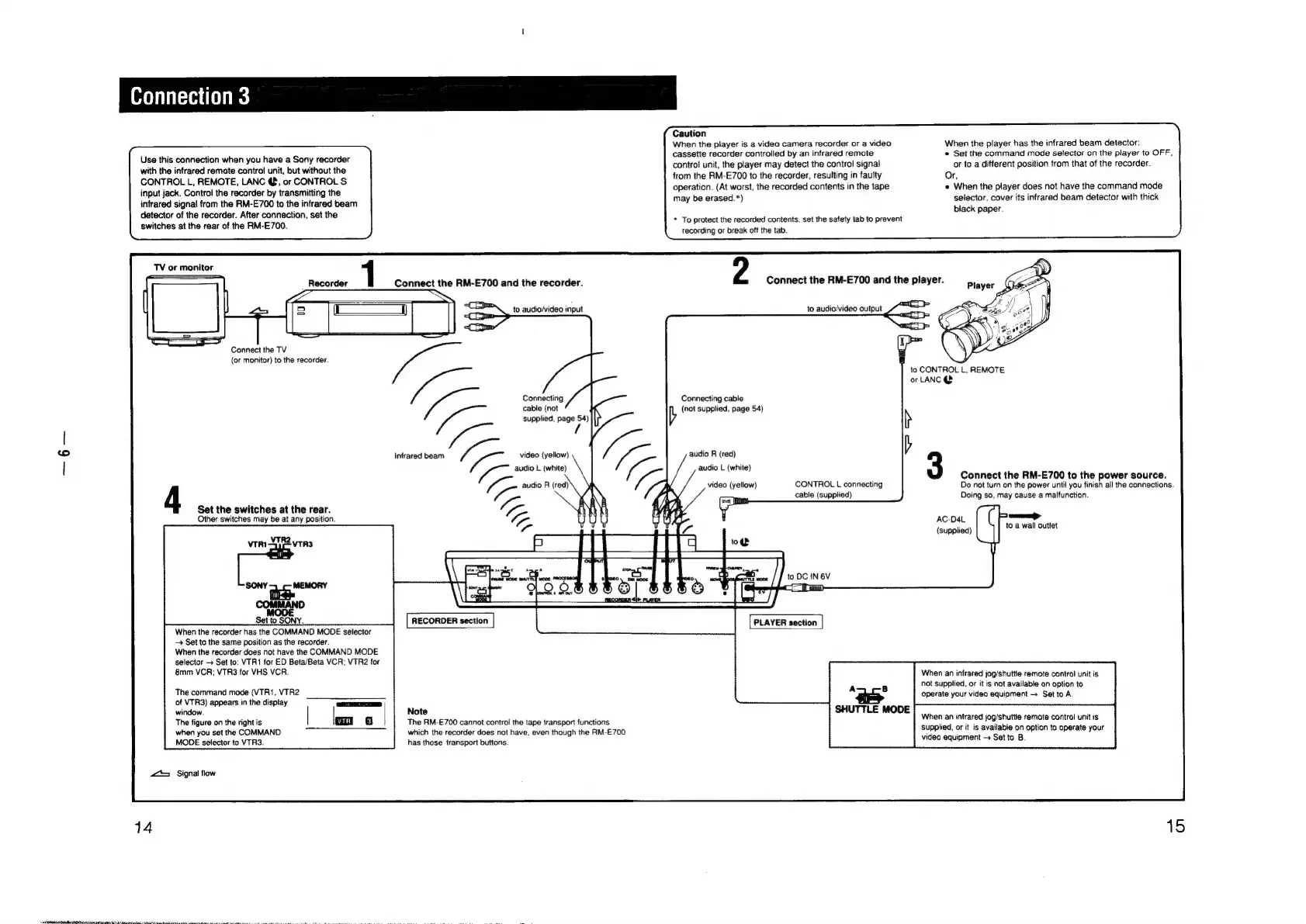
Connect
the
RM-E700
to
the
power
source.
video
(yellow)
CONTROL
L
connecting
Do
not
turn
on
the
power
until
you
finish
all
the
connections.
cable
(supplied)
Doing
so,
may
cause
a
malfunction.
Set
the
switches
at
the
rear.
h
b
Other
switches
may
be
at
any
position.
~
3
AC-D4L
(supplied)
to
a
wall
outlet
Set
to
SONY.
RECORDER
section
PLAYER
section
When
the
recorder
has
the
COMMAND
MODE
selector
Set
to
the
same
position
as
the
recorder.
When
the
recorder
does
not
have
the
COMMAND
MODE
selector
>
Set
to:
VTR1
for
ED
Beta/Beta
VCR;
VTR2
for
8mm
VCR;
VTR3
for
VHS
VCR.
When
an
infrared
jog/shuttle
remote
control
unit
is
not
supplied,
or
it
is
not
available
on
option
to
The
command
mode
(VTR1,
VTR2
ie
7
operate
your
video
equipment
Set
to
A.
of
VTR3)
appears
in
the
display
window.
Note
SHUTTLE
MODE
;
:
The
figure
on
the
right
is
The
RM-E700
cannot
control
the
tape
transport
functions
When
an
infrared
jog/
shuttle
remote
control
unit
is
when
you
set
the
COMMAND
which
the
recorder
does
not
have,
even
though
the
RM-E700
supplied,
or
it
is
available
on
option
to
operate
your
MODE
selector
to
VTR3.
has
those
transport
buttons.
video
equipment
Set
to
B.
zt
Signal
flow
14
15

Other manuals for Sony RM-E700

Related product manuals