8
For details about selecting a group, see
“Selecting a Camera” (page 34).
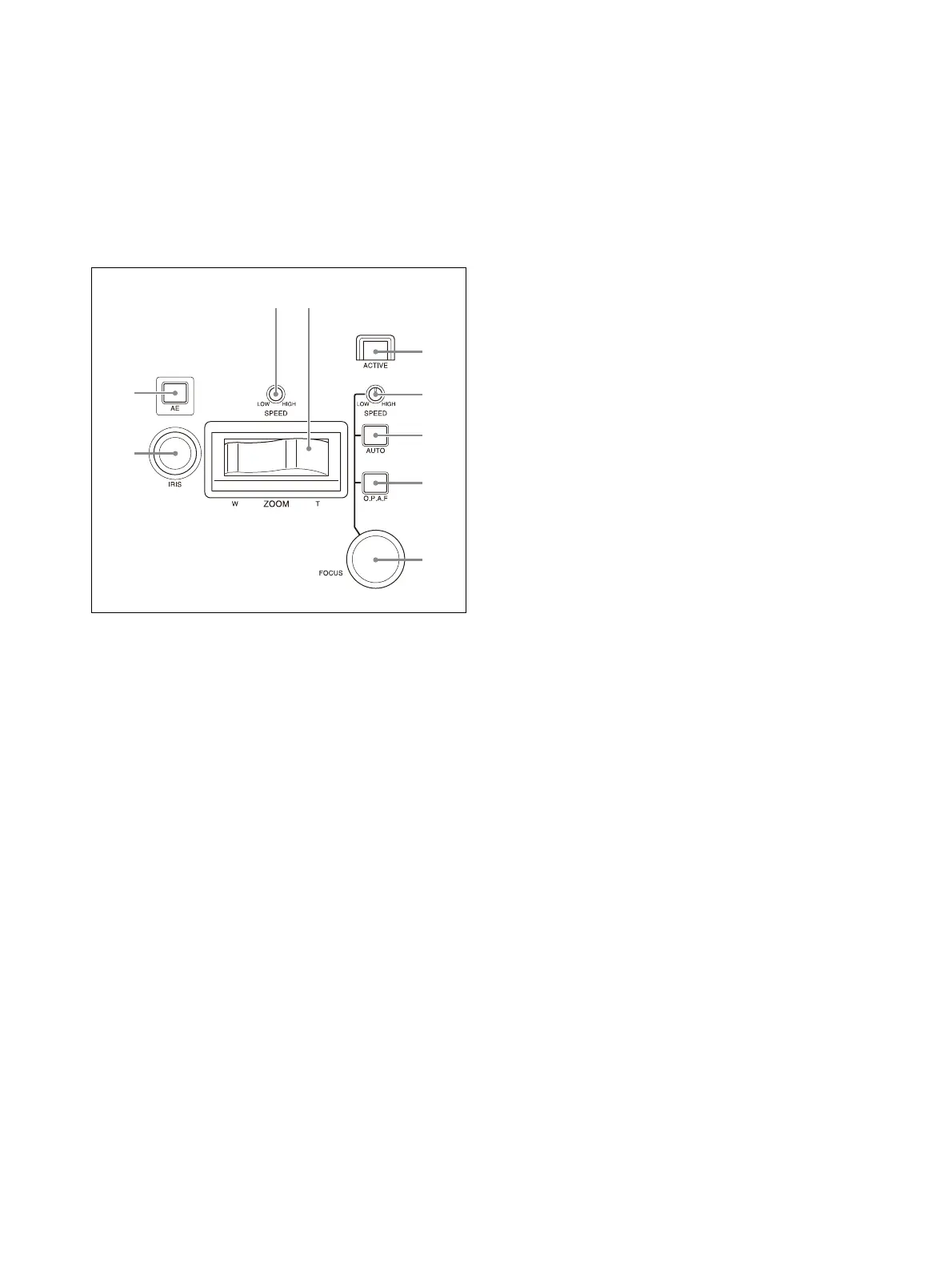
Lens control block
Use to control the lens (adjustment and settings)
of the target camera.
The lens control block is enabled when the
ACTIVE button is lit. Note that the ZOOM
SP
EED knob is always enabled.
IRIS knob
Adjusts the iris of the target camera.
For details, see “To adjust the exposure
manually” (page 38).
For an ILME-FR7 target camera, you can also
assig
n ND filter adjustments (page 41).
AE button
For a target camera other than an ILME-FR7,
switche
s the exposure mode of the target
camera. When turned on (button is lit),
automatic adjustment mode is selected.
When turned off (button is not lit), the
exposure mode set using AE CONFIG in the
RM menu is selected.
For an ILME-FR7 target
camera, when the
button is turned on (button is lit), the
exposure mode set using AE CONFIG2 in the
RM menu is selected. When the button is
turned off (button is not lit), manual
adjustment mode is selected.
For details, see “To adjust the exposure
automatically” (page 38).
ZOOM SPEED knob
Sets the speed of zoom operations.
For details, see “To control the zoom using
the ZOOM lever on the lens control block”
(page 37).
ZOOM lever
Controls the zoom operation of the target
ca
mera.
For details, see “To control the zoom using
the ZOOM lever on the lens control block”
(page 37).
ACTIVE button
Enables/disables the lens control block.
When the button is pressed, turning it on
(b
utton is lit), the lens control block becomes
enabled.
When the button is turned off (button is not
l
it), the lens control block becomes disabled
except for the ZOOM SPEED knob operation.
FOCUS SPEED knob
Sets the focus speed when adjusting the
fo
cus manually.
For details, see “To adjust the focus
manually” (page 38).
AUTO FOCUS mode button
Switches between automatic (button is lit)
and
manual (button is not lit) focus
adjustment mode on the target camera.
For details, see “To adjust the focus
automatically” (page 38).
O.P.A.F (one-push auto focus) button
For a target camera other than an ILME-FR7,
p
ress during manual focus adjustment mode
to execute one-push auto adjustment.
For details, see “One-push auto focus during
manual focus adjustment” (page 38).
For an ILME-FR7 target camera, it becomes a
P
ush AF/Push MF button. While the button is
pressed, it operates in the adjustment mode
opposite to the focus adjustment mode set
by the AUTO FOCUS mode button. For
example, it performs automatic adjustment
while the button is pressed in manual
adjustment mode.
For details, refer to the Help Guide of the
ca
mera.
FOCUS adjustment knob
Adjusts the focus of the
target camera
manually.
For details, see “To adjust the focus
manually” (page 38).












 To Next Page