56
GB
6
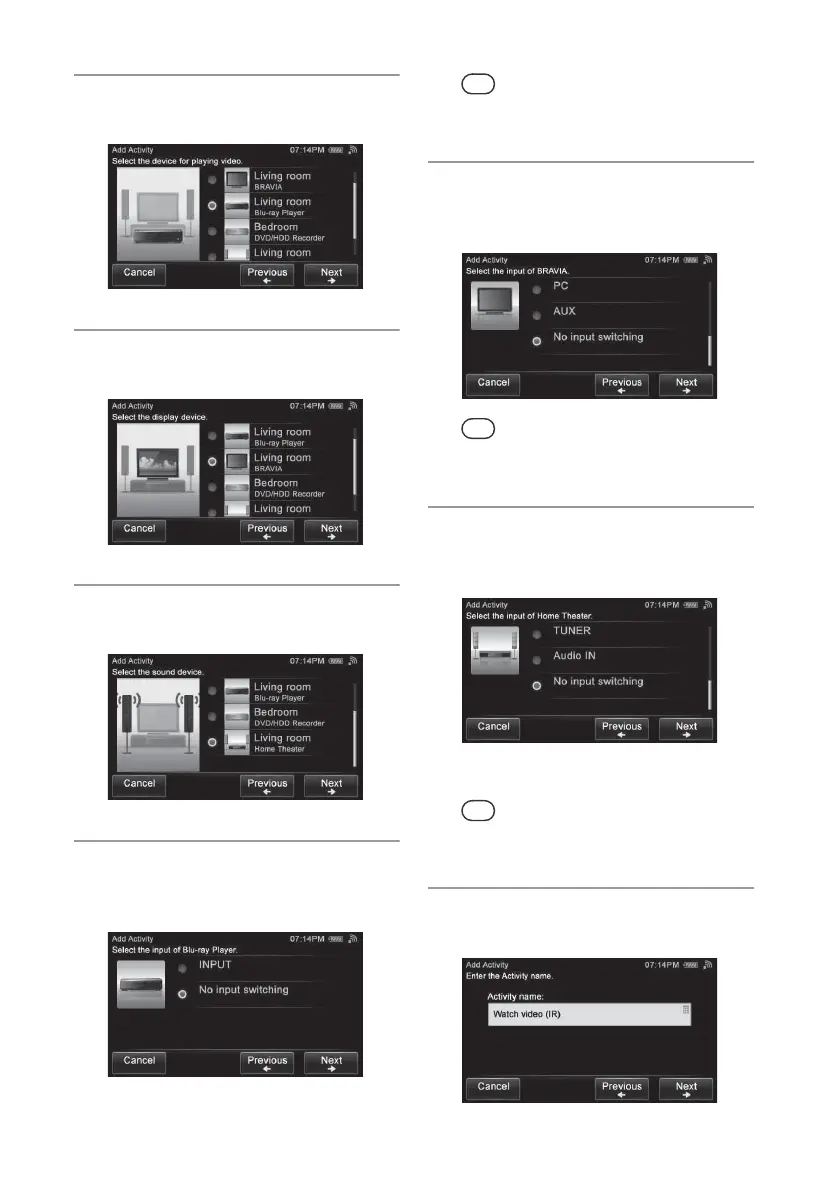
Tap the device for playing video,
then tap “Next b.”
7
Tap the device for displaying
images, then tap “Next b.”
8
Tap the device for outputting
sound, then tap “Next b.”
9
Tap the desired input operation of
the device for playing video, then
tap “Next b.”
Tip
If you do not want to switch the input, tap “No input
switching,” then tap “Next b.”
10
Tap the desired input operation of
the device for displaying images,
then tap “Next b.”
Tip
If you do not want to switch the input, tap “No input
switching,” then tap “Next b.”
11
Tap the desired input operation of
the device for outputting sound,
then tap “Next b.”
The Activity name screen appears.
Tip
If you do not want to switch the input, tap “No input
switching,” then tap “Next b.”
12
Check the Activity name, then tap
“Next b.”


 To Next Page