65
GB
Additional information
Editing a registered remote control
You can edit an infrared remote control registered.
Note
You cannot edit the DLNA remote control.
Editing a device remote
control
1
Press HOME.
The HOME screen appears.
2
Tap the “Device” tab.
3
Tap the desired device.
The Activity list appears.
4
Tap .
The option menu appears.
Tip
You can also display a menu by tapping and holding
the desired device in step 3.
5
Tap “Edit Device.”
6
Tap “Edit Remote.”
The screen used for editing the remote
control of a device appears.
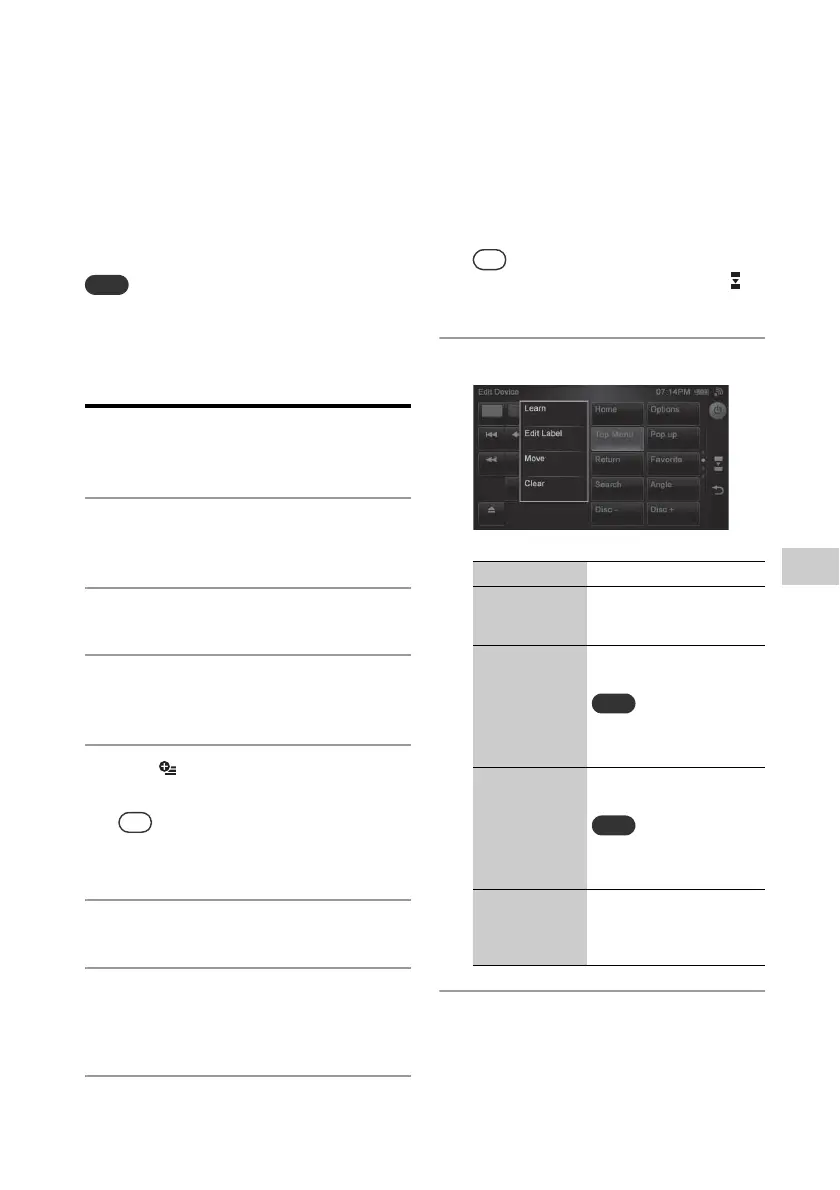
7
Tap the desired key.
The following items appear.
Tip
You can switch the remote screen by tapping on
the side menu.
8
Tap the desired item.
9
Edit the item following the
on-screen instructions.
Menu item Description
Learn You can program the
remote code to a key of the
remote screen.
Edit Label You can edit the label of a
key of the remote screen.
Note
This item appears when you
tap a key that is displayed
with a label.
Move You can move the key
position.
Note
This item appears when you
tap a key that is displayed
with a label.
Clear You can also clear the
remote code which is being
programmed to a key of the
remote screen.


 To Next Page