HT-CT770
11
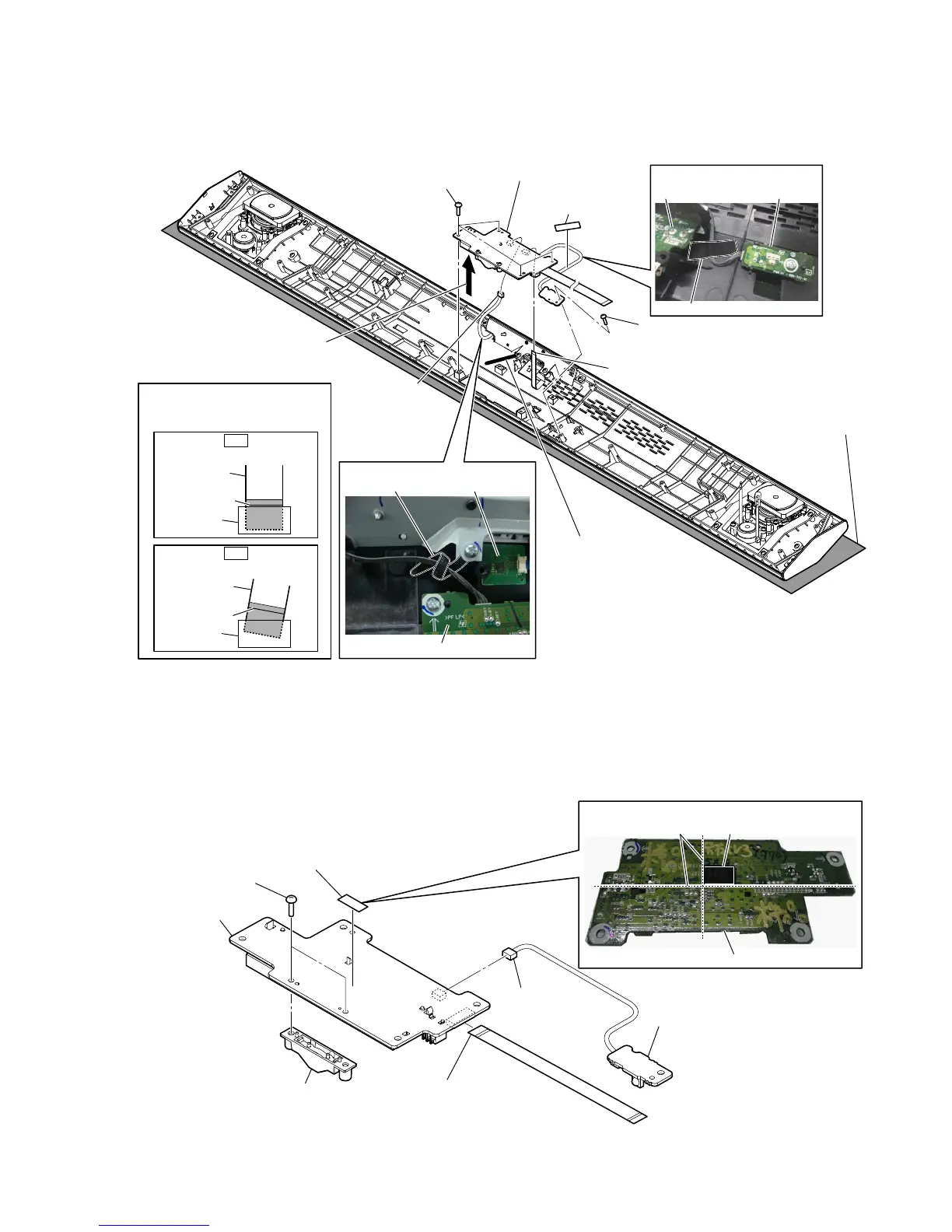
2-6. DISPLAY BOARD BLOCK
2-7. DISPLAY BOARD
1 cushion (D)
cushion (D)
IR boardDISPLAY board
:LUHsetting
–3DneOtRSEORFNERttRPYieZ–
Note:
Please spread a sheet under a
unit not to injure panel top.
3 screw
(BVTP3 u 8)
3 four screws
(BVTP3 u 8)
2 Remove the wire from
the coating clip.
colored line
colored line
Insert is straight to the interior.
Insert is incline
flexible flat
cable
flexible flat
cable
connector
connector
Note:
When installing the flexible flat
cable, ensure the colored line.
No slanting after insertion.
4 Remove the DISPLAY board
block in the direction of the
arrow.
7 DISPLAY board block
5 connector
(CN804)
6 flexible flat cable (8 core)
(CN802)
DISPLAY board
:iUesetting
coating clip NFC module (NFC1)
OK
NG
4 two screws
(BVTP2.6)
7 DISPLAY board
DISPLAY board
guide line
6 cushion (C)
cushion (C)
2 connector
(CN803)
5 indicator assy
3 IR board block
1 flexible flat cable
(24 core) (FFC4)
(CN801)
&XVKLRQ&setting



 To Next Page