EasyManua.ls Logo

Sony SA-CT770 - 2-3. Panel Top Block-2

Sony SA-CT770
74 pages
Print Icon
To Next Page IconTo Next Page
To Previous Page IconTo Previous Page
Loading...
HT-CT770
8
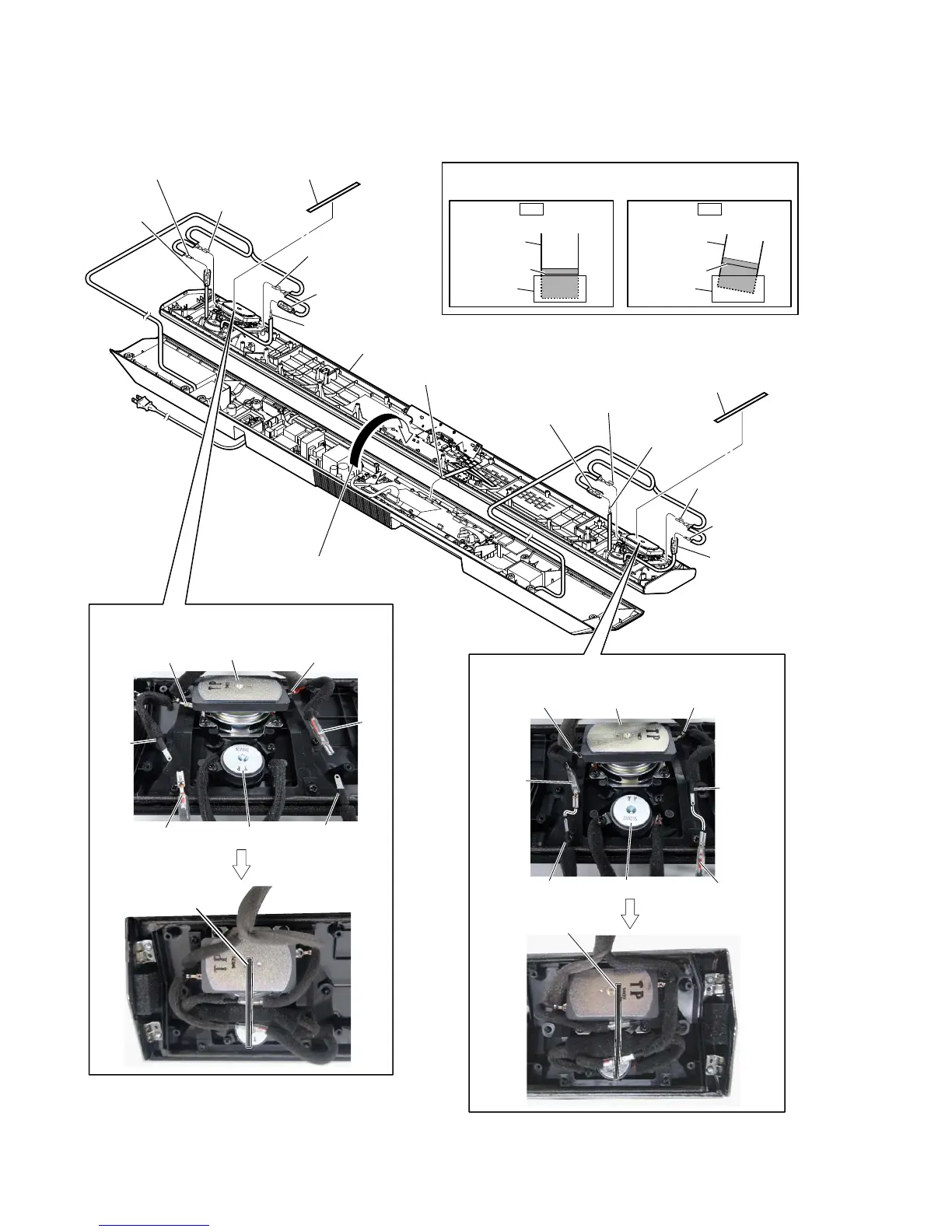
2-3. PANEL TOP BLOCK-2
colored line
colored line
Insert is straight to the interior. Insert is incline
flexible flat
cable
flexible flat
cable
connectorconnector
OK
– Rear view –
1 Remove the panel top block
in the direction of the arrow.
6 panel top block
4 terminal [gray]
(wide side)
3 terminal [gray]
3 terminal [black
]
3 terminal [black]
4 terminal [black]
(narrow side)
4 terminal [black]
(narrow side)
3 terminal [black]
3 terminal [red]
3 terminal [red]
3 terminal
[red]
3 terminal [black]
4 terminal [red]
(wide side)
5 flexible flat cable (24 core)
(CN1002)
NG
:ire VeWWiQJ
:ire VeWWiQJ
[red]
(wide side)
[black]
(narrow side)
[black]
[black]
[red]
loudspeaker (6 cm)
(R-ch) (SP2)
TW assy (R-ch) (SP4)
[black]
(narrow side)
[gray]
(wide side)
[gray]
[black]
[black]
[red]
[red]
loudspeaker (6 cm)
(L-ch) (SP1)
TW assy (L-ch) (SP3)
2 cushion (A)
2 cushion (A)
cushion (A)
cushion (A)
Note:
When installing the flexible flat cable,
ensure the colored line.
No slanting after insertion.

Other manuals for Sony SA-CT770

Related product manuals