32 US
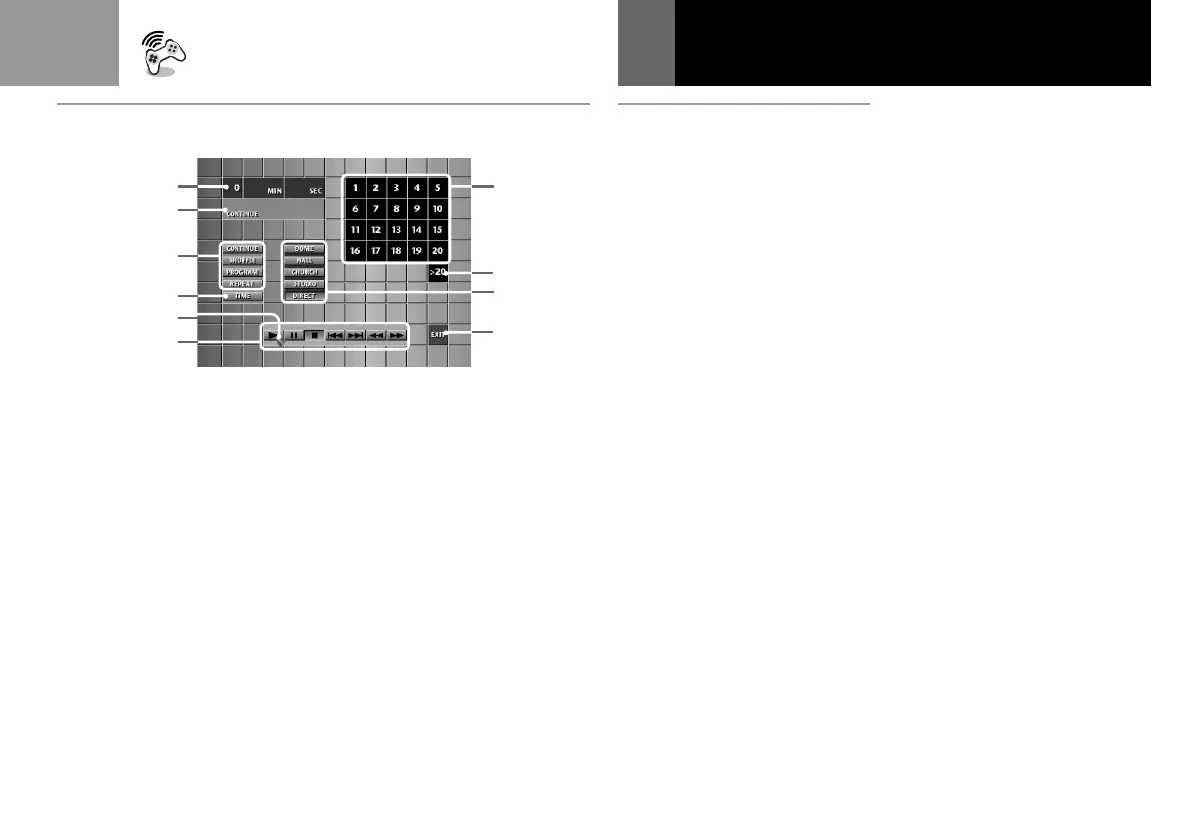
A CD operation screen
1 Displays the elapsed or
remaining playback time.
Press the “TIME” button to
switch the display.
2 Displays the selected
playback mode.
3 “CONTINUE”: Play all tracks
on the disc in order.
“SHUFFLE”: Play the tracks
in random order.
“PROGRAM”: Play the
desired tracks in a specified
order.
“REPEAT”: Play a track or all
the tracks repeatedly.
4 Change the playback time
display.
5 Move with the directional
buttons to select the button.
6 “N”: Start playing.
“X”: Pause.
“x”: Stop playing.
“.”: Find the beginning of
the current or previous track.
“>”: Find the beginning of
the next track.
“m”: Rewind.
“M”: Fast Forward.
Playing an audio CD (Continued)
7 Cancel the audio CD
operation.
8 Sound effect buttons.
Select “DIRECT” to cancel the
sound effect you chose.
9 Select a track number higher
than 20. (Appears only when
there are more than 20 tracks
on a CD.)
0 Select the track number you
want to play.
(Continued)
1
2
3
4
5
6
7
8
9
0
A



 To Next Page