EasyManua.ls Logo

Sony SLV-495 - Page 13

Sony SLV-495
61 pages
Print Icon
To Next Page IconTo Next Page
To Previous Page IconTo Previous Page
Loading...
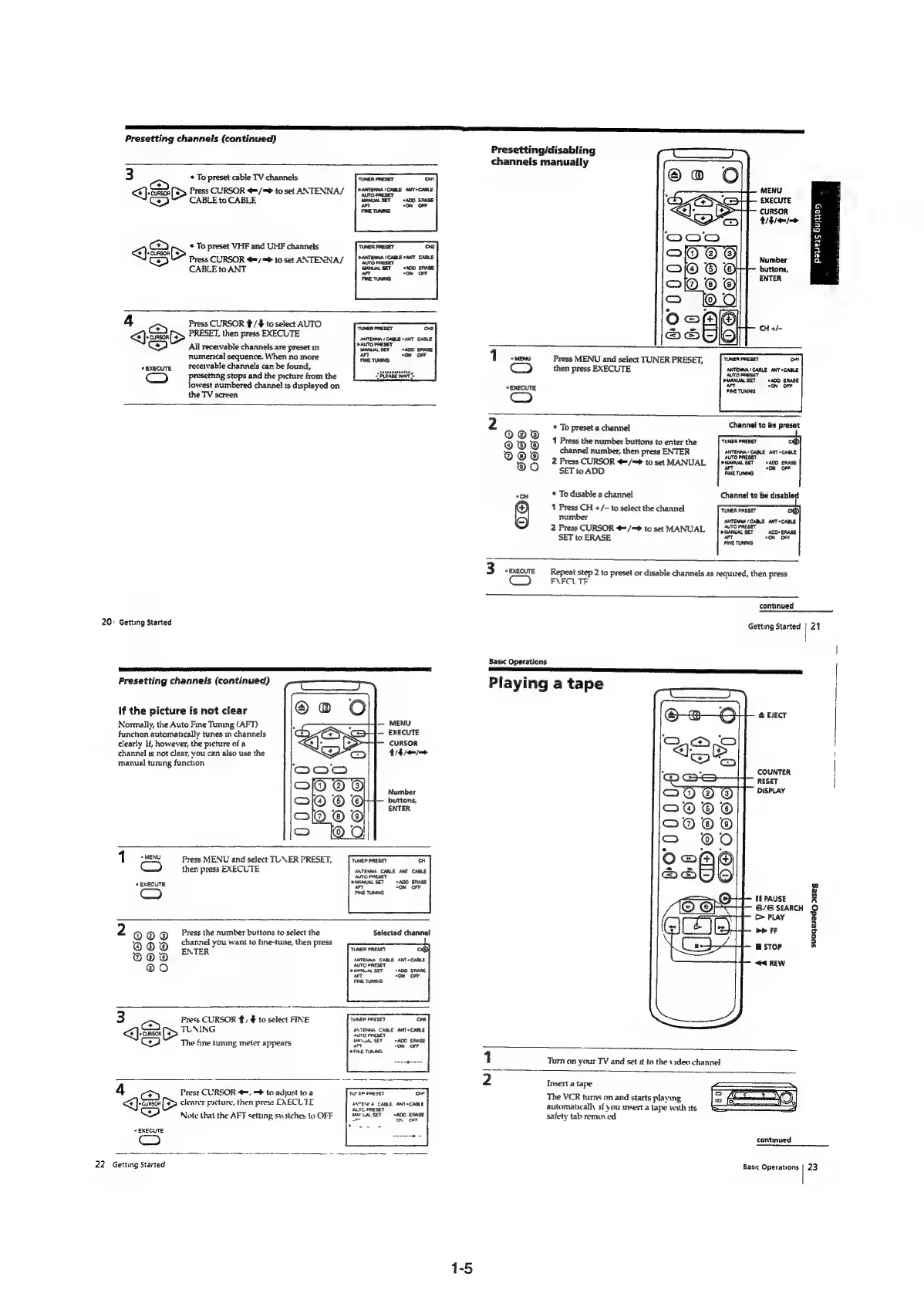
Presetting
channels
(continued)
3
cy
<<)
cues
*
To
preset
cable
TV
channels
Press
CURSOR
@/=
to
set
ANTENNA/
CABLE
to
CABLE
*
To
preset
VHF
and
UHF
channels
Qs
conser
(>
e
@
Press
CURSOR
€=/
=
to
set
ANTENNA/
CABLE
to
ANT
ANTENNA
/
CABLE
*ANT
CABLE
4
or
«EXECUTE
Press
CURSOR
t/#
to
select
AUTO
<)>
PRESET,
then
press
EXECUTE
All
receivable
channels
are
preset
in
numenical
sequence.
When
no
more
receivable
channels
can
be
found,
presetting
stops
and
the
picture
from
the
lowest
numbered
channel
1s
displayed
on
the
TV
screen
igesaagseetaes,
20°
Getting
Started
Presetting
channels
(continued)
if
the
picture
is
not
clear
Normally,
the
Auto
Fine
Tuning
(AFT)
function
automatically
tunes
in
channels
clearly
lf,
however,
the
picture
of
a
channel
1s
not
clear,
you
can
also
use
the
manual
tuning
function
CURSOR
thie
Number
i
buttons,
ENTER
1
«MENU
om)
+
EXECUTE
C
Press
MENU
and
select
TUNER
PRESET,
then
press
EXECUTE
‘TUNEP
PRESET
cH
ANTENNA
CABLE
ANT
CABLE
AUTC
PRESET
PMANUAL
SET
“ADD
ERASE
AFT
*ON
OFF
FINE
TUNING
Seo
©8608
O0GGO
Press
the
number
buttons
to
select
the
channel
you
want
to
fine-tune,
then
press
ENTER
Selected
channel
TUNER
PRESET
ANTEWKA
CABLE
ANT
CABLE
AUTC
PRESET
DISANUAL
SET
a
a
FINE
TUNING
=)
Qh
Press
CURSOR
#,
$
to
select
FINE
TUNING
The
fine
tuning
meter
appears
TUNER
PRESET
CHS
ANTENNA
CABLE
ANT+CABLE
AUTO
PRESET
MANUAL
SET
«ADO
ERASE
aT
<ON
OFF
FINE
TURING
4
*
EXECUTE
<=)
Use
Press
CURSOR
<=,
=
to
adjust
toa
clearer
picture,
then
press
EXECLIE
Note
that
the
AFT
setting
switches
to
OFF
Tut
EE
PRESET
He
ENTENDA
CABLE
ANT*CABLE
4UTC
PRESET
Mat
UAL
SET
ADD
ERASE
22°
Getting
Started
Presetting/disabling
channels
manually
MENU
EXECUTE
=
CURSOR
cc
thie
wo
2
=
a
Number
a
buttons,
ENTER
CH
+/-
i
i
0
Press
MENU
and
select
TUNER
PRESET,
then
press
EXECUTE
*
To
preset
a
channel
Channel
to
be
preset
Basic
Operations
OE
SEES
ESE
A
AE
REESE
Playing
a
tape
S
4 2
1
Press
the
number
buttons
to
enter
the
Ps
,
channel
number,
then
press
ENTER
ANTENNA
/
CABLE
ANT
*CABLE
ORORO)
i
00
2
Press
CURSOR
<=/=>
to
set
MANUAL
SET
to
ADD
*cH
*
To
disable
a
channel
Channel
to
be
disabled
1
Press
CH
+/-
to
select
the
channel
TUNER
PRESET
7)
number
ANTENNA
/CABLE
ANT
*CABLE
2
Press
CURSOR
@/=>
to
set
MANUAL
[
,AMTORRESET.
SET
to
ERASE
On
anias
e
3
“EXECUTE
—_-
Repeat
step
2
to
preset
or
disable
channels
as
required,
then
press
F\FCL
TF
continued
Getting
Started
|
21
@
BET
COUNTER
RESET
DISPLAY
tf
PAUSE
@/®
SEARCH
>
PLAY
be
FF
suoneedg
rIseg
STOP
<4
REW
Turn
on
your
TV
and
set
:t
to
the
video
channel
Insert
a
tape
The
VCR
turns
on
and
starts
playing
automatically
1f
you
insert
a
tape
with
its
safety
tab
removed
continued
Basic
Operations
|
23

Table of Contents