EasyManua.ls Logo

Sony SLV-495 - Howto Remove a Rotary Upper Drum; Howto Attach a New Rotary Upper Drum

Sony SLV-495
61 pages
Print Icon
To Next Page IconTo Next Page
To Previous Page IconTo Previous Page
Loading...
HOW
TO
REPLACE
A
ROTARY
UPPER
DRUM
(SLV-675HF/676HF/
675HFPX/685HF/695HF/L60HFCS/
L60HFMX/L60HFPA/X6HFMX/
L70HFCS/L70HFMX/L70HFPA)
5-1.
HOWTO
REMOVE
A
ROTARY
UPPER
DRUM
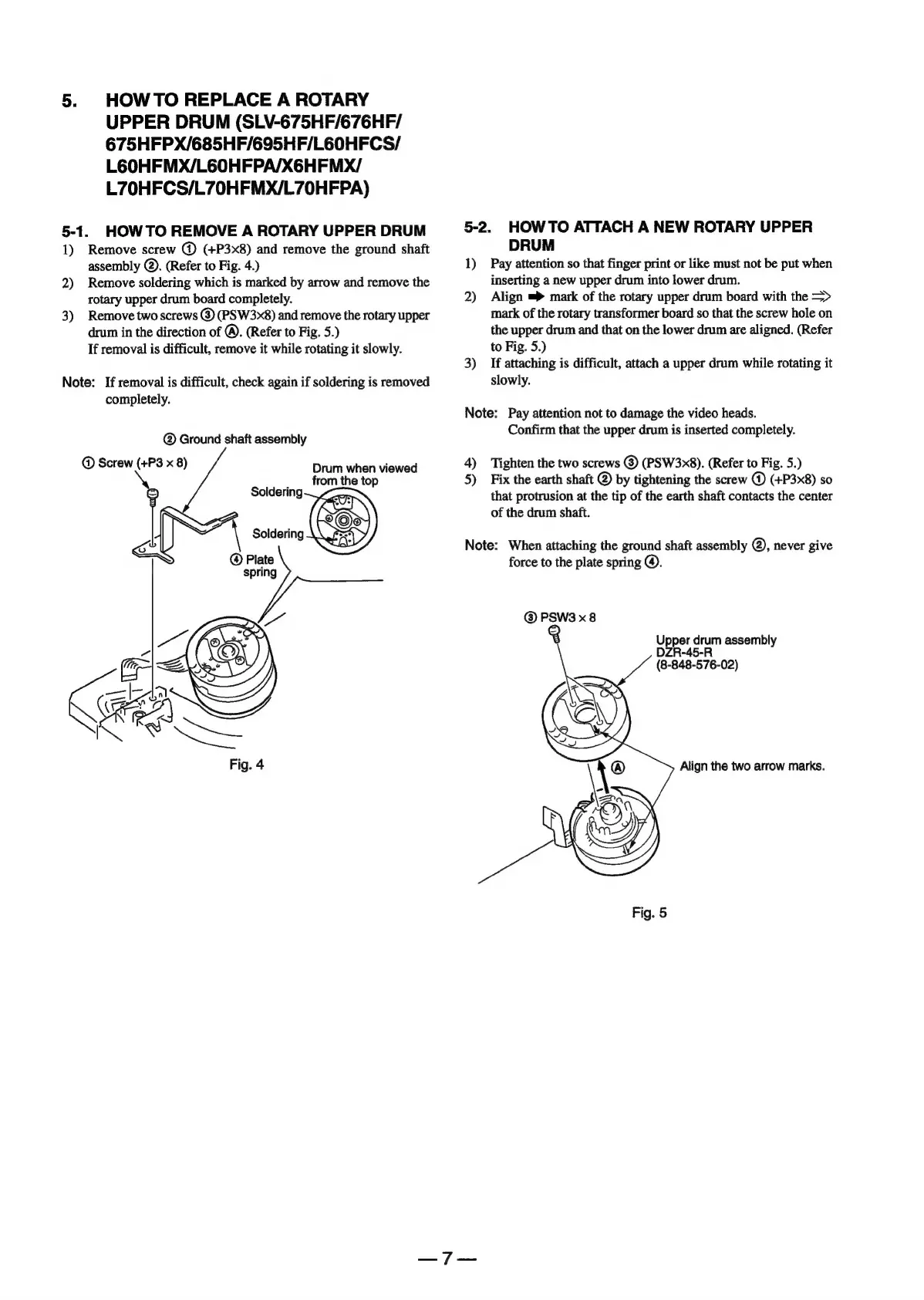
1)
2)
3)
Remove
screw
@
(+P3x8)
and
remove
the
ground
shaft
assembly
@).
(Refer
to
Fig.
4.)
Remove
soldering
which
is
marked
by
arrow
and
remove
the
rotary
upper
drum
board
completely.
Remove
two
screws
@
(PSW3x8)
and
remove
the
rotary
upper
drum
in
the
direction
of
@.
(Refer
to
Fig.
5.)
If
removal
is
difficult,
remove
it
while
rotating
it
slowly.
Note:
If
removal
is
difficult,
check
again
if
soldering
is
removed
completely.
Ground
shaft
assembly
@
Screw
(+P3
x
8)
Drum
when
viewed
from
the
top
cs
)
o—
5-2.
HOWTO
ATTACH
A
NEW
ROTARY
UPPER
DRUM
1)
Pay
attention
so
that
finger
print
or
like
must
not
be
put
when
inserting
a
new
upper
drum
into
lower
drum.
2)
Align
mark
of
the
rotary
upper
drum
board
with
the
=>
mark
of
the
rotary
transformer
board
so
that
the
screw
hole
on
the
upper
drum
and
that
on
the
lower
drum
are
aligned.
(Refer
to
Fig.
5.)
3)
If
attaching
is
difficult,
attach
a
upper
drum
while
rotating
it
slowly.
Note:
Pay
attention
not
to
damage
the
video
heads.
Confirm
that
the
upper
drum
is
inserted
completely.
4)
Tighten
the
two
screws
®
(PSW3x8).
(Refer
to
Fig.
5.)
5)
Fix
the
earth
shaft
@
by
tightening
the
screw
@
(+P3x8)
so
that
protrusion
at
the
tip
of
the
earth
shaft
contacts
the
center
of
the
drum
shaft.
Note:
When
attaching
the
ground
shaft
assembly
@,
never
give
force
to
the
plate
spring
@.
©
PSW3
x8
Upper
drum
assembl
DERAA5-R
(8-848-576-02)
Align
the
two
arrow
marks.
Fig.
5

Table of Contents

Related product manuals