EasyManua.ls Logo

Sony SLV-495 - Selecting a Language; Setting the Clock -++-+:-Ss06

Sony SLV-495
61 pages
Print Icon
To Next Page IconTo Next Page
To Previous Page IconTo Previous Page
Loading...
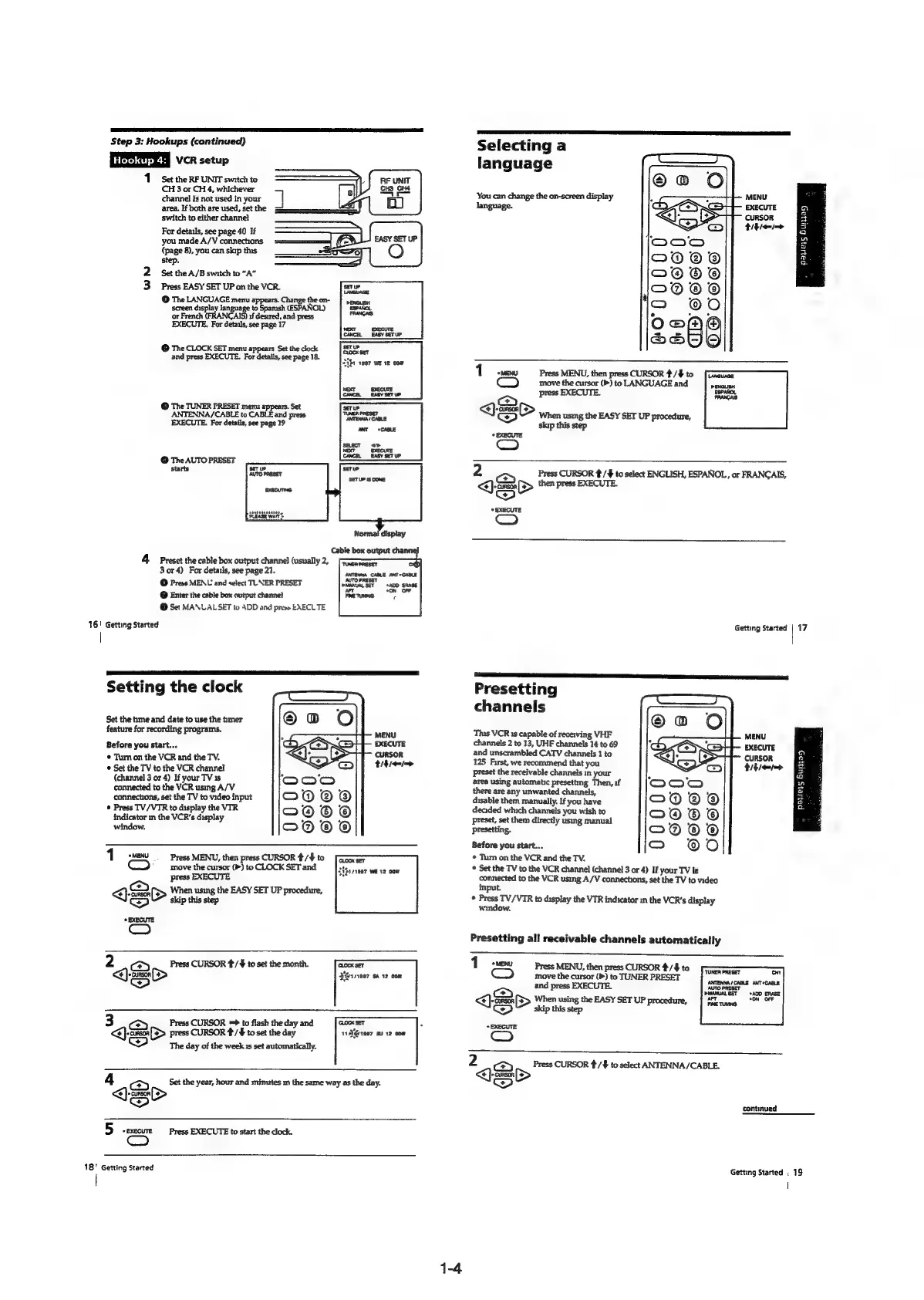
Step
3:
Hookups
(continued)
VR
setup
1
Set
the
RF
UNIT
switch
to
CH
3
or
CH
4,
whichever
channel
is
not
used
in
your
area.
If
both
are
used,
set
the
switch
to
either
channel
For
details,
see
page
40
If
you
made
A/V
connechons
{page
8),
you
can
skip
this
step.
2
Set
the
A/B
switch
to
“A”
3
Press
EASY
SET
UP
on
the
VCR.
@
The
LANGUAGE
menu
appears.
Change
the
on-
screen
display
language
to
Sparush
(ESPANOL)
or
French
(FRANCAIS)
if
desired,
and
press
EXECUTE.
For
details,
see
page
17
@
The
CLOCK
SET
menu
appears
Set
the
clock
and
press
EXECUTE.
For
details,
see
page
18.
©
The
TUNER
PRESET
menu
appears.
Set
ANTENNA/CABLE
to
CABLE
and
press
EXECUTE.
For
details,
see
page
19
©
The
AUTO
PRESET
starts
eage
ware
Normal
display
Cable
box
output
chai
4
Preset
the
cable
box
output
channel
(usually
2,
neneneser
3or4)
For
detauls,
see
page
21.
©
Press
MENU
and
select
TUNER
PRESET
©
Enter
the
cable
box
output
channel
©
Set
MANLAL
SET
tu
ADD
and
press
EXECLTE
16!
Getting
Started
Setting
the
clock
Set
the
me
and
date
to
use
the
hmer
feature
for
recording
programs.
MENU
Before
you
start...
EXECUTE
CURSOR
©
Tum
on
the
VCR
and
the
TV.
thie
©
Set
the
TV
to
the
VCR
channel
(channel
3
or
4)
If
your
TV
1s
connected
to
the
VCR
using
A/V
connections,
set
the
TV
to
video
input
Press
TV/VTR
to
display
the
VIR
indicator
in
the
VCR's
display
window.
Teme
Press
MENU,
then
press
CURSOR
#/$
to
C™)
_
move
the
cursor
(>)
to
CLOCK
SET
and
press
EXECUTE
QS>
When
using
the
EASY
SET
UP
procedure,
OO
skip
this
step
*
EXECUTE
em)
2
ae}
Press
CURSOR
t/¥
to
set
the
month.
CLOCK
SET
<<):
cre
[>
Bgtv007
$A
12
COM
3
cay
Press
CURSOR
=*
to
flash
the
day
and
CLOCK
SET
<€)-crson
[F>
press
CURSOR
4/+
to
set
the
day
11881007
su
12
cow
@
The
day
of
the
week
1s
set
automatically.
Set
the
year,
hour
and
minutes
in
the
same
way
as
the
day.
<>)
y
y
¥
1»
CURSOR
<>)
5
-execure
Press
EXECUTE
to
start
the
clock.
18°
Getting
Started
1-4
Selecting
a
language
MENU
EXECUTE
CURSOR
ttle
You
can
change
the
on-screen
display
language.
a
co]
2
Ss
a
nw
Pi
a
a
oD
a
MENU
Press
MENU,
then
press
CURSOR
#/$
to
[Onaunse
move
the
cursor
(>)
to
LANGUAGE
and
pEnausr
press
EXECUTE.
[were
<j
>
OO
When
using
the
EASY
SET
UP
procedure,
skip
this
step
EXECUTE
jou)
2
Press
CURSOR
¢/¥
to
select
ENGLISH,
ESPANOL,
or
FRANCAIS,
a
>
then
press
EXECUTE.
7)
EXECUTE
Getting
Started
|
17
*
Presetting
channels
This
VCR
1s
capable
of
receiving
VHF
MENU
channels
2
to
13,
UHF
channels
14
to
69
EXECUTE
and
unscrambled
CATV
channels
1
to
CURSOR
125
First,
we
recommend
that
you
RS
emia
preset
the
receivable
channels
in
your
area
using
automatic
presetting
Then,
if
there
are
any
unwanted
channels,
disable
them
manually.
If
you
have
deaded
which
channels
you
wish
to
preset,
set
them
directly
using
manual
presetting.
Before
you
start...
*
Tum
on
the
VCR
and
the
TV.
*
Set the
TV
to
the
VCR
channel
(channel
3
or
4)
If
your
TV
is
connected
to
the
VCR
using
A/V
connections,
set
the
TV
to
video
input.
©
Press
TV/VIR
to
display
the
VTR
indicator
mm
the
VCR's
display
window.
.
cy
=
=
a
=
gs
aa
3B
2
Presetting
all
receivable
channels
automatically
1
sweww
Press
MENU,
then
press
CURSOR
4/#
to
©)
move
the
cursor
(»)
to
TUNER
PRESET
and
press
EXECUTE.
<j
eS
When
using
the
EASY
SET
UP
procedure,
Co
skip
this
step
*
EXECUTE
(om)
continued
Getting
Started
.
19
|

Table of Contents