EasyManua.ls Logo

Sony SLV-E170EE - Adjustments after Replacing the Drum (Video Head)

Sony SLV-E170EE
116 pages
Print Icon
To Next Page IconTo Next Page
To Previous Page IconTo Previous Page
Loading...
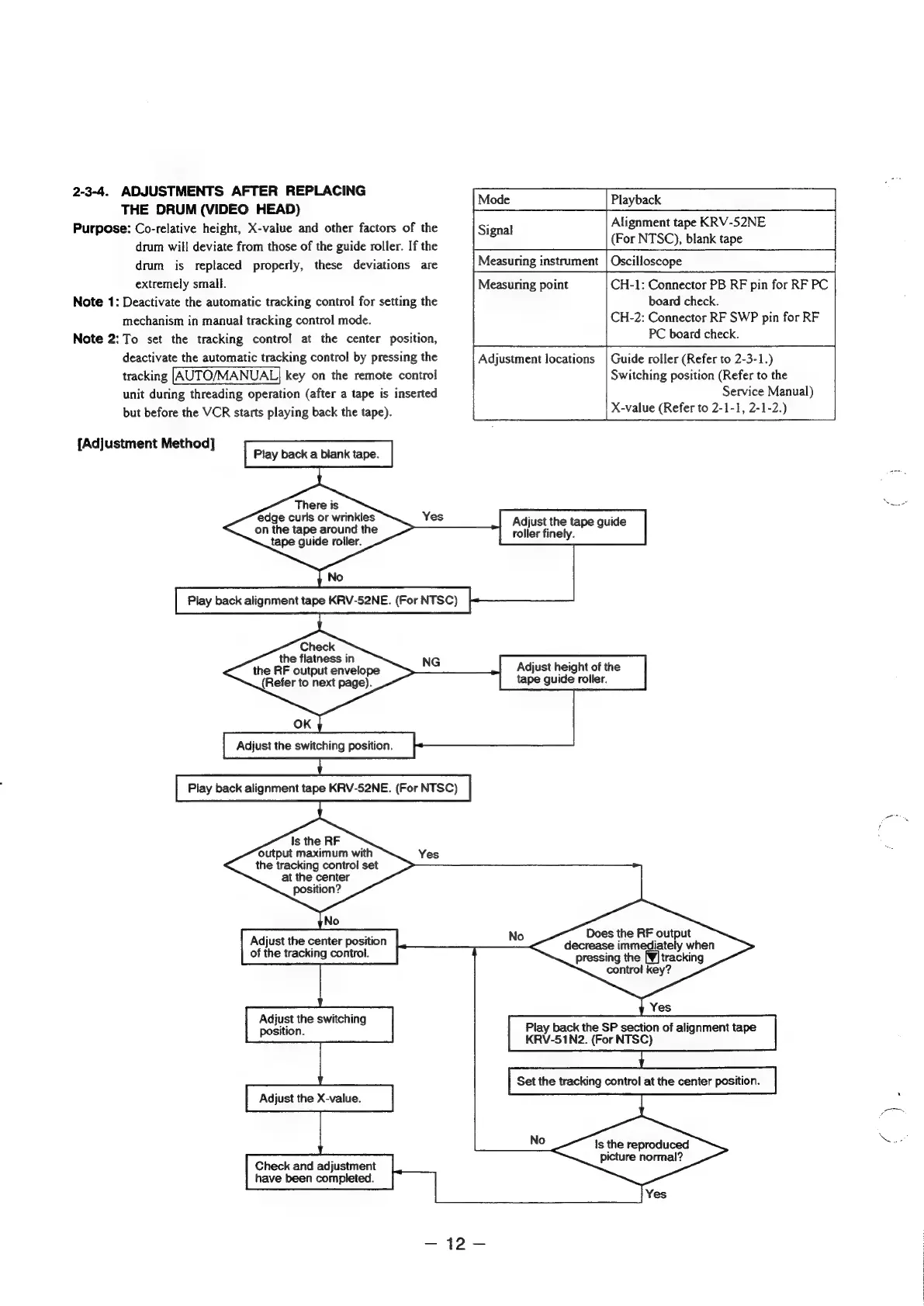
2-3-4.
ADJUSTMENTS
AFTER
REPLACING
THE
DRUM
(VIDEO
HEAD)
Purpose:
Co-relative
height,
X-value
and
other
factors
of
the
drum
will
deviate
from
those
of
the
guide
roller.
If
the
drum
is
replaced
properly,
these
deviations
are
extremely
small.
Note
1:
Deactivate
the
automatic
tracking
control
for
setting
the
mechanism
in
manual
tracking
control
mode.
Note
2:
To
set
the
tracking
control
at
the
center
position,
deactivate
the
automatic
tracking
control
by
pressing
the
tracking
key
on
the
remote
control
unit
during
threading
operation
(after
a
tape
is
inserted
but
before
the
VCR
starts
playing
back
the
tape).
{Adjustment
Method]
There
is
edge
curls
or
wrinkles
on
the
tape
around
the
tape
guide
roller.
Play
back
alignment
tape
KRV-52NE.
(For
NTSC)
Check
the
flatness
in
the
RF
output
envelope
(Refer
to
next
page).
OK
Adjust
the
switching
position.
Play
back
alignment
tape
KRV-52NE.
(For
NTSC)
Is
the
RF
output
maximum
with
the
tracking
controi
set
at
the
center
position?
Adjust
the
center
position
of
the
tracking
control.
Adjust
the
switching
position.
Adjust
the
X-value.
Check
and
adjustment
have been
completed.
NG
Mode
Signal
Measuring
instrument
Measuring
point
Adjustment
locations
Does
the
RF
output
decrease
immediately
when
pressing
the
[¥]
tracking
Is
the
reproduced
Playback
Alignment
tape
KRV-52NE
(For
NTSC),
blank
tape
Oscilloscope
CH-1:
Connector
PB
RF
pin
for
RF
PC
board
check.
CH-2:
Connector
RF
SWP
pin
for
RF
PC
board
check.
Guide
roller
(Refer
to
2-3-1.)
Switching
position
(Refer
to
the
Service
Manual)
X-value
(Refer
to
2-1-1,
2-1-2.)
Adjust
the
tape
guide
roller
finely.
Adjust
height
of
the
tape
guide
roller.
control
key?
Play
back
the
SP
section
of
alignment
tape
KRV-51N2.
(For
NTSC)
Set
the
tracking
control
at
the
center
position.
picture
normal?

Table of Contents

Related product manuals