EasyManua.ls Logo

Sony SLV-E170EE - Precautions; Preparation

Sony SLV-E170EE
116 pages
Print Icon
To Next Page IconTo Next Page
To Previous Page IconTo Previous Page
Loading...
1.
HOW
TO
USE
THE
MODE
SELECTOR
Il
FOR
ADJUSTING
H
TYPE
MECHANISM
ASSEMBLY
1-1.
OUTLINE
To
activate
the
VHS
system
H
type
mechanism
assembly
using
mode
selector
II
(J-6082-282-A),
use
connector
conversion
jig
(J-6090-052-A).
By
using
the
connector
conversion
jig,
the
following
operations
are
possible.
+
Loading
and
unloading
action
by
the
loading
motor
*
Reading
of
the
current
setting
of
the
mode
switch
+
Normal
and
reverse
rotation
of
the
capstan
motor
1-2.
PREPARATION
1-2-1.
ADDITION
OF
POWER
SUPPLY
CABLE
(Already
added
Mode
Selector
II
also
available)
In
order
to
drive
the
capstan
motor,
the
power
+5
V
and
+12
V
are
supplied
from
the
Mode
Selector
II.
Disassemble
the
D-SUB
connector
of
the
Mode
Selector
cable,
then
solder
the
following
three
places.
DSUB
connector
of
Supplied
3-pin
cable
the
mode
selector
I
Pin
1
(Red
index)
+12
V
Pin
2
GND
Pin
3
+5V
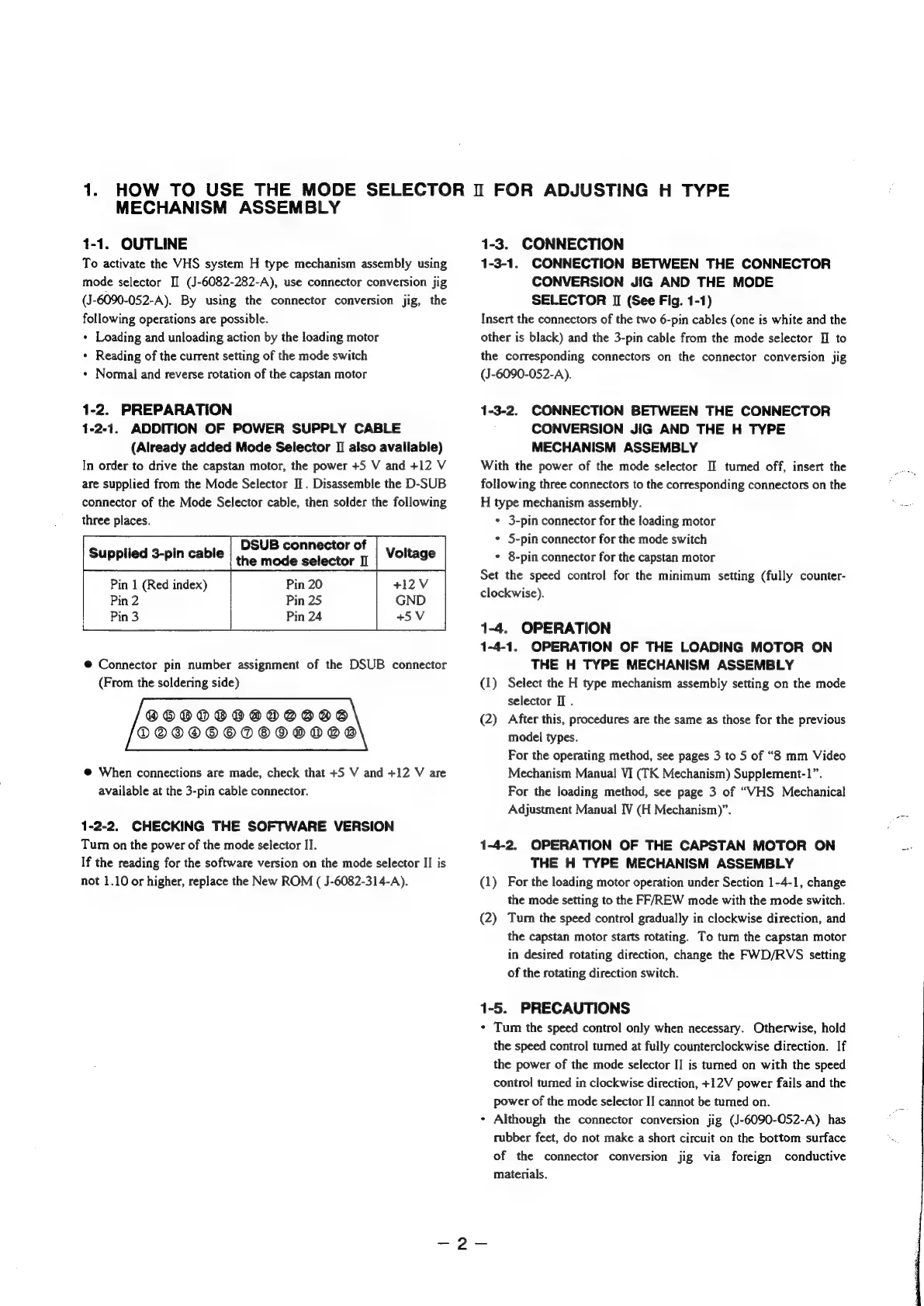
@
Connector
pin
number
assignment
of
the
DSUB
connector
(From
the
soldering
side)
OBOODOBOADVSSBS
DOOODOODOODDOD
@
When
connections
are
made, check
that
+5
V
and
+12
V
are
available
at
the
3-pin
cable
connector.
1-2-2.
CHECKING
THE
SOFTWARE
VERSION
Tum
on
the
power
of
the
mode
selector
II.
If
the
reading
for
the
software
version
on
the
mode
selector
II
is
not
1.10
or
higher,
replace
the
New
ROM
(
J-6082-314-A).
1-3.
CONNECTION
1-3-1.
CONNECTION
BETWEEN
THE
CONNECTOR
CONVERSION
JIG
AND
THE
MODE
SELECTOR
II
(See
Fig.
1-1)
Insert
the
connectors
of
the
two
6-pin
cables
(one
is
white
and
the
other
is
black)
and
the
3-pin
cable
from
the
mode
selector
I]
to
the
corresponding
connectors
on
the
connector
conversion
jig
(J-6090-052-A).
1-3-2.
CONNECTION
BETWEEN
THE
CONNECTOR
CONVERSION
JIG
AND
THE
H
TYPE
MECHANISM
ASSEMBLY
With
the
power
of
the
mode
selector
II
tumed
off,
insert
the
following
three
connectors
to
the
corresponding
connectors
on
the
H
type
mechanism
assembly.
¢
3-pin
connector
for
the
loading
motor
+
5-pin
connector
for
the
mode
switch
¢
8-pin
connector
for
the
capstan
motor
Set
the
speed
control
for
the
minimum
setting
(fully
counter-
clockwise).
1-4.
OPERATION
1-4-1.
OPERATION
OF
THE
LOADING
MOTOR
ON
THE
H
TYPE
MECHANISM
ASSEMBLY
(1)
Select
the
H
type
mechanism
assembly
setting
on
the
mode
selector
II
.
(2)
After
this,
procedures
are
the
same
as
those
for
the
previous
model
types.
For
the
operating
method,
see
pages
3
to
5
of
“8
mm
Video
Mechanism
Manual
VI
(TK
Mechanism)
Supplement-1”.
For
the
loading
method,
see
page
3
of
“WHS
Mechanical
Adjustment
Manual
IV
(H
Mechanism)”.
1-4-2.
OPERATION
OF
THE
CAPSTAN
MOTOR
ON
THE
H
TYPE
MECHANISM
ASSEMBLY
(1)
For
the
loading
motor
operation
under
Section
1-4-1,
change
the
mode
setting
to
the
FF/REW
mode
with
the
mode
switch.
(2)
Tum
the
speed
control
gradually
in
clockwise
direction,
and
the
capstan
motor
starts
rotating.
To
turn
the
capstan
motor
in
desired
rotating
direction,
change
the
FWD/RVS
setting
of
the
rotating
direction
switch.
1-5.
PRECAUTIONS
+
Tum
the
speed
control
only
when
necessary.
Otherwise,
hold
the
speed
control
tumed
at
fully
counterclockwise
direction.
If
the
power
of
the
mode
selector
II
is
turned
on
with
the
speed
control
tumed
in
clockwise
direction,
+12V
power
fails
and
the
power
of
the
mode
selector
II
cannot
be
tumed
on.
*
Although
the
connector
conversion
jig
(J-6090-O052-A)
has
rubber
feet,
do
not
make
a
short
circuit
on
the
bottom
surface
of
the
connector
conversion
jig
via
foreign
conductive
materials.

Table of Contents

Related product manuals