EasyManua.ls Logo

Sony SLV-E170EE - Adjusting the Mechanism Using Alignment Tape; Height Adjustment of Guide Rollers

Sony SLV-E170EE
116 pages
Print Icon
To Next Page IconTo Next Page
To Previous Page IconTo Previous Page
Loading...
2-3.
ADJUSTING
THE
MECHANISM
USING
ALIGNMENT
TAPE
(KRV-52NE
for
NTSC)
HEIGHT
ADJUSTMENT
OF
GUIDE
ROLLERS
NO.
3
AND
NO.
6
Playback
Alignment
tape
KRV-52NE
(For
NTSC)
Oscilloscope
TIM/DIV:
2ms
Trigger
source:
CH2
Trigger
slope:
+
CH-1:
Connector
PB
RF
pin
for
RF
PC
board
check
CH-2:
Connector
RF
SWP
pin
for
RF
PC
board
check
Height
adjustment
screw
for
No.3
tape
guide
roller
Height
adjustment
screw
for
No.6
tape
guide
roller
[Adjustment
Method]
The
following
adjustment
shall
be
carried
out
after
completed
Section
2-1-1
“X-value
adjustment
and
check”.
1)
Deactivate
the
automatic
tracking
control,
and
set
the
tracking
control
at
the
center
position.
To
set
the
tracking
control
at
the
center
position
for
the
VCRs
equipped
with
the
and
[¥]
tracking
control
keys,
press
both
the
and
tracking
control
keys
at
the
same
time.
For
the
VCRs
not
equipped
with
the
tracking
control
keys,
deactivate
the
control
by
pressing
the
tracking
2-3-1.
Measuring
instrument
Measuring
point
Adjustment
locations
automatic
tracking
[AUTO/MANUAL|
key
on
the
remote
control
unit
during
threading
operation
(after
a
tape
is
inserted
but
before
the
VCR
starts
playing
back
the
tape).
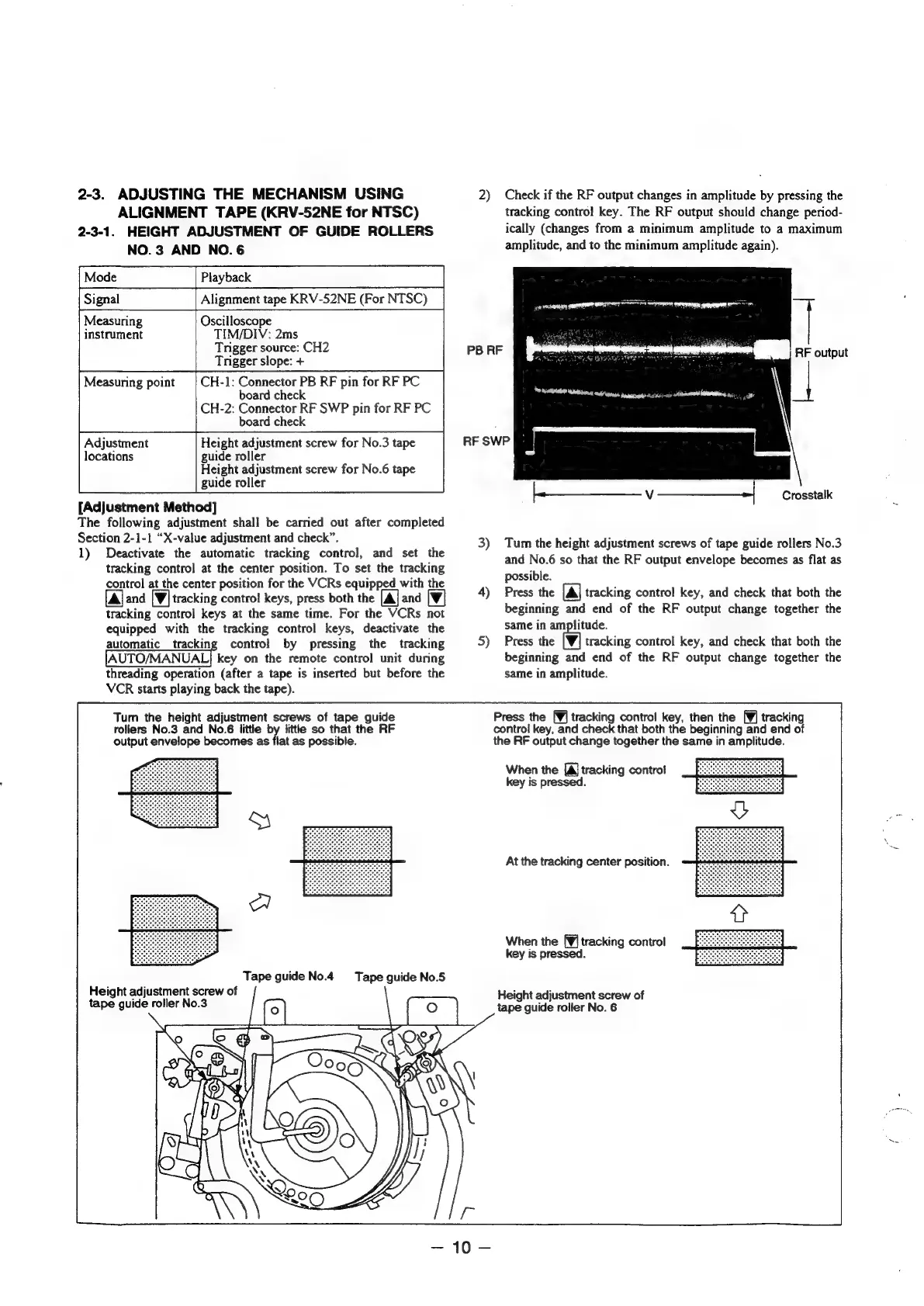
Turn
the
height
adjustment
screws
of
tape
guide
rollers
No.3
and
No.6
little
by
little
so
that
the
RF
output
envelope
becomes
as
flat
as
possible.
a
Tape
guide
No.4
Height
adjustment
screw
of
tape
guide
roller
No.3
Tape
guide
No.5
2)
Check
if
the
RF
output
changes
in
amplitude
by
pressing
the
tracking
contro!
key.
The
RF
output
should
change
period-
ically
(changes
from
a
minimum
amplitude
to
a
maximum
amplitude,
and
to
the
minimum
amplitude
again).
RF
output
EET
RTI
Ss
OR
Fon
PB
RF
RF
SWP
Crosstalk
3)
Tum
the
height
adjustment
screws
of
tape
guide
rollers
No.3
and
No.6
so
that
the
RF
output
envelope
becomes
as
flat
as
possible.
4)
Press
the
[Al
tracking
control
key,
and
check
that
both
the
beginning
and
end
of
the
RF
output
change
together
the
same
in
amplitude.
5)
Press
the
tracking
control
key,
and
check
that
both
the
beginning
and
end
of
the
RF
output
change
together
the
same
in
amplitude.
Press
the
[¥]
tracking
control
key,
then
the
[¥]
tracking
control
key,
and
check
that
both
the
beginning
and
end
of
the
RF
output
change
together
the
same
in
amplitude.
When
the
[Aj
tracking
contro!
key
is
pressed.
At
the
tracking
center
position.
When
the
[¥j
tracking
control
key
is
pressed.
Height
adjustment
screw
of
tape
guide
roller
No.
6

Table of Contents

Related product manuals