EasyManua.ls Logo

Sony SLV-E170EE - Page 52

Sony SLV-E170EE
116 pages
Print Icon
To Next Page IconTo Next Page
To Previous Page IconTo Previous Page
Loading...
2-3.
SERVO
SYSTEM
CHECK
Unless
otherwise
specified,
set
the
switches
to
the
following
positions.
©
LCHANNEL
J
SWiHHCH
oo.
el
ccceseeeeeeeeeereeeneeneneeeetens
LINE
©
|
TAPE
SPEED
|
SWitch
oo.
csesessneeseseteneteesenseeenereeneees
SP
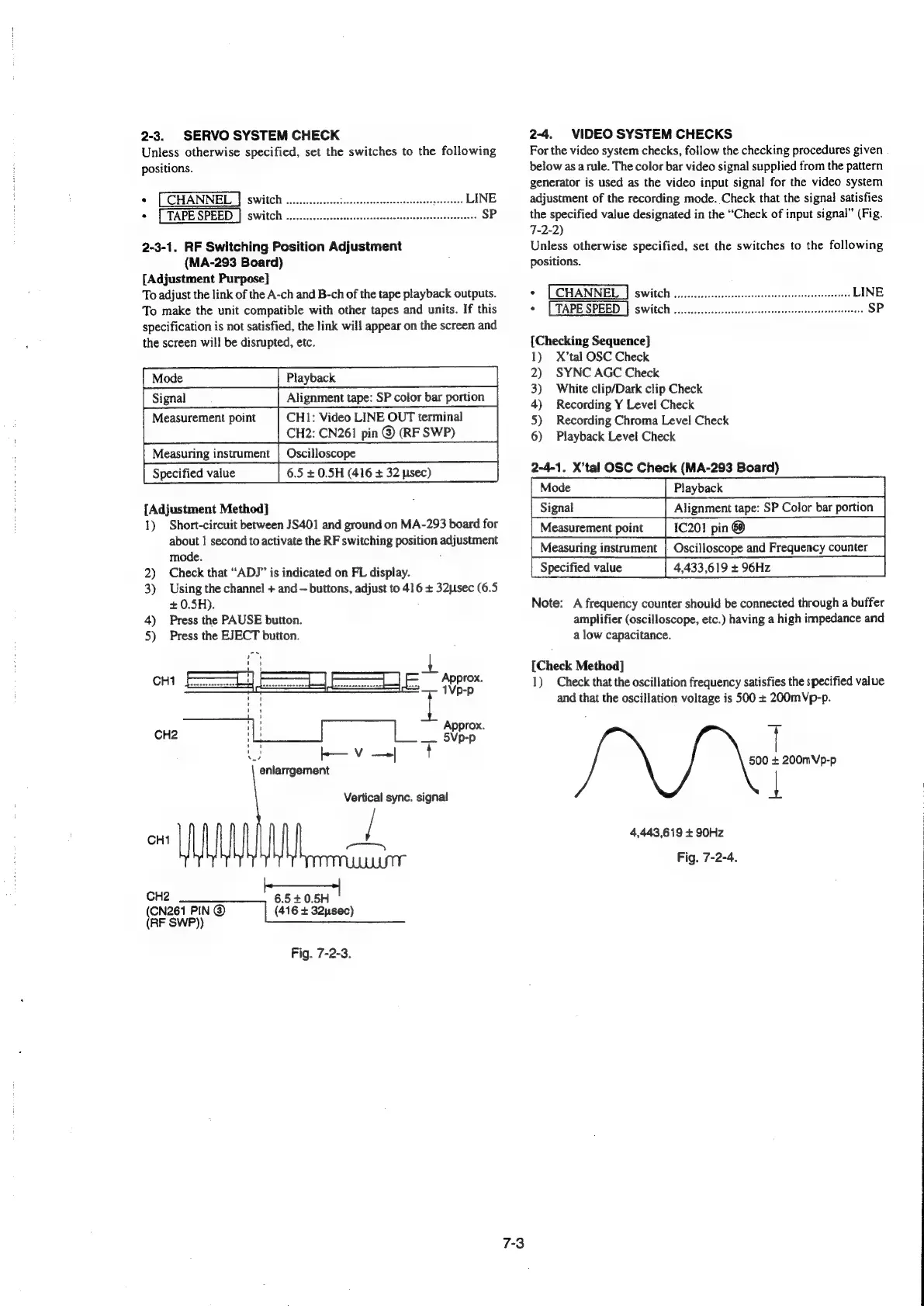
2-3-1.
RF
Switching
Position
Adjustment
(MA-293
Board)
[Adjustment
Purpose]
To
adjust
the
link
of
the
A-ch
and
B-ch
of
the
tape
playback
outputs.
To
make
the
unit
compatible
with
other
tapes
and
units.
If
this
specification
is
not
satisfied,
the
link
will
appear
on
the
screen
and
the
screen
will
be
disrupted,
etc.
Playback
Alignment
tape:
SP
color
bar
portion
CH1:
Video
LINE
OUT
terminal
CH2:
CN261
pin
@
(RF
SWP)
Measuring
instrument
|
Oscilloscope
Specified
value
6.5
+
0.5H
(416
+
32
usec)
[Adjustment
Method]
1)
Short-circuit
between
JS401
and
ground
on
MA-293
board
for
about
|
second
to
activate
the
RF
switching
position
adjustment
mode.
;
2)
Check
that
“ADJ”
is
indicated
on
FL
display.
3)
Using
the
channel
+
and
buttons,
adjust
to
416
+
32psec
(6.5
+
0.5H).
4)
Press
the
PAUSE
button.
5)
Press
the
EJECT
button.
7
kK—v—|
f
enlarrgement
Vertical
sync.
signal
baat
CH2
6.5
+0.5H
CN261
PIN
@
(416
+
32usec)
RF
SWP))
Fig.
7-2-3,
2-4.
VIDEO
SYSTEM
CHECKS
For
the
video
system
checks,
follow
the
checking
procedures
given
below
as
arule.
The
color
bar
video
signal
supplied
from
the
pattern
generator
is
used
as
the
video
input
signal
for
the
video
system
adjustment
of
the
recording
mode.
Check
that
the
signal
satisfies
the
specified
value
designated
in
the
“Check
of
input
signal”
(Fig.
7-2-2)
Unless
otherwise
specified,
set
the
switches
to
the
following
positions.
©
LCHANNEL
|
SWICK
oo.
ccecceteccerseneeeseenseaatsceeenene
LINE
©
[TAPE
SPEED
|
sWitch
00.0...
cccereceeereeeeceeesseseasenrestensese
SP
{Checking
Sequence]
1)
X’tal
OSC
Check
2)
SYNC
AGC
Check
3)
White
clip/Dark
clip
Check
4)
Recording
Y
Level
Check
5)
Recording
Chroma
Level
Check
6)
Playback
Level
Check
2-4-1.
X’tal
OSC
Check
(MA-293
Board)
"Mode
di
Playback
Sd
[Signal
[Alignment
ape
SP
Color
bar
portion
Note:
A
frequency
counter
should
be
connected
through
a
buffer
amplifier
(oscilloscope,
etc.)
having
a
high
impedance
and
a
low
capacitance.
[Check
Method]
1)
Check
that
the
oscillation
frequency
satisfies
the
specified
value
and
that
the
oscillation
voltage
is
500
+
200mVp-p.
500
+
200mVp-p
|
4,443,619
+
90Hz
Fig.
7-2-4.

Table of Contents

Related product manuals