masterpage:Left
filename[\\Nas-data-server\SONY Current jobs\SONY STR-
DA5000ES\DTP\4247188133\424718813STRDA5000ESU\GB03CON_STR-DA5000ES-U.fm]
14
GB
model name1[STR-DA5000ES]
[4-247-188-13(4)]
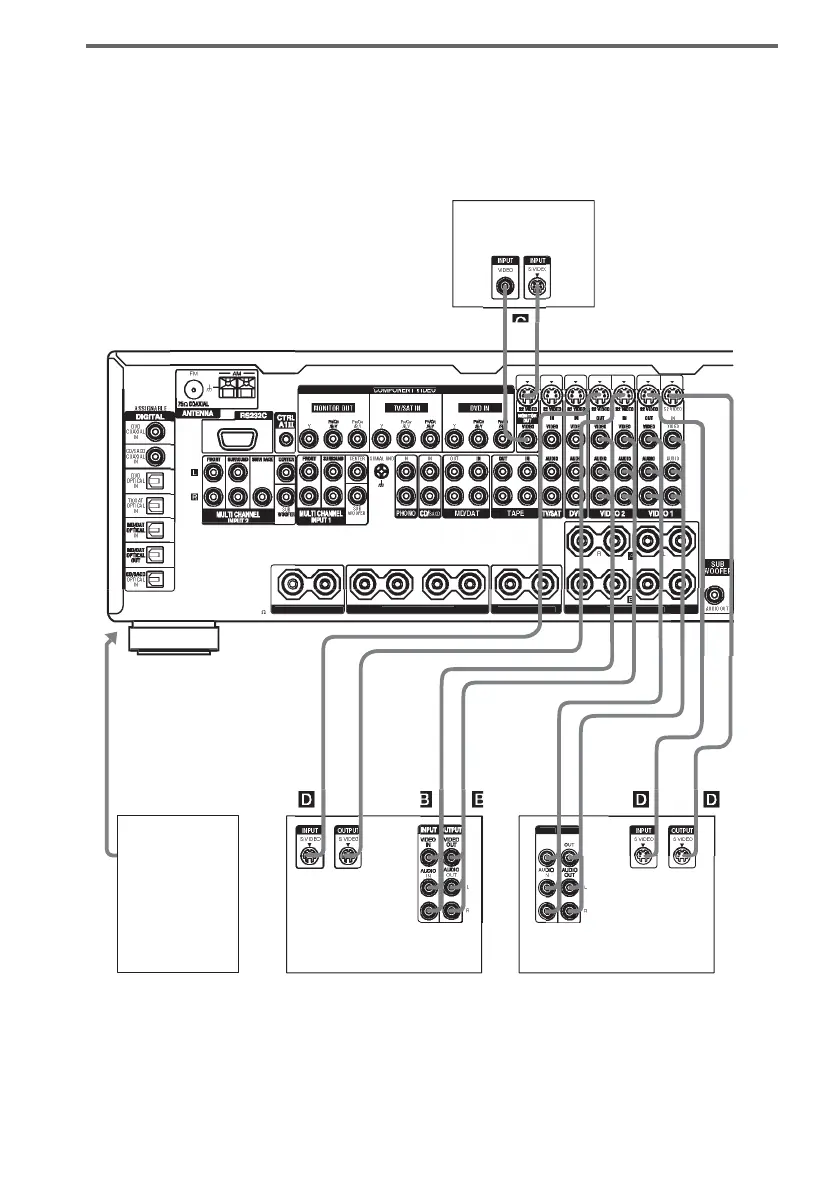
Hooking up video components
If you connect your TV to the MONITOR jacks, you can watch the video from the selected input
(page 24). You can also display the SPEAKER SET UP, LEVEL, SURR SET UP, EQUALIZER,
CUSTOMIZE and TUNER menu settings and sound fields on your TV by pressing ON SCREEN on
the remote.
For details on the required cords (A
–H), see page 7.
RR
ND
PEAKER
RR
ND BA
K
PEAKE
IMPEDAN
E
E 4-1
VIDE
VIDE
TP
INP
INOUT
L
L
INOUT
L
L
INOUT
L
L
B, D
INOUT
L
L
Camcorder or
TV game
TV monitor
VCR
VCR
To the
VIDEO 3
INPUT jacks
(Front panel)














 To Next Page