masterpage:Left
filename[\\Nas-data-server\SONY Current jobs\SONY STR-
DA5000ES\DTP\4247188133\424718813STRDA5000ESU\GB03CON_STR-DA5000ES-U.fm]
8
GB
model name1[STR-DA5000ES]
[4-247-188-13(4)]
.
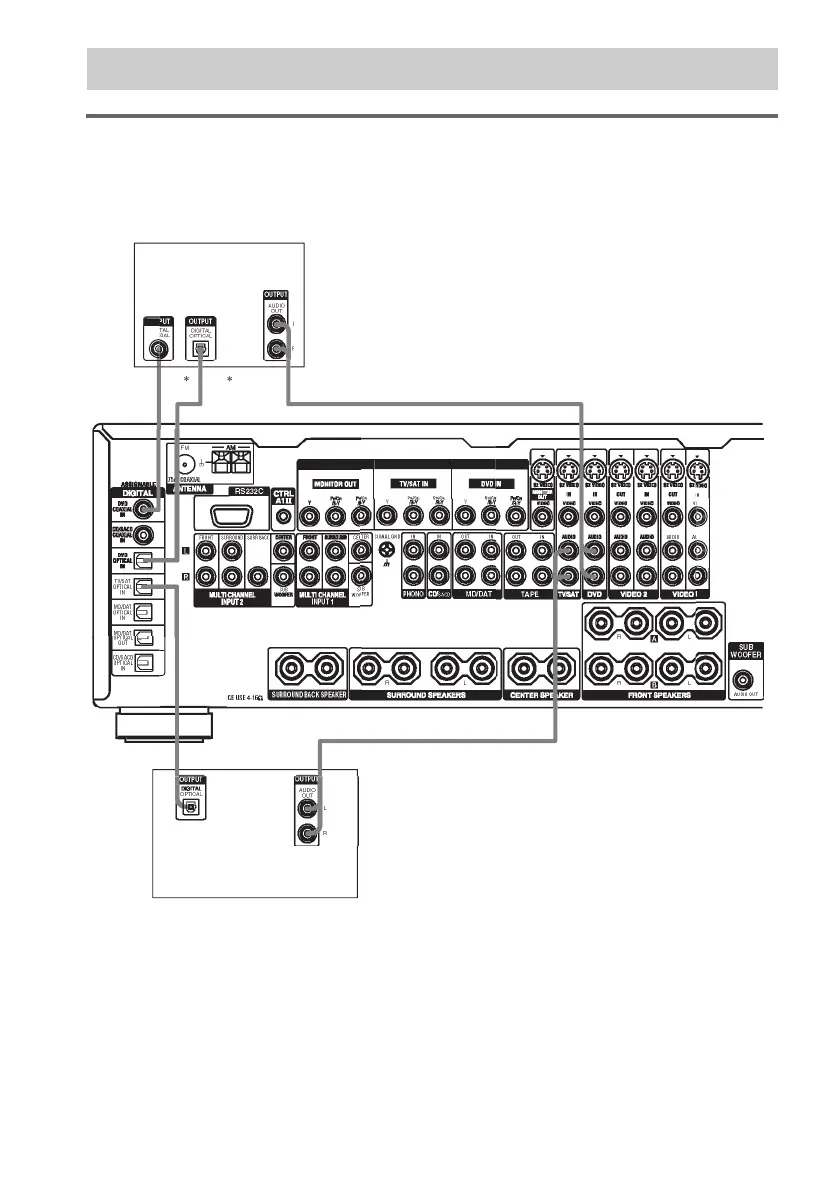
Hooking up a DVD player, TV monitor, or satellite tuner
For details on the required cords (A–H), see page 7.
1 Connect the audio jacks.
* Connect to either the DVD COAXIAL IN or the DVD OPTICAL IN jack. We recommend making connections to
the DVD COAXIAL IN jack.
Note
You can listen to the sound of your TV by connecting your TV’s audio output jacks to the TV/SAT AUDIO IN jacks
on the receiver. In this case, do not connect the TV’s video output jack to the TV/SAT VIDEO IN jack on the
receiver.
1a: Connecting components with digital audio output jacks
MP
NENT VIDE
DI
E
IMPEDA
DI
I
A
T
Satellite tuner
DVD player














 To Next Page