Getting Started
masterpage:Right
filename[\\Nas-data-server\SONY Current jobs\SONY STR-
DA5000ES\DTP\4247188133\424718813STRDA5000ESU\GB03CON_STR-DA5000ES-U.fm]
9
GB
model name1[STR-DA5000ES]
[4-247-188-13(4)]
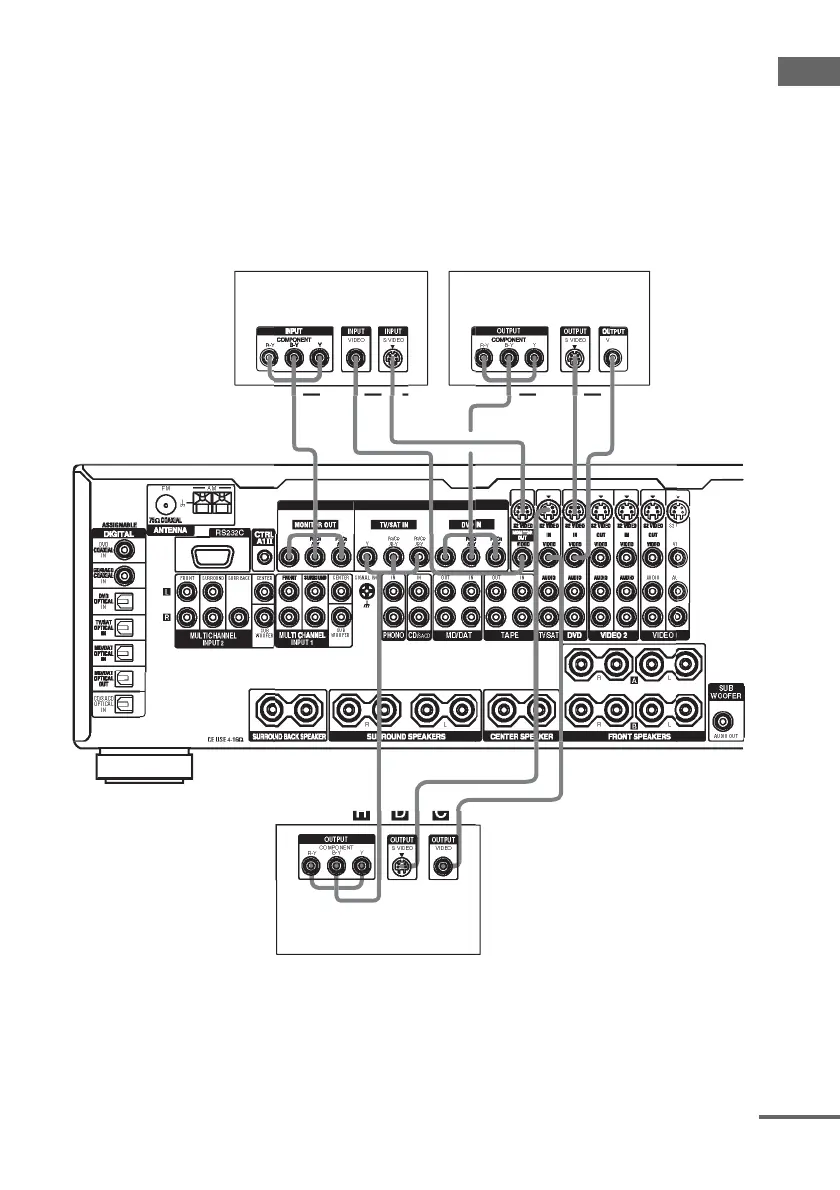
2 Connect the video jacks.
The following illustration shows how to connect a TV or satellite tuner and a DVD player with
COMPONENT VIDEO (Y, P
B
/C
B
/B-Y, P
R
/C
R
/R-Y) output jacks. Connecting a TV with component
video input jacks allows you to enjoy higher quality video. You can upconvert the video signals, and
adjust the hue, etc. of the converted signals (page 43).
Note
On this receiver, standard video signals can be converted to component video or S-video signals, and S-video signals
can be converted to component video signals. However, you cannot convert the component video signals to standard
video or S-video signals.
DI
E
IDE
MP
NENT VIDE
IMPEDA
DE
Satellite tuner
DVD player
TV monitor
continued














 To Next Page