Getting Started
masterpage:Right
filename[\\Nas-data-server\SONY Current jobs\SONY STR-
DA5000ES\DTP\4247188133\424718813STRDA5000ESU\GB03CON_STR-DA5000ES-U.fm]
17
GB
model name1[STR-DA5000ES]
[4-247-188-13(4)]
Required cords
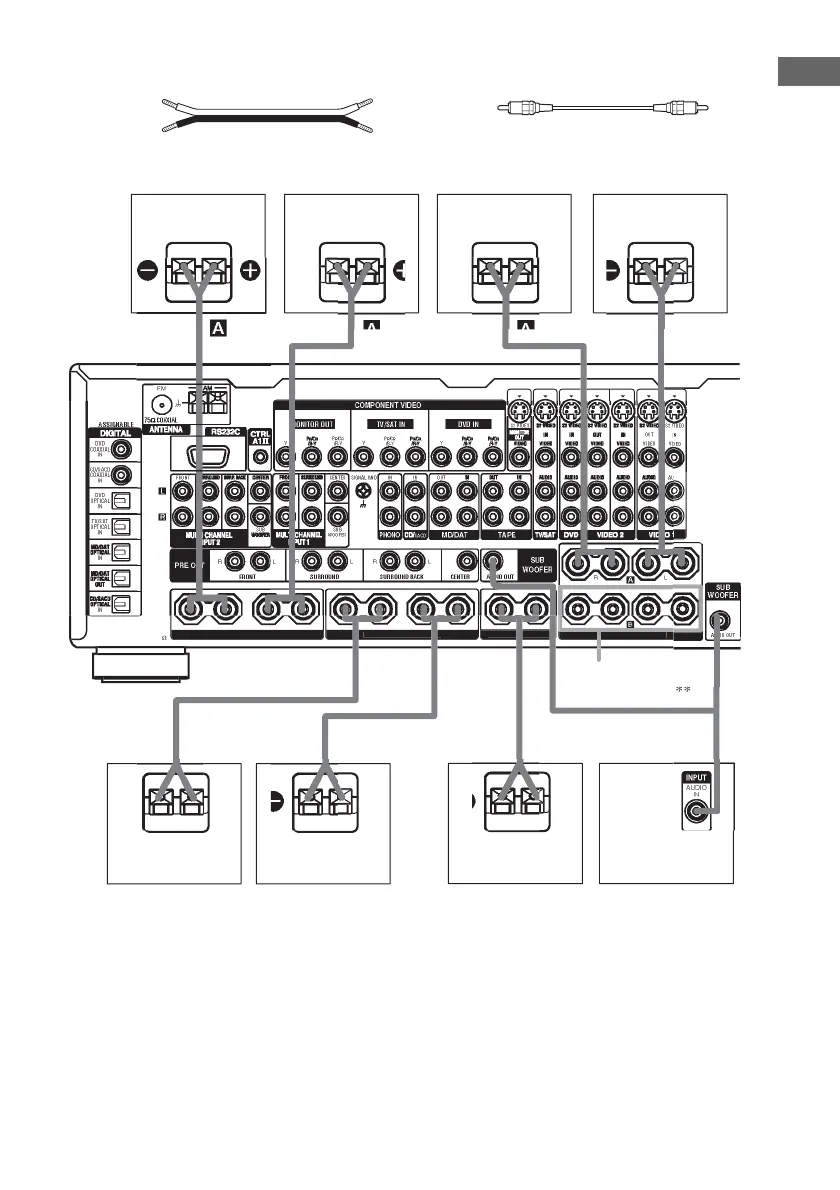
A Speaker cords (not supplied)
(+)
B Monaural audio cord (not supplied)
Black
(–)
* If you connect only one surround back speaker, connect it to the SURROUND BACK SPEAKERS L terminal
(except for STR-DA3000ES models of area code CEL, TW).
STR-DA3000ES models of area code CEL, TW have only one SURROUND BACK SPEAKER terminal.
**You can select the front speakers you want to use with SPEAKERS. For details, see “Selecting the speaker system”
(page 50).
Tip (Models of area code U, CA only)
To connect certain speakers to another power amplifier, use the PRE OUT jacks. The same signal is output from both
the SPEAKERS jacks and the PRE OUT jacks. For example, if you want to connect just the front speakers to another
amplifier, connect that amplifier to the PRE OUT FRONT L and R jacks.
FR
NT
PEAKER
RR
ND BA
K
PEAKER
DI
IMPEDAN
E
E 4-1
E
Ee
AAB
FR
NT
A
Surround speaker
(R)
Surround back
speaker (R)*
Sub woofer
Surround back
speaker (L)*
Front speaker (R)
Front speaker (L)
Center speakerSurround speaker
(L)
(Models of area
code U, CA only)
(Except for
models of
area code
U, CA)














 To Next Page