Getting Started
11
GB
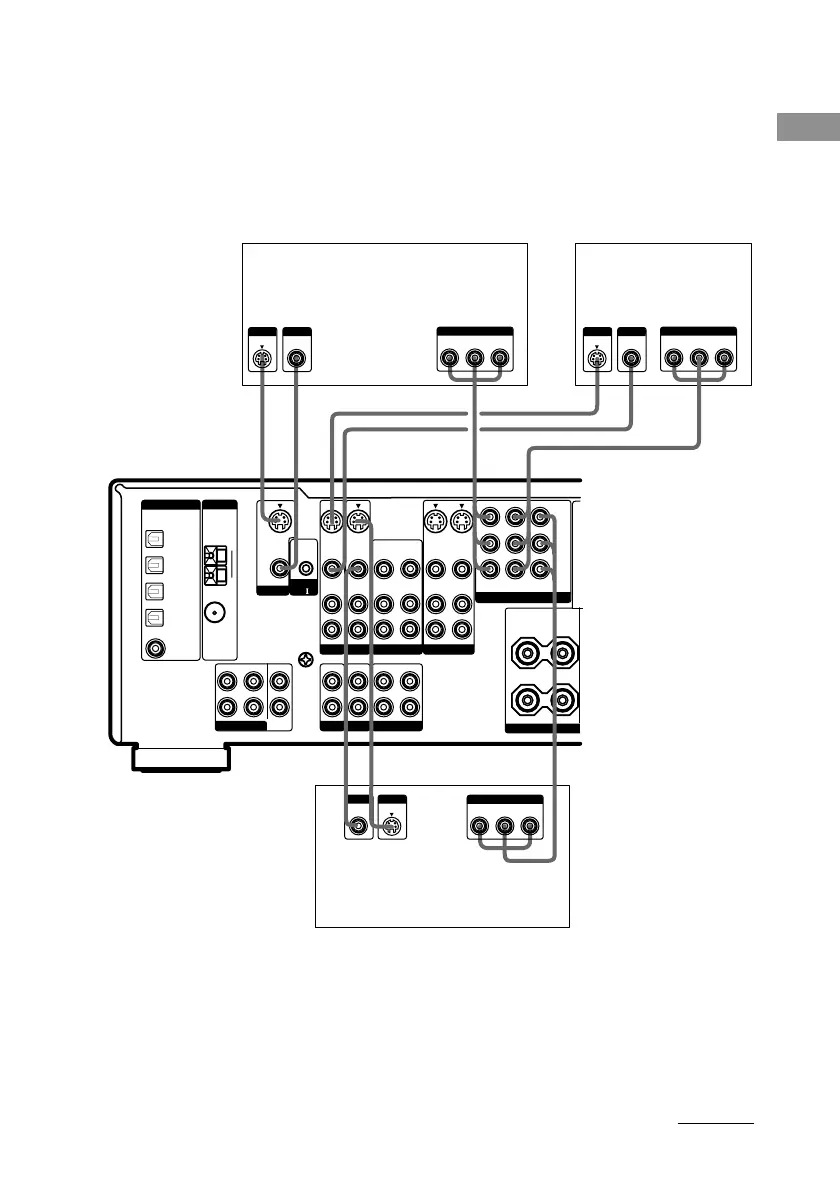
2 Connect the video jacks.
(Except for models of area code CEL, CEK)
The following illustration shows how to connect a TV or satellite tuner and a DVD/LD player with
COMPONENT VIDEO (Y, B-Y, R-Y) output jacks. Connecting a TV with component video input
jacks allows you to enjoy higher quality video.
Note
On this receiver, the component video signals cannot be converted to S-video or standard video signals (or vice
versa).
DVD/LD player
Satellite tuner
TV monitor
PHONO
CD/SACD
MD/TAPE
IN IN
OUT
IN
MULTI CH IN
SIGNAL
GND
U
CONTROL
A1
FRONT
SURROUND
CENTER
SUB
WOOFER
L
R
L
R
L
R
L
R
MONITOR
OUT
TV/SAT
IN
DVD/LD
IN
MONITOR
AUDIO
IN
IN
VIDEO
OUT
VIDEO
AUDIO
OUT
VIDEO 1
AUDIO
IN
TV/SAT
AUDIO
IN
DVD/LD
COMPONENT VIDEO
AUDIO
IN
AUDIO
OUT
VIDEO 2
S-VIDEO
IN
VIDEO
S-VIDEO
OUT
VIDEO
S-VIDEO
IN
VIDEO
S-VIDEO
IN
VIDEO
S-VIDEO
OUT
VIDEO
DIGITAL
ANTENNA
MD/TAPE
OPTICAL
IN
TV/SAT
OPTICAL
IN
DVD/LD
OPTICAL
IN
FM
75
Ω
COAXIAL
ASSIGNABLE
COAXIAL IN
DVD/LD
CD/SACD
MD/TAPE
OPTICAL
OUT
AM
U
Y
P
B
/C
B
/B-Y
P
R
/C
R
/R-Y
+
–
SURROUND
()
SPEA
L
R
IMPEDANCE
+
–
SURROUND
HDC
H
B-Y
COMPONENT
Y
R-Y
INPUT OUTPUT
B-Y
COMPONENT
Y
R-Y
OUTPUT
H
B-Y
COMPONENT
Y
R-Y
CDCD
S VIDEO
INPUT
VIDEO
INPUT
S VIDEO
OUTPUT
VIDEO
OUTPUT
S VIDEO
OUTPUT
VIDEO
OUTPUT
continued
Tip
When the component is equipped with S-video jacks, you can connect the component to the S-VIDEO jacks on
this receiver.
Note
You can listen to the sound of your TV by connecting your TV’s audio output jacks to the TV/SAT AUDIO IN
jacks on the receiver. In this case, do not connect the TV’s video output jack to the TV/SAT VIDEO IN jack on
the receiver. If you connect a separate satellite tuner, etc., connect both the audio and video output jacks to the
receiver as shown above.







 To Next Page