17
US
Getting Started
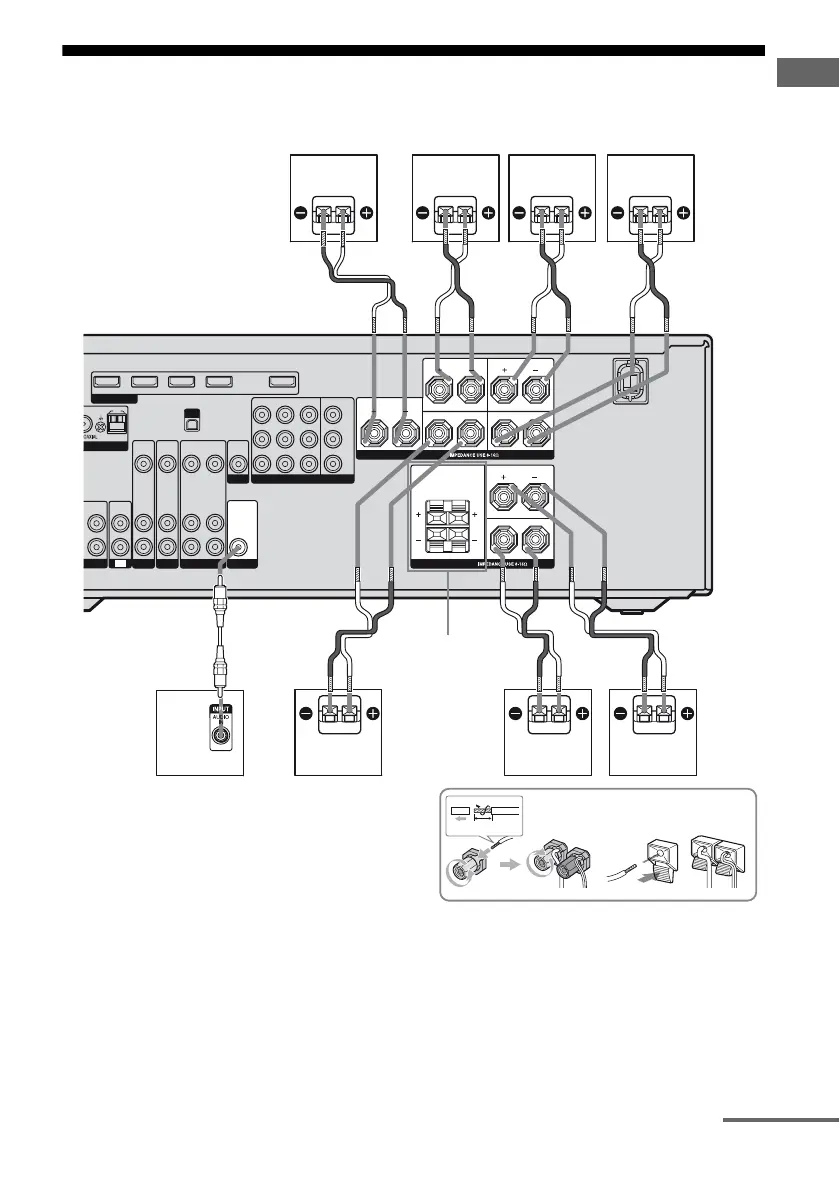
2: Connecting the speakers
Before connecting the cords, be sure to disconnect the AC power cord (mains lead).
AFront speaker A (Left)
BFront speaker A (Right)
CCenter speaker
DSurround speaker (Left)
ESurround speaker (Right)
FSurround back speaker (Left)
b)
GSurround back speaker (Right)
b)
HSubwoofer
c)
AM
M
XM
NTENNA
SAT IN DVD IN BD IN
VIDEO 1 IN OUT
HDMI
CENTER
FRONT AFRONT B
L
R
L
R
L
L
R
R
COMPONENT VIDEO
SAT IN DVD IN VIDEO 1 IN MONITOR OUT
Y
P
B
/
C
B
P
R
/
C
R
AUDIO
OUT
VIDEO
OUT
VIDEO 1
AUDIO
IN
VIDEO
IN
VIDEO
OUT
AUDIO
IN
VIDEO
IN
SAT
AUDIO
IN
VIDEO
IN
DVD
MONITOR
IN
TV
IN
D/CD-R
SPEAKERS
AUDIO
OUT
10 mm
SURROUND BACK
SUBWOOFER
SPEAKERS
SURROUND
H
F
A
B
B
E
G
A Monaural audio cord (not supplied)
B Speaker cord (not supplied)
A
SPEAKERS
FRONT B
terminals
a)
D
B
C
B
B
continued



 To Next Page