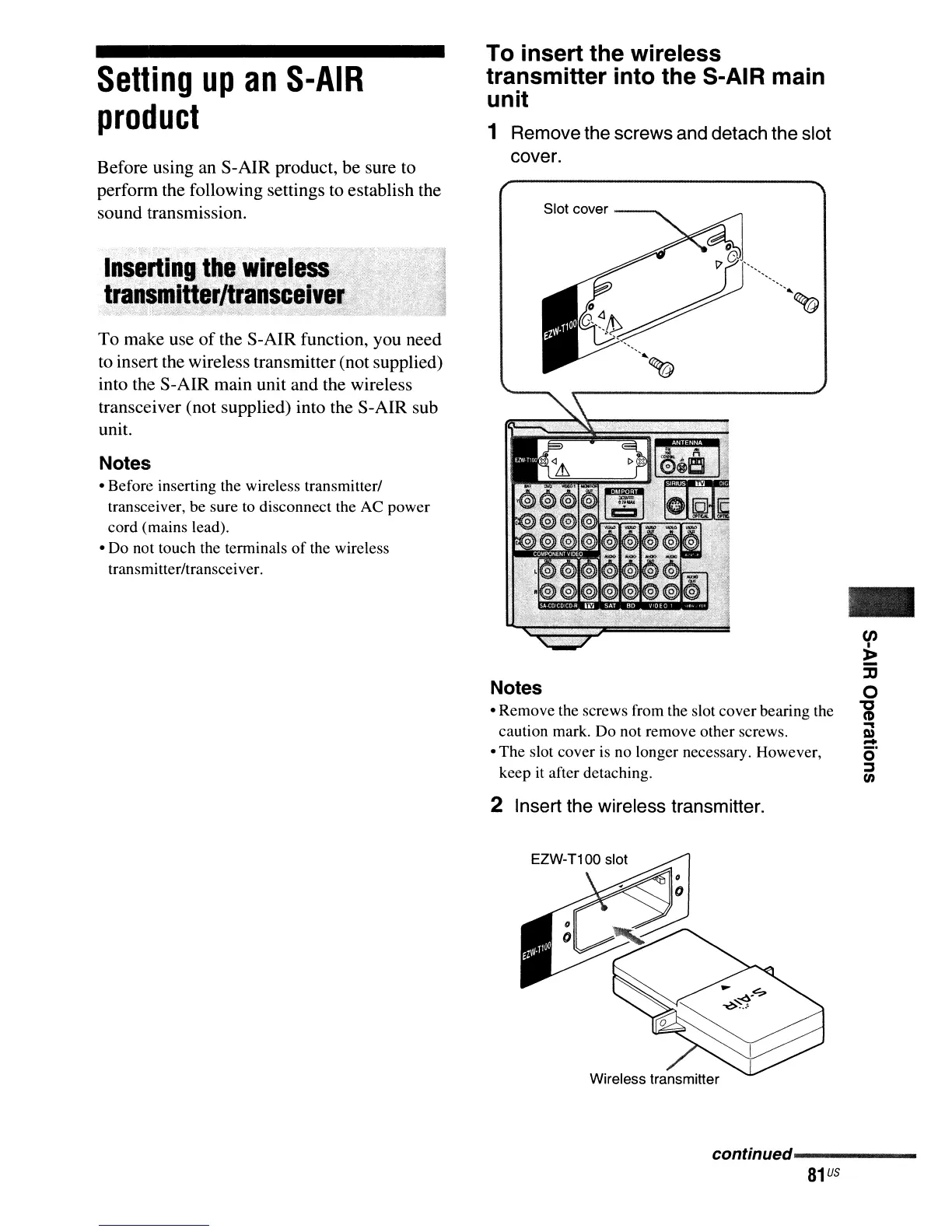
To insert the wireless
transmitter into the S-AIR main
unit
1 Remove the screws and detach the slot
cover.
Setting
up
an
S-AIR
product
Before using an S-AIR product, be sure to
perform the following settings
to
establish the
sound transmission.
To make use
of
the S-AIR function, you need
to
insert the wireless transmitter (not supplied)
into the S-AIR main unit and the wireless
transceiver (not supplied) into the S-AIR sub
unit.
Notes
• Before inserting the wireless transmitter/
transceiver, be sure to disconnect the AC power
cord (mains lead).
• Do not touch the terminals
of
the wireless
transmitter/transceiver.
Slot cover
---.......
Notes
• Remove the screws from the slot cover bearing the
caution mark. Do not remove other screws.
• The slot cover is no longer necessary. However,
keep it after detaching.
2 Insert the wireless transmitter.
-
en
I
~
:D
o
"i
..
l»
-
c)"
j
(/)
continued------
81
us



 To Next Page