17
GB
Connections
1: Installing the speakers
This receiver allows you to use a 7.1 channel
system (7 speakers and one subwoofer).
To fully enjoy theater-like multi channel
surround sound requires five speakers (two
front speakers, a center speaker, and two
surround speakers) and a subwoofer (5.1
channel).
You can enjoy high fidelity reproduction of
DVD software recorded sound in the Surround
EX format if you connect additional one
surround back speaker (6.1 channel) or two
surround back speakers (7.1 channel).
You can enjoy vertical sound effects if you
connect additional two front high speakers
(7.1 channel) in PLIIz mode (page 52).
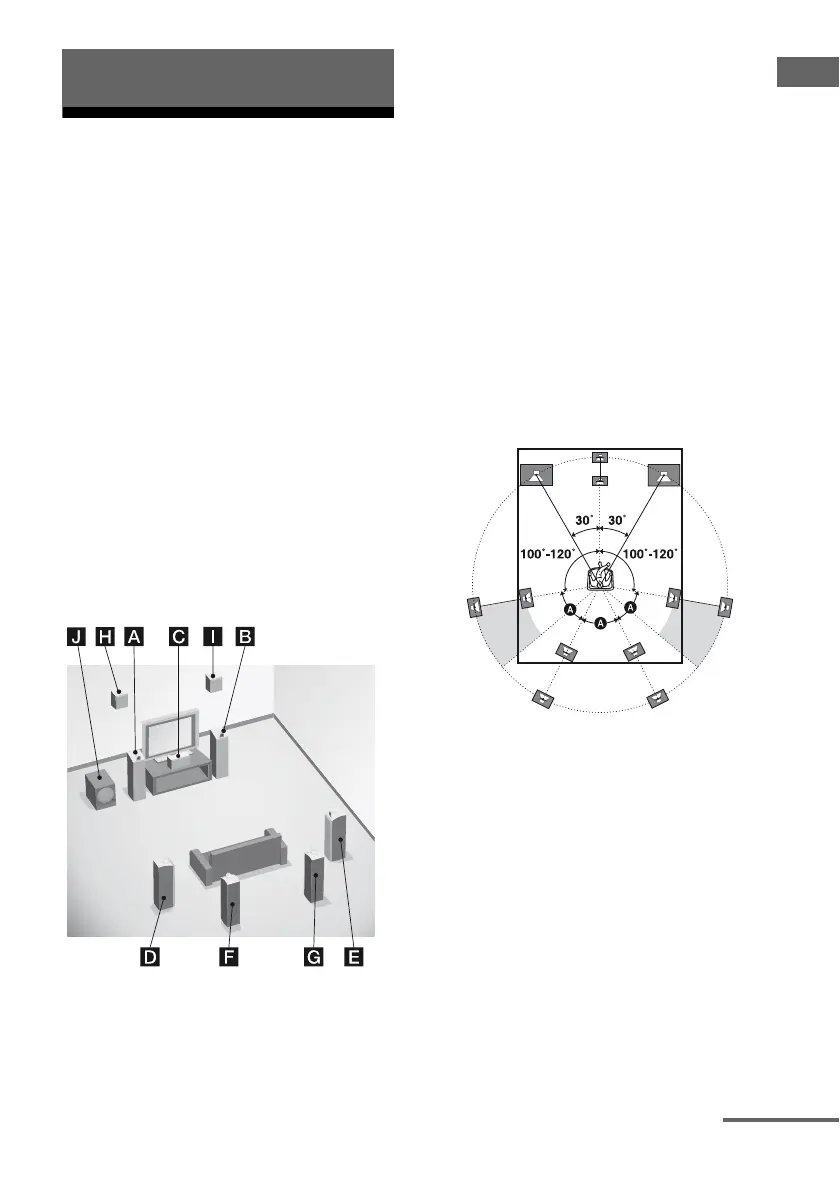
Example of speaker system
configuration
AFront speaker (Left)
BFront speaker (Right)
CCenter speaker
DSurround speaker (Left)
ESurround speaker (Right)
FSurround back speaker (Left)*
GSurround back speaker (Right)*
HFront high speaker (Left)*
IFront high speaker (Right)*
JSubwoofer
* You cannot use the surround back speakers and the
front high speakers simultaneously.
Tips
• When you connect a 7.1 channel speaker system
with two surround back speakers, all angle A
should be the same.
Connections
continued















 To Next Page