27
GB
Connections
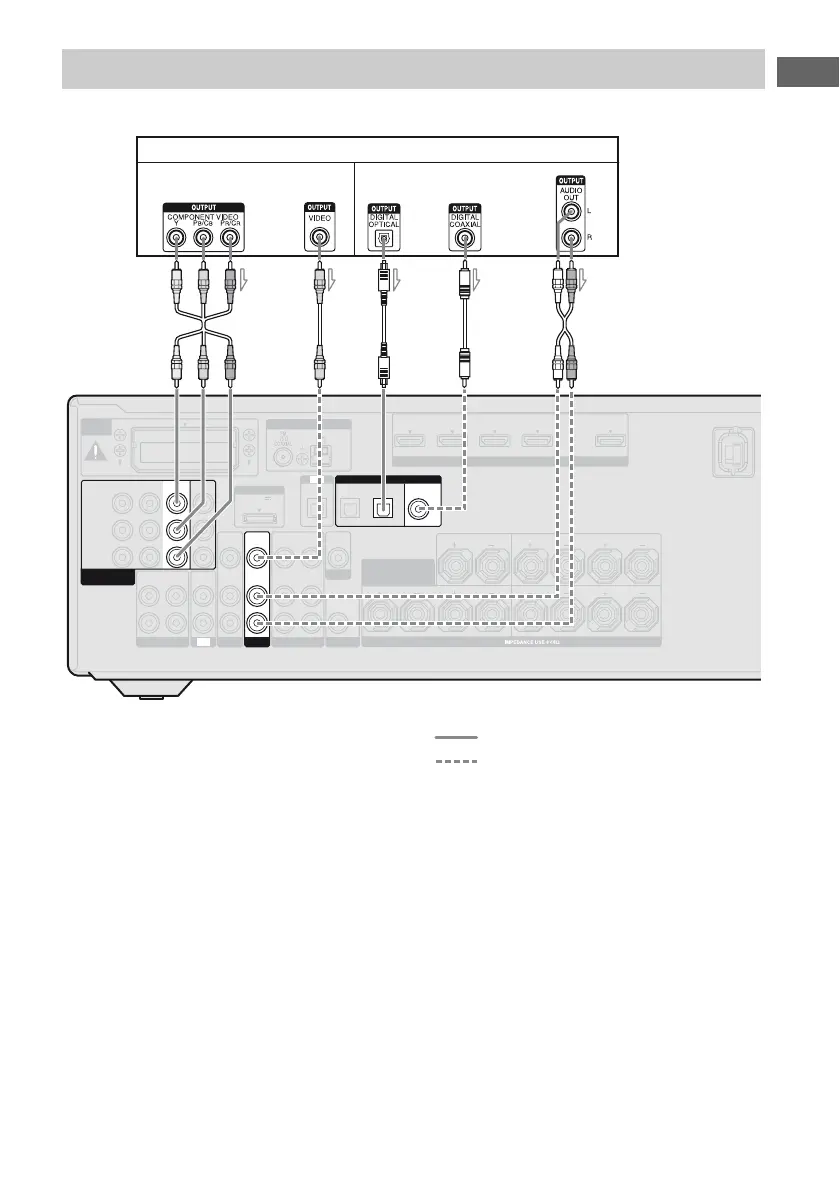
The following illustration shows how to connect a Blu-ray disc player.
A Component video cord (not supplied)
B Video cord (not supplied)
C Optical digital cord (not supplied)
D Coaxial digital cord (not supplied)
E Audio cord (not supplied)
Recommended connection
Alternative connection
* When you connect a component equipped with a
COAXIAL jack, set “A. ASSIGN” in the AUDIO
menu (page 69).
Notes
• The initial setting of the COMPONENT VIDEO
IN 1 jacks are Blu-ray disc player. If you want to
connect your Blu-ray disc player to the
COMPONENT VIDEO IN 2 or IN 3 jacks, set
“V. ASSIGN” in the VIDEO menu (page 69).
• To input multi channel digital audio from the Blu-
ray disc player, set the digital audio output setting
on the Blu-ray disc player. Refer to the operating
instructions supplied with the Blu-ray disc player.
Connecting a Blu-ray disc player
AM
EZW-T100
ANTENNA
DMPORT
IN 4 IN 3 IN 2 IN 1 TV OUT
ARC
DC5V
0.7A MAX
IN
OPTICAL
AUDIO
OUT
AUDIO
IN
AUDIO
OUT
AUDIO
IN
AUDIO
IN
VIDEO
IN
VIDEO
OUT
L
R
SA-CD
/
CD
/
CD-R
SAT
/
CATV SUBWOOFER
AUDIO
OUT
VIDEO
OUT
AUDIO
IN
VIDEO
IN
VIDEO 1
MONITOR
HDMI
ASSIGNABLE (INPUT ONLY)
TV
TV
LR LR
LR
SPEAKERS
CENTER
SURROUND
FRONT A
SURROUND BACK/
FRONT HIGH/
BI-AMP/ FRONT B
AUDIO
IN
VIDEO
IN
BD
OPTICAL
SAT
/
CATV
IN
BD
IN
COAXIAL
(ASSIGNABLE)
IN 3 IN 2
MONITOR
OUT
Y
P
B
/
C
B
P
R
/
C
R
COMPONENT VIDEO
ASSIGNABLE (INPUT ONLY)
IN 1
DVD
IN
DIGITAL
Blu-ray disc player
AB
Video signals Audio signals
D* E
C















 To Next Page