63
GB
S-AIR Operations
To establish sound transmission, you need to
set the same ID for your S-AIR main unit and
S-AIR sub unit.
However, if your neighbors have S-AIR
products and their IDs are the same as yours,
your neighbors could receive the sound of
your S-AIR main unit or vice versa.
To prevent this, you can pair the S-AIR main
unit with a specific S-AIR sub unit by
performing the pairing operation.
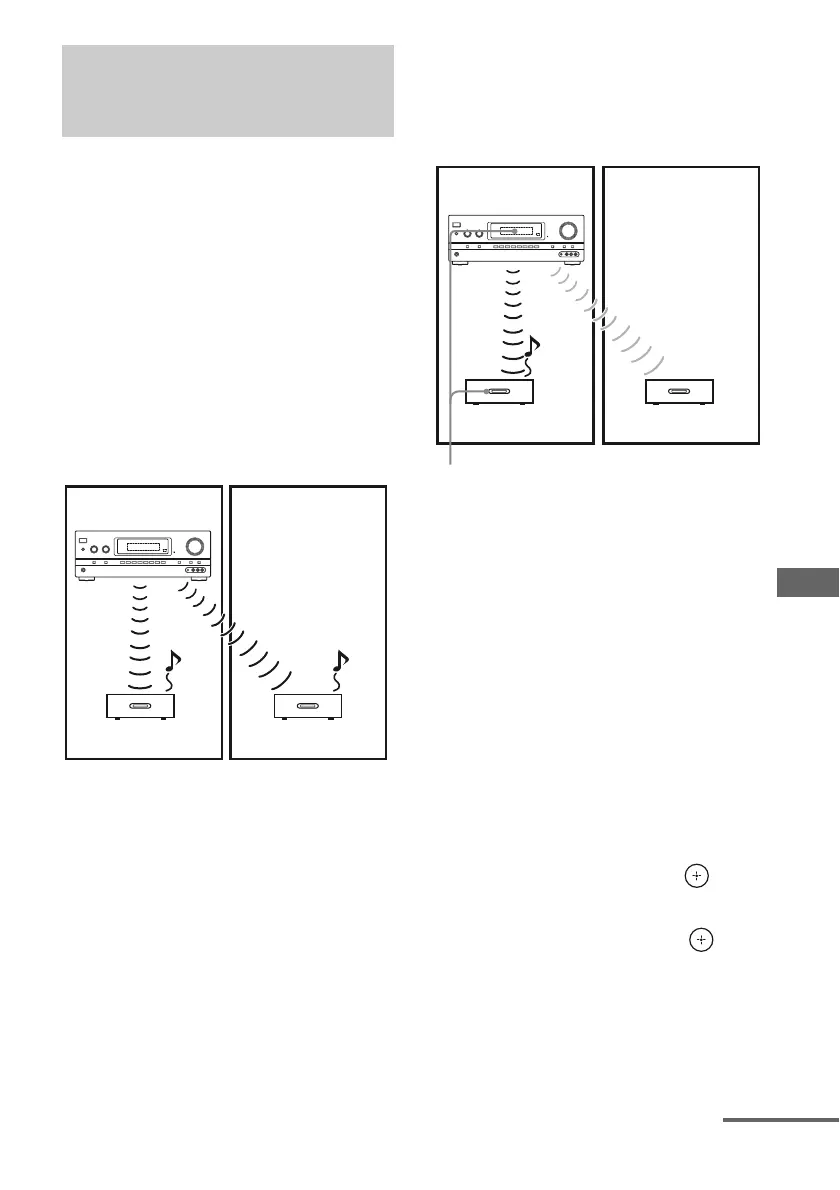
x Before pairing
Sound transmission is established by the ID
(example).
x After pairing
Sound transmission is established between the
paired S-AIR main unit and S-AIR sub unit(s)
only.
1 Place the S-AIR sub unit that
you want to pair near the S-AIR
main unit.
2 Match the IDs of the S-AIR main
unit and the S-AIR sub unit.
• To set the ID of the S-AIR main unit,
see “To set the ID of the S-AIR main
unit” (page 62).
• To set the ID of the S-AIR sub unit,
refer to the operating instructions
supplied with the S-AIR sub unit.
3 Press AMP MENU.
4 Press V/v repeatedly to select
“<S-AIR>”, then press or b.
5 Press V/v repeatedly to select
“PAIRING”, then press or b.
Pairing the S-AIR main unit with
a specific S-AIR sub unit
(Pairing operation)
ID A
ID A
ID A
?/1
our room
S-AIR main unit
(this receiver)
S-AIR sub unit S-AIR sub unit
Neighbor
ID A
ID A
ID A
?/1
Your room
S-AIR main unit
(this receiver)
S-AIR sub unit S-AIR sub unit
Neighbor
No transmission
Pairing
continued















 To Next Page