10
US
D:\NORM'S JOB\SONY HA\SO120021\STR-DN1030_PMRF
03\4420297131_US\US03DES_STR-DN1030-CEL.fm
masterpage: Left
STR-DN1030
4-420-297-13(1)
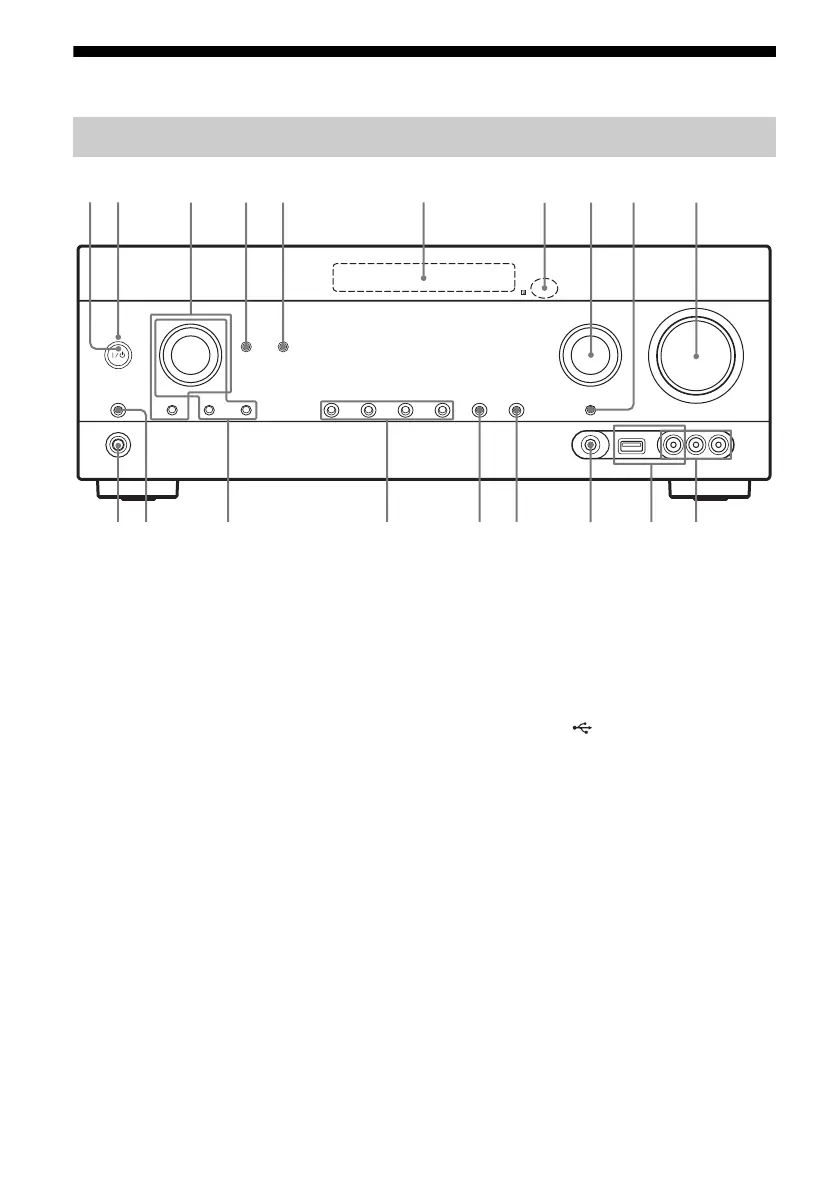
Description and location of parts
Front panel
qj
2
1345 6
ql qk
9
qfqgqh qaqd qs
78 q;
A ?/1 (on/standby) (page 37, 59, 65)
B ON/STANDBY indicator
Lights up as follows:
Green: The receiver is turned on.
Amber: The receiver is in standby mode, and
– Either Control for HDMI, Network Standby, or
Bluetooth Standby is set to on.
– The receiver in zone 2 is turned on.
Lights off when the receiver is in standby mode
and Control for HDMI, Network Standby, and
Bluetooth Standby are set to off.
Note
If the ON/STANDBY indicator flashes slowly,
the software update is in progress (page 77). If
the indicator flashes in quick succession, the
software update has error (page 114).
C TONE, TONE MODE
Press TONE MODE repeatedly to select BASS
or TREBLE, then turn TONE to adjust the level.
D BLUETOOTH (page 82)
Operates the Bluetooth function.
E PARTY (page 74)
Operates the PARTY STREAMING function.
Hold down the button to start or close a PARTY.
F Display panel (page 11)
G Remote control sensor
Receives signals from remote control.
H INPUT SELECTOR (page 51, 57, 88)
I INPUT MODE (page 88)
J MASTER VOLUME (page 51)
K VIDEO 2 IN jacks (page 32)
L iPod/iPhone ( (USB) port and
VIDEO IN jack) (page 31, 34)
M AUTO CAL MIC jack (page 40)
N DISPLAY (page 107)
O DIMMER
Adjusts the brightness of the display panel in 3
levels.
P 2CH/A.DIRECT, A.F.D., MOVIE
(HD-D.C.S.), MUSIC (page 61, 62)
Q TUNING MODE, MEMORY/ENTER,
TUNING
Press to operate a tuner (FM/AM).
Turn TUNING to scan a station.
R SPEAKERS (page 39)
S PHONES jack
Connects to headphones.



 To Next Page