29
US
D:\NORM'S JOB\SONY HA\SO120021\STR-DN1030_PMRF
03\4420297131_US\US04GET_STR-DN1030-CEL.fm
masterpage: Right
STR-DN1030
4-420-297-13(1)
Connections
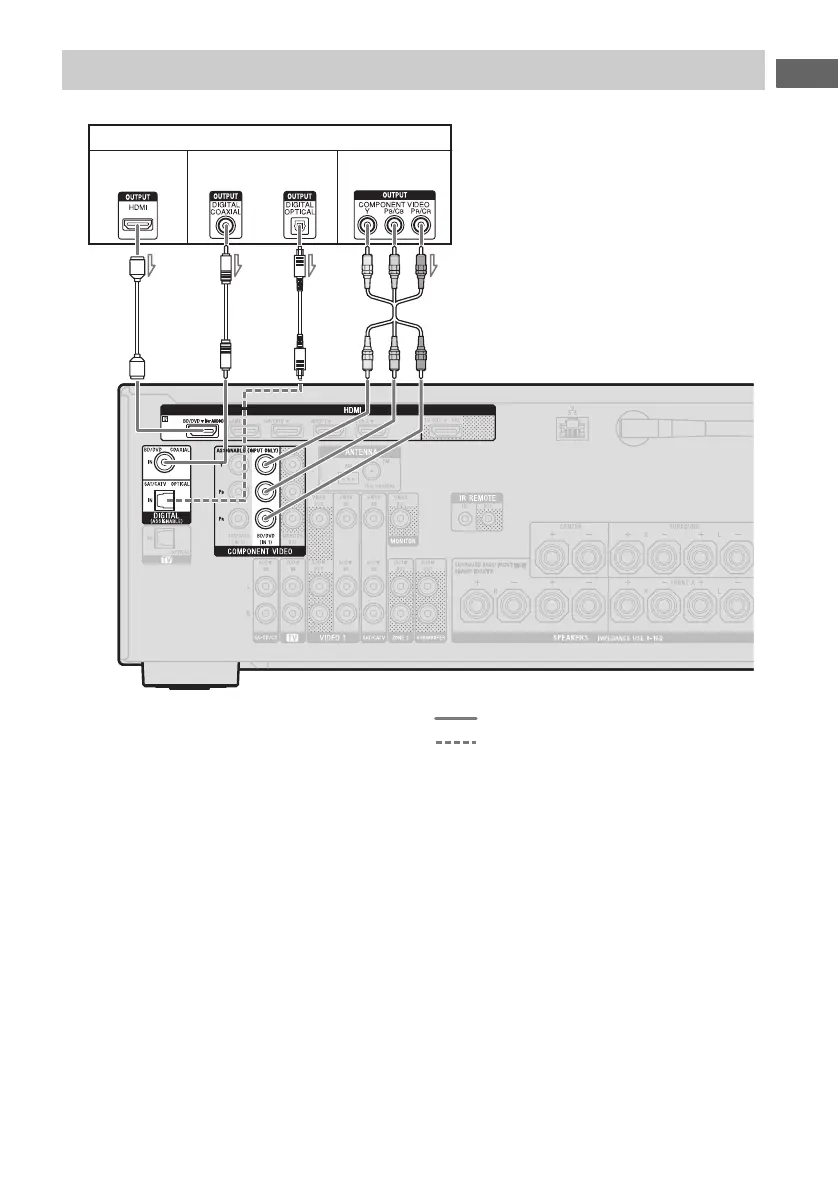
A HDMI cable (not supplied)
Sony recommends that you use an HDMI-
authorized cable or Sony HDMI cable.
B Coaxial digital cord (not supplied)
C Optical digital cord (not supplied)
D Component video cord (not supplied)
Recommended connection
Alternative connection
* When you connect equipment with an OPTICAL
jack, set the “Input Assign” in the Input Option
menu (page 88).
Notes
• BD/DVD input has a better sound quality. When
you need a higher sound quality, connect your
equipment to the BD/DVD (for AUDIO) jack and
select BD/DVD as input.
• The default setting for the BD/DVD input button
on the remote control is Blu-ray Disc player. Be
sure to change the default setting of the BD/DVD
input button so that you can use the button to
control your equipment. For details, see
“Programming the remote control” (page 107).
• You can also rename the BD/DVD input so that it
can be displayed on the receiver’s display panel.
For details, see “Naming the input (Name Input)”
(page 51).
Connecting a Blu-ray Disc player, DVD player
Blu-ray Disc player, DVD player
AB
Video signalsAudio signals
D
or
Audio/video
signals
C*



 To Next Page