18
GB
D:\NORM'S JOB\SONY HA\SO0086\STR-DN610_PMRF 2\GB\GB04CON_STR-DN610-U2.fm masterpage: Left
STR-DN610
4-167-824-13(1)
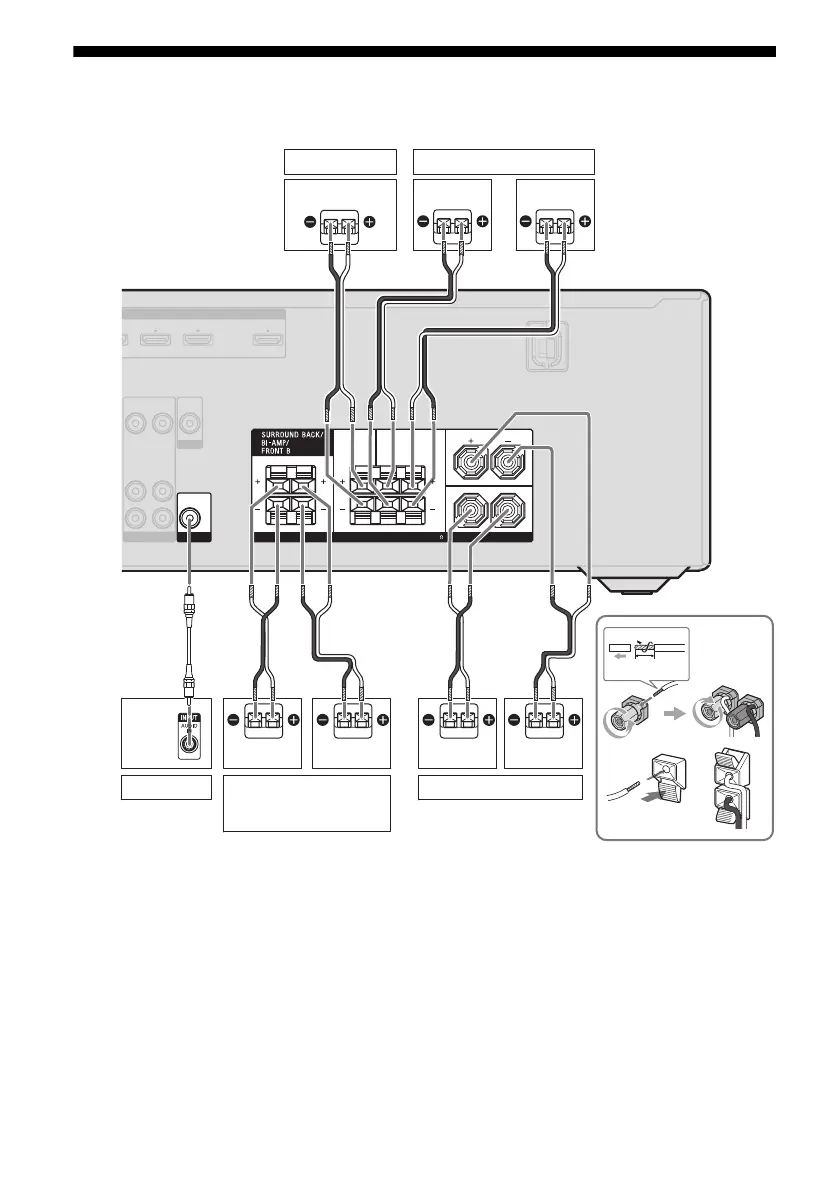
2: Connecting the speakers
Before connecting the cords, be sure to disconnect the AC power cord (mains lead).
10 mm
(13/32")
LR
R
L
TV OUT1 NI2 NI
HDMI
ASSIGNABLE (INPUT ONLY)
ARC
VIDEO
OUT
VIDEO
IN
MONITOR
VIDEO
OUT
AUDIO
IN
AUDIO
OUT
VIDEO 1
AUDIO
OUT
SPEAKERS
IMPEDANCE USE 8-16
RL
CENTER SURROUND
FRONT A
SUBWOOFER
Right
B
Left
Right
A Monaural audio cord (not supplied)
B Speaker cord (not supplied)
LeftRight
Center speaker
B
Left
B
B
Front A speakerSurround back/
Bi-amplifier/Front B
speaker
a)
Surround speaker
Subwoofer
b)
A



 To Next Page