10
US
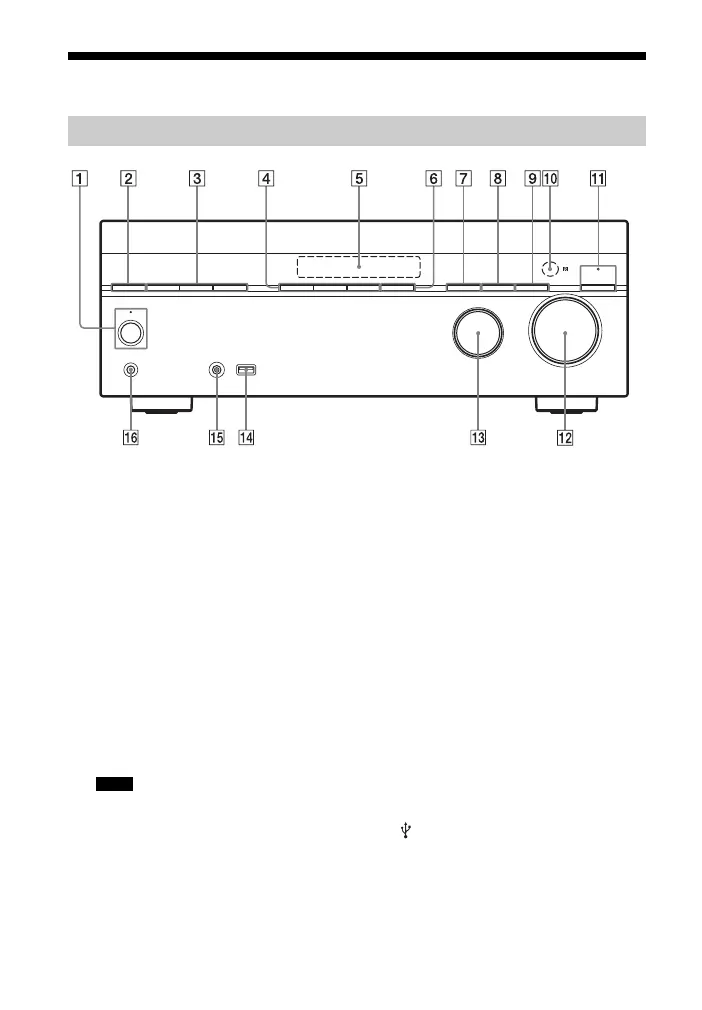
Description and location of parts
A ?/1 (on/standby) (page 33, 50, 56)
The indicator above the button lights
up as follows:
Green: The receiver is turned on.
Amber: The receiver is in standby
mode, and
– Either “Control for HDMI”
(page 94), “Network Standby”
(page 96), or “BT Standby”
(page 78) is set to “On”.
– “Pass Through” (page 94) is set to
“On” or “Auto”.
Lights off when the receiver is in
standby mode and “Control for
HDMI”, “Pass Through”, “Network
Standby”, and “BT Standby” are set to
“Off”.
If the indicator flashes slowly, the software
update is in progress (page 71). If the
indicator flashes in quick succession, the
software update has error (page 106).
B SPEAKERS (page 35)
C TUNING MODE, TUNING +/–
Press TUNING MODE to operate a
tuner (FM/AM).
Press TUNING +/– to scan a station.
D A.F.D./2CH, MOVIE, MUSIC
(page 51, 53)
E Display panel (page 11)
F SOUND OPTIMIZER (page 54)
G BLUETOOTH (page 76)
Operates the Bluetooth function.
H DIMMER
Adjusts the brightness of the display
panel in 3 levels.
I DISPLAY (page 102)
J Remote control sensor
Receives signals from remote control.
K PURE DIRECT (page 55)
The indicator above the button lights
up when PURE DIRECT is activated.
L MASTER VOLUME (page 42)
M INPUT SELECTOR (page 42)
N (USB) port (page 29)
O AUTO CAL MIC jack (page 34)
P PHONES jack
Connects to headphones.
Front panel
Note



 To Next Page