14
US
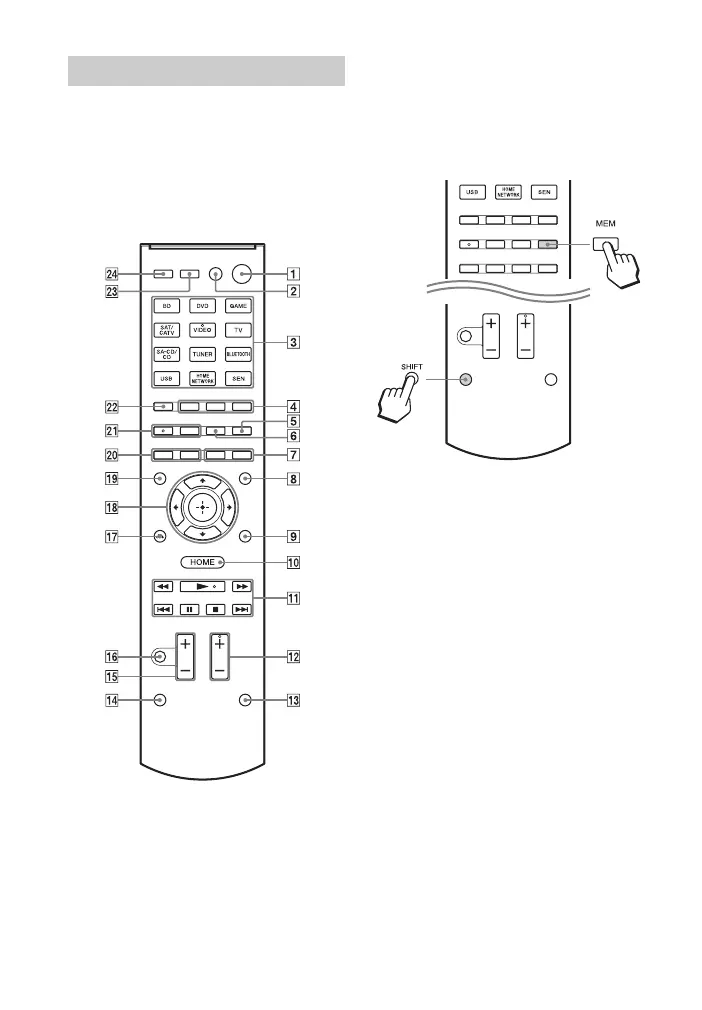
Use the supplied remote control to operate
this receiver and other equipment. The
remote control is assigned to operate Sony
audio/video equipment. You can reassign
the input button to match the equipment
connected to your receiver (page 103).
RM-AAU170
To use the buttons printed
in pink
Hold down SHIFT (N), then press the
button printed in pink that you want to use.
Example: Hold down SHIFT (
N), then
press MEM (
E).
To control the receiver
A ?/1 (on/standby)
Turns the receiver on or sets it to the
standby mode.
Saving the power in standby mode
When “Control for HDMI”, “Network
Standby”, “Pass Through”, and “BT
Standby” are set to “Off”.
B TV ?/1
1)
(on/standby)
Turns the TV on or sets it to the
standby mode.
C Input buttons
Selects the equipment you want to use.
When you press any of the input
buttons, the receiver turns on. The
buttons are assigned to control Sony
equipment.
Numeric/text buttons
1) 2)
Hold down SHIFT (N), then press
numeric/text buttons to
– preset/tune to the preset stations
(page 50).
Remote control
1
Hold down
2
Press



 To Next Page