44
US
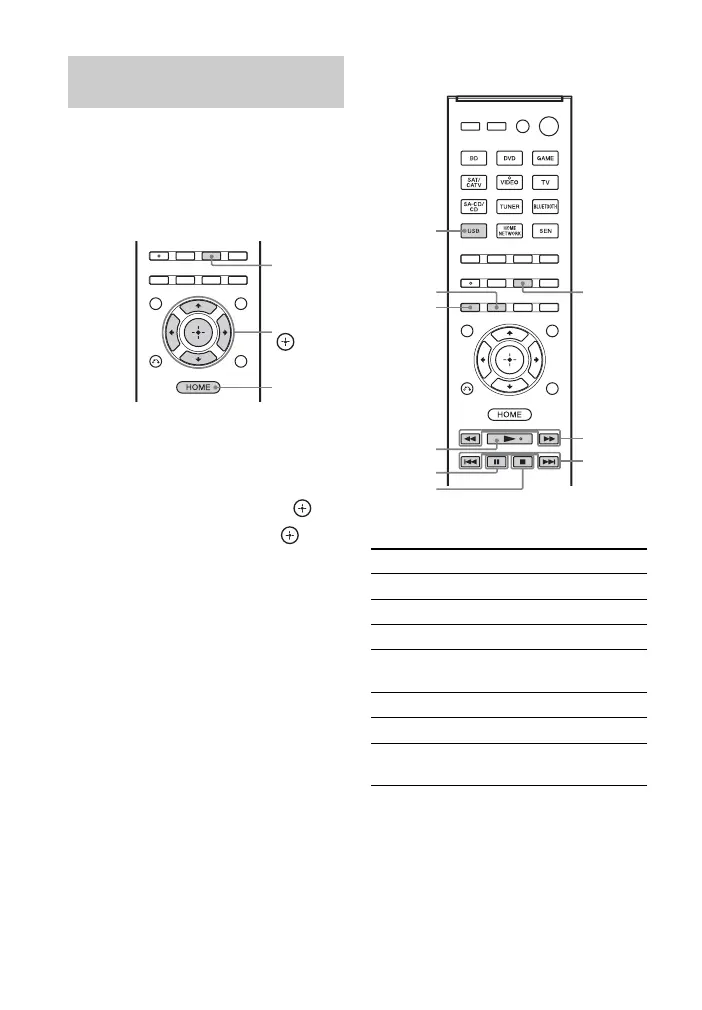
You can select the iPod/iPhone control
mode using the iPhone CTRL on the
remote control.
You can also control all operations by
viewing the information on the display
panel when the TV screen is turned off.
1 Press HOME.
The home menu is displayed on the TV
screen.
2 Select “Listen”, then press .
3 Select “USB”, then press .
When the iPod or iPhone is connected,
“iPod/iPhone” appears on the TV
screen.
4 Follow the on-screen instructions
to select the iPod/iPhone control
mode.
To operate the iPod/iPhone
using the remote control
Press USB before you use the following
buttons.
Selecting the iPod/
iPhone control mode
iPhone
CTRL
HOME
V/v/B/b,
Press Operation
N Starts play.
X, x Pauses play.
m/M Fast reverses or forwards.
./> Goes to the previous/next
track.
REPEAT Enters repeat mode.
SHUFFLE Enters shuffle mode.
iPhone CTRL Selects the iPod/iPhone
control mode.
./>
m/M
x
X
N
iPhone
CTRL
USB
SHUFFLE
REPEAT



 To Next Page