EasyManua.ls Logo

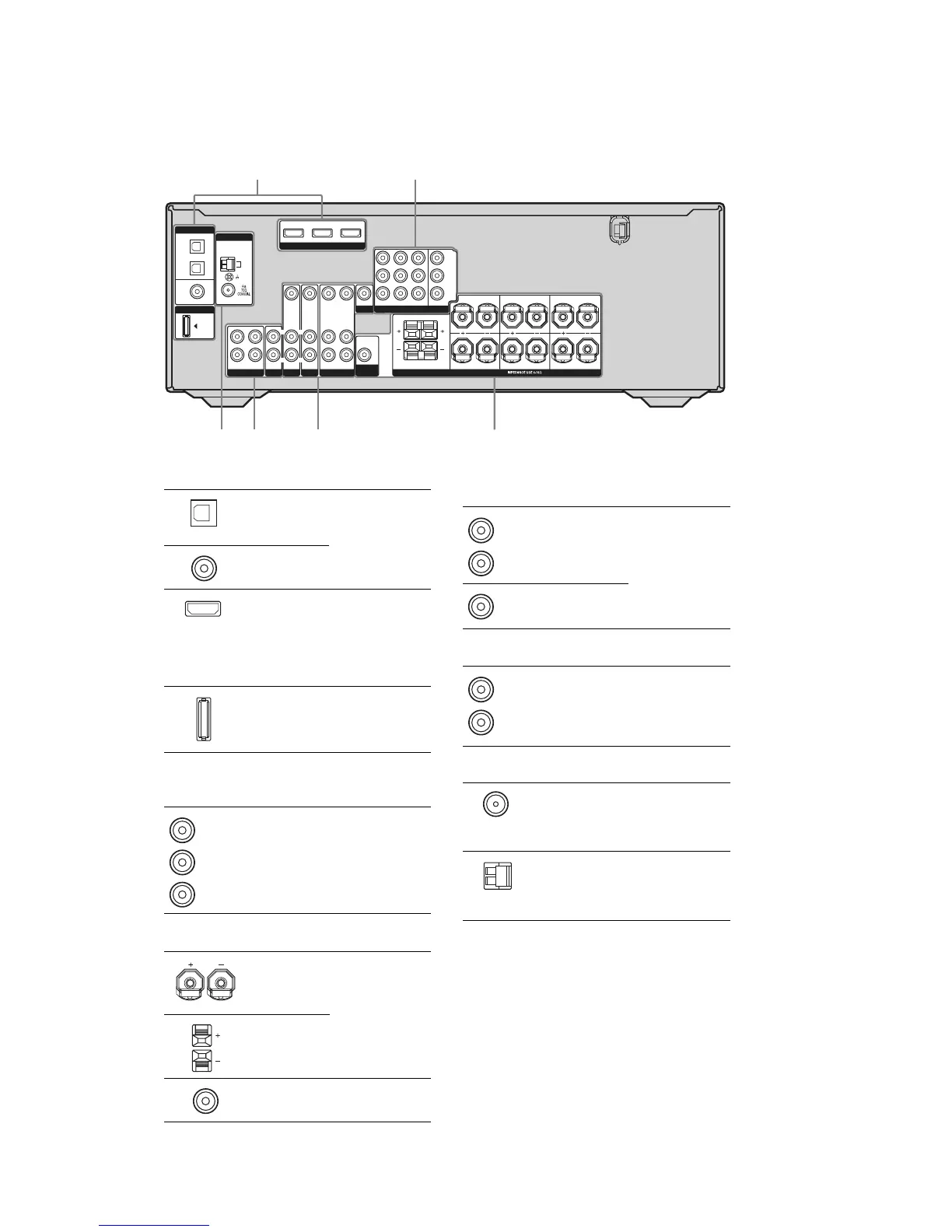
Sony STR-K890 - Rear Panel Connections; Digital Input;Output Section; Component Video and Audio I;O; Speaker and Antenna Connections

Sony STR-K890
60 pages
Print Icon
To Next Page IconTo Next Page
To Previous Page IconTo Previous Page
Loading...
6
STR-K890
Rear panel
12
3456
DIGITAL
DMPORT
OPTICAL
SAT
IN
DVD
IN
COAXIAL
ANTENNA
VIDEO 2/
BD IN
AM
SA-CD/CD/CD-R
TV
L
R
OUT IN IN
HDMI
DVD IN VIDEO 2/BD IN OUT
SAT
AUDIO IN
VIDEO IN
DVD
AUDIO IN
VIDEO IN
VIDEO 1
AUDIO OUT
VIDEO OUT
VIDEO OUT
SAT IN
AUDIO IN
AUDIO OUT
VIDEO IN
L
R
L
R
L
R
SUB
WOOFER
MONITOR
COMPONENT VIDEO
DVD IN VIDEO 1 IN
Y
P
B
/C
B
P
R
/C
R
MONITOR OUT
SPEAKERS
FRONT B
FRONT A
L
L
R
R
SURROUND
L
R
CENTER
SURROUND BACK
A DIGITAL INPUT/OUTPUT section
OPTICAL IN
jacks
Connects to a DVD
player, etc. The
COAXIAL jack
provides a better
quality of loud
sound.
COAXIAL IN
jacks
HDMI IN/
OUT jacks*
Connects to a DVD
player, or a Blu-ray
disc player. The
image and the
sound are output to
a TV or a projector.
DMPORT
jack
Connects to a
DIGITAL MEDIA
PORT adapter.
B COMPONENT VIDEO INPUT/
OUTPUT section
COMPONENT
VIDEO
INPUT/
OUTPUT
jacks*
Connects to a DVD
player, TV,
satellite tuner, etc.
You can enjoy high
quality image.
Green
Blue
Red
C SPEAKERS section
Connects to
speakers.
Connects to sub
woofer.
D VIDEO/AUDIO INPUT/OUTPUT
section
AUDIO IN/
OUT jacks
Connects to the
video and audio
jacks of a VCR,
DVD player, etc.
VIDEO IN/
OUT jacks*
E AUDIO INPUT/OUTPUT section
AUDIO IN/
OUT jacks
Connects to a
Super Audio CD
player, CD
recorder, etc.
White (L)
Red (R)
Yellow
White (L)
Red (R)
*You can watch the selected input image when you
connect the HDMI OUT or MONITOR OUT jack
to a TV.
F ANTENNA section
FM
ANTENNA
jack
Connects to the
FM wire antenna
supplied with this
receiver.
AM
ANTENNA
terminals
Connects to the
AM loop antenna
supplied with this
receiver.

Related product manuals