EasyManua.ls Logo

Sony STR-V220 - Adjusting Delay Time; Adjusting the Speaker Volume

Sony STR-V220
24 pages
Print Icon
To Next Page IconTo Next Page
To Previous Page IconTo Previous Page
Loading...
16
Receiver
Operations
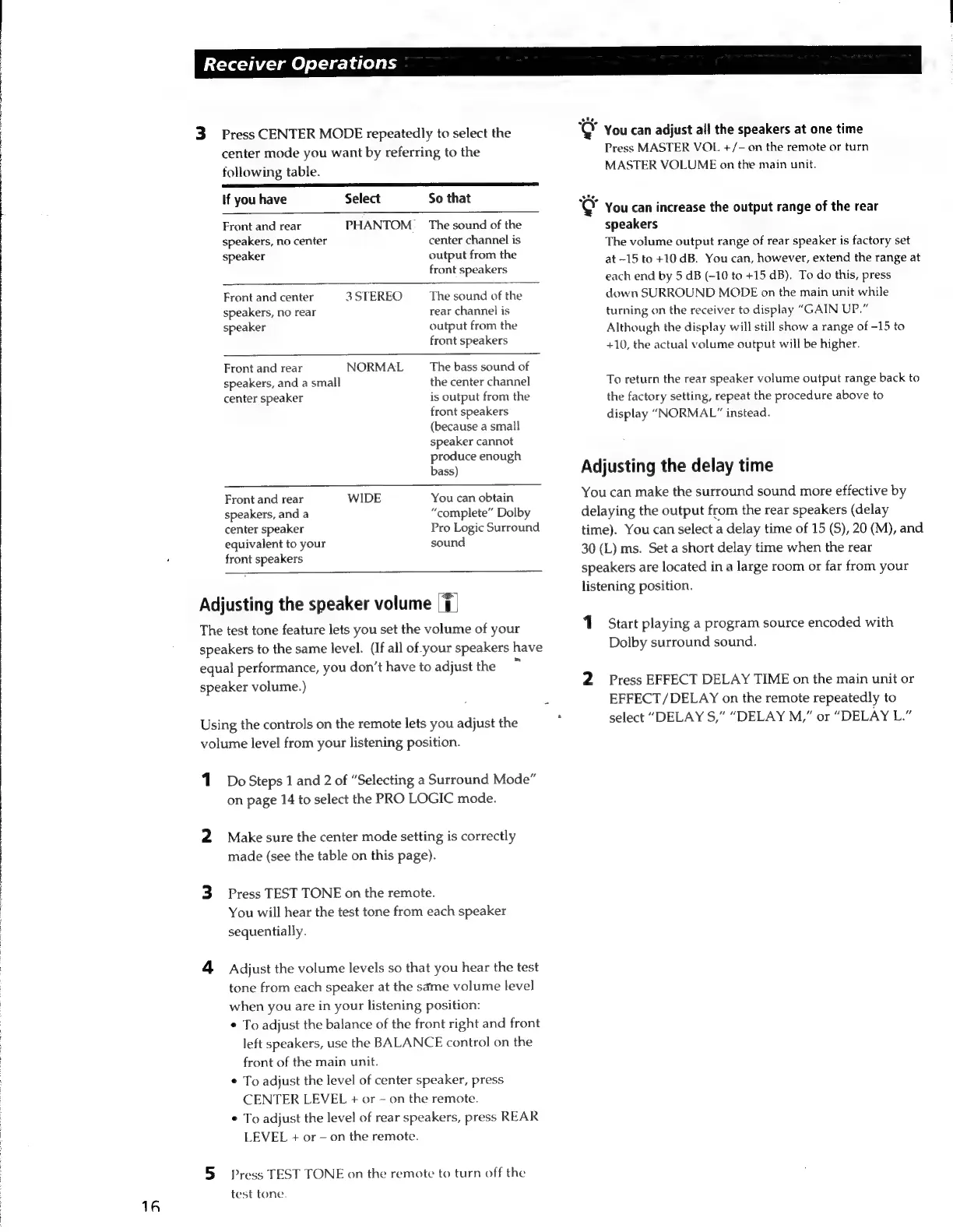
Press
CENTER
MODE
repeatedly
to
select
the
center
mode
you
want
by
referring
to
the
following
table.
If
you
have
Select
So
that
Front
and
rear
PHANTOM
_
The
sound
of
the
speakers,
no
center
center
channel
is
speaker
output
from
the
front
speakers
Front
and
center
3
STEREO
The
sound
of
the
speakers,
no
rear
rear
channel
is
speaker
output
from
the
front
speakers
NORMAL
The
bass
sound
of
the
center
channel
is
output
from
the
front
speakers
(because
a
small
speaker
cannot
produce
enough
bass)
Front
and
rear
speakers,
and
a
small
center
speaker
Front
and
rear
WIDE
You
can
obtain
speakers,
and
a
“complete”
Dolby
center
speaker
Pro
Logic
Surround
equivalent
to
your
sound
front
speakers
Adjusting
the
speaker
volume
|7|
The
test
tone
feature
lets
you
set
the
volume
of
your
speakers
to
the
same
level.
(If
all
of
your
speakers
have
equal
performance,
you
don’t
have
to
adjust
the
speaker
volume.)
Using
the
controls
on
the
remote
lets
you
adjust
the
volume
level
from
your
listening
position.
1
Do
Steps
1
and
2
of
“Selecting
a
Surround
Mode”
on
page
14
to
select
the
PRO
LOGIC
mode.
2
Make
sure
the
center
mode
setting
is
correctly
made
(see
the
table
on
this
page).
3
Press
TEST
TONE
on
the
remote.
You
will
hear
the
test
tone
from
each
speaker
sequentially.
4
Adjust
the
volume
levels
so
that
you
hear
the
test
tone
from
each
speaker
at
the
same
volume
level
when
you
are
in
your
listening
position:
¢
To
adjust
the
balance
of
the
front
right
and
front
left
speakers,
use
the
BALANCE
control
on
the
front
of
the
main
unit.
¢
To
adjust
the
level
of
center
speaker,
press
CENTER
LEVEL
+
or
on
the
remote.
*
To
adjust
the
level
of
rear
speakers,
press
REAR
LEVEL
+
or
-
on
the
remote.
5
Press
TEST
TONE
on
the
remote
to
turn
off
the
test
tone.
"@
You
can
adjust
all
the
speakers
at
one
time
Press
MASTER
VOL
+/-
on
the
remote
or
turn
MASTER
VOLUME
on
the
main
unit.
"@
You
can
increase
the
output
range
of
the
rear
speakers
The
volume
output
range
of
rear
speaker
is
factory
set
at-15
to
+10
dB.
You
can,
however,
extend
the
range
at
each
end
by
5
dB
(-10
to
+15
dB).
To
do
this,
press
down
SURROUND
MODE
on
the
main
unit
while
turning
on
the
receiver
to
display
“GAIN
UP.”
Although
the
display
will
still
show
a
range
of
-15
to
+10,
the
actual
volume
output
will
be
higher.
To
return
the
rear
speaker
volume
output
range
back
to
the
factory
setting,
repeat
the
procedure
above
to
display
“NORMAL”
instead.
Adjusting
the
delay
time
You
can
make
the
surround
sound
more
effective
by
delaying
the
output
from
the
rear
speakers
(delay
time).
You
can
select
a
delay
time
of
15
(S),
20
(M),
and
30
(L)
ms.
Set
a
short
delay
time
when
the
rear
speakers
are
located
in
a
large
room
or
far
from
your
listening
position.
Start
playing
a
program
source
encoded
with
Dolby
surround
sound.
2
Press
EFFECT
DELAY
TIME
on
the
main
unit
or
EFFECT
/DELAY
on
the
remote
repeatedly
to
select
“DELAY
S,”
“DELAY
M,”
or
“DELAY
L.”

Related product manuals