EasyManua.ls Logo

Sony STR-V220 - Video Component Hookups

Sony STR-V220
24 pages
Print Icon
To Next Page IconTo Next Page
To Previous Page IconTo Previous Page
Loading...
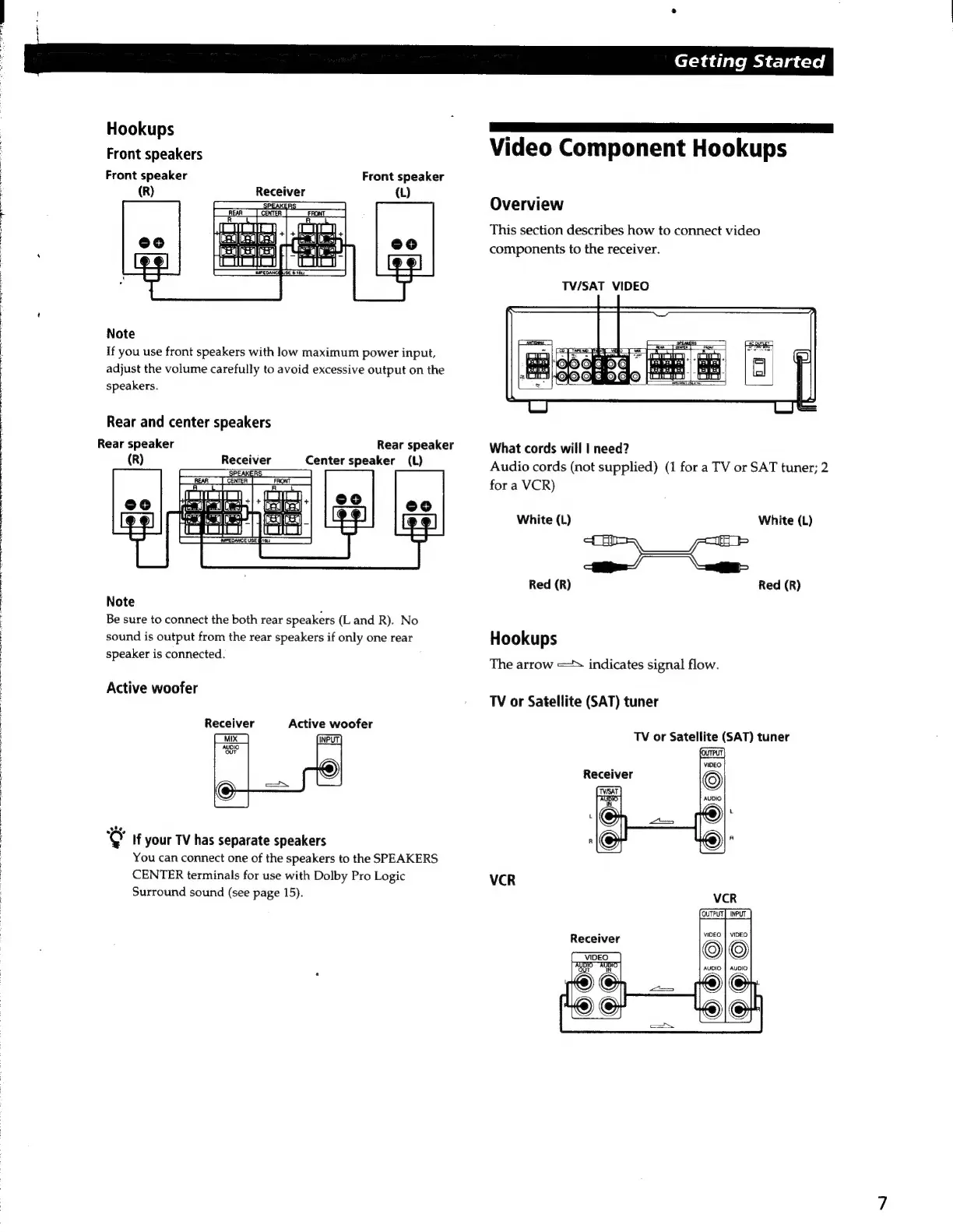
Hookups
Front
speakers
Front
speaker
Front
speaker
(R)
Receiver
(L)
Note
If
you
use
front
speakers
with
low
maximum
power
input,
adjust
the
volume
carefully
to
avoid
excessive
output
on
the
speakers.
Rear
and
center
speakers
Rear
speaker
(R)
Receiver
Rear
speaker
Center
speaker
(L)
Note
Be
sure
to
connect
the
both
rear
speakers
(Land
R).
No
sound
is
output
from
the
rear
speakers
if
only
one
rear
speaker
is
connected.
Active
woofer
Receiver
Active
woofer
‘©
If
your
TV
has
separate
speakers
You
can
connect
one
of
the
speakers
to
the
SPEAKERS
CENTER
terminals
for
use
with
Dolby
Pro
Logic
Surround
sound
(see
page
15).
Getting
Started
8
a
Video
Component
Hookups
Overview
This
section
describes
how
to
connect
video
components
to
the
receiver.
TV/SAT
VIDEO
What
cords
will
|
need?
Audio
cords
(not
supplied)
(1
for
a
TV
or
SAT
tuner;
2
for
a
VCR)
White
(L)
White
(L)
Red
(R)
Red
(R)
Hookups
The
arrow
=
indicates
signal
flow.
TV
or
Satellite
(SAT)
tuner
TV
or
Satellite
(SAT)
tuner
VCR
VCR
Receiver
UDIS
UBIO

Related product manuals