EasyManua.ls Logo

Sony STR-V220 - Remote Button Descriptions

Sony STR-V220
24 pages
Print Icon
To Next Page IconTo Next Page
To Previous Page IconTo Previous Page
Loading...
22
Volelielels
eM
iieleitchicels,
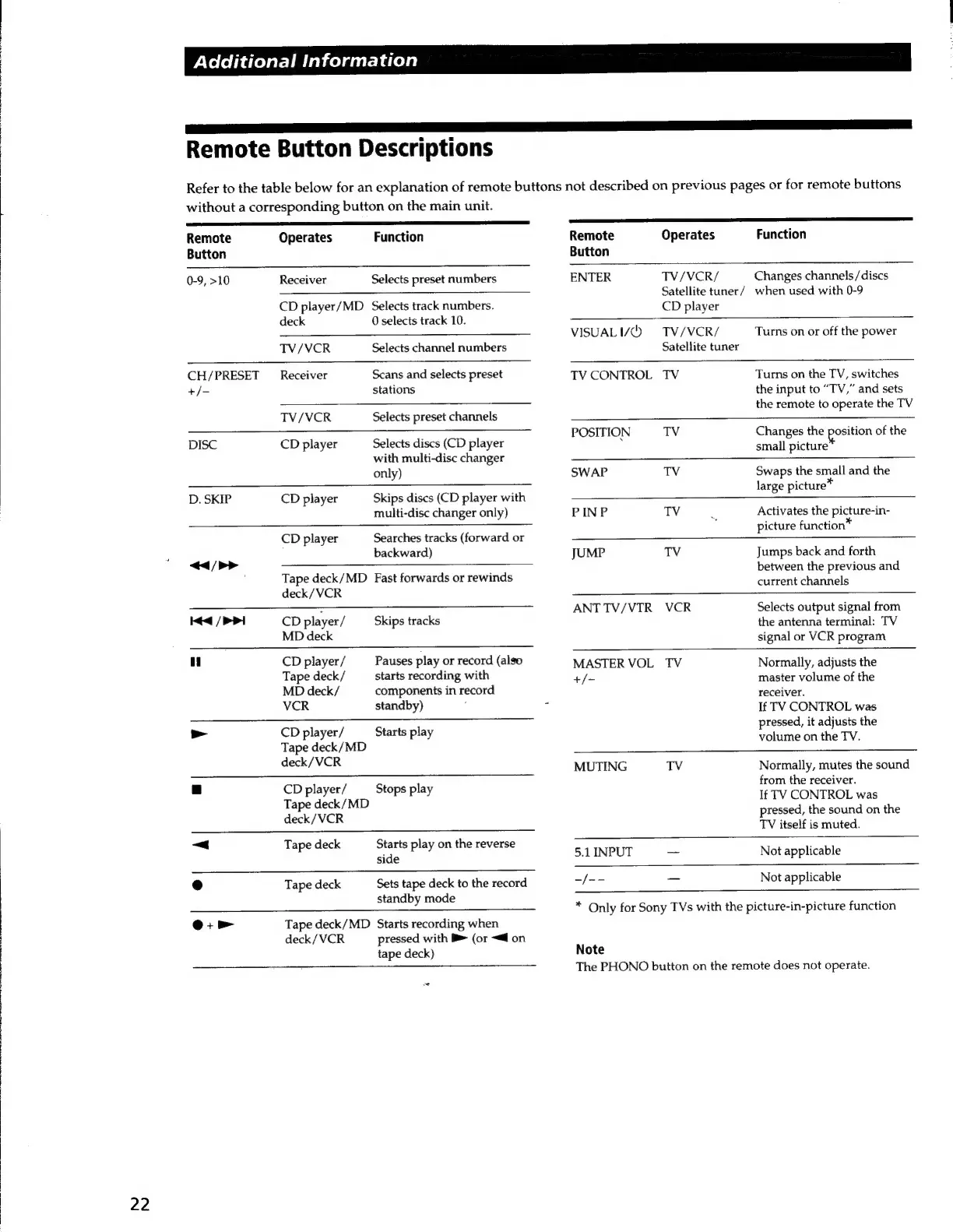
Remote
Button
Descriptions
Refer
to
the
table
below
for
an
explanation
of
remote
buttons
not
described
on
previous
pages
or
for
remote
buttons
without
a
corresponding
button
on
the
main
unit.
Remote
Operates
Function
Button
0-9,
>10
Receiver
Selects
preset
numbers
CD
player/MD
Selects
track
numbers.
——
nn
Remote
Operates
Function
Button
ENTER
TV/VCR/
Changes
channels
/discs
Satellite
tuner/
when
used
with
0-9
CD
player
VISUALIQ
=
TV/VCR/
Satellite
tuner
Turns
on
or
off
the
power
deck
0
selects
track
10.
TV/VCR
Selects
channel
numbers
CH/PRESET
_
Receiver
Scans
and
selects
preset
+/=
stations
TV/VCR
Selects
preset
channels
DISC
CD
player
Selects
discs
(CD
player
with
multi-disc
changer
only)
D.
SKIP
CD
player
Skips
discs
(CD
player
with
multi-disc
changer
only)
CD
player
Searches
tracks
(forward
or
backward)
<<
/>>
ee
Tape
deck/MD
Fast
forwards
or
rewinds
deck/VCR
Hed
/
PPI
cD
player/
Skips
tracks
MD
deck
ui
CD
player/
Pauses
play
or
record
(also
Tape
deck/
starts
recording
with
MD
deck/
components
in
record
VCR
standby)
>
CD
player/
Starts
play
Tape
deck/MD
deck/VCR
|
CD
player/
Stops
play
Tape
deck/MD
deck/VCR
~<
Tape
deck
Starts
play
on
the
reverse
side
e
Tape
deck
Sets
tape
deck
to
the
record
standby
mode
Oo:
>
Tape
deck/MD
Starts
recording
when
deck/VCR
pressed
with
B>
(or
~@
on
tape
deck)
_
TV
CONTROL
TV
Turns
on
the
TV,
switches
the
input
to
“TV,”
and
sets
the
remote
to
operate
the
TV
POSITION
TV
Changes
the
position
of
the
small
picture
SWAP
TV
Swaps
the
small
and
the
large
picture*
PINP
TV
Activates
the
picture-in-
picture
function*
JUMP
TV
Jumps
back
and
forth
between
the
previous
and
current
channels
ANT
TV/VTR
VCR
Selects
output
signal
from
the
antenna
terminal:
TV
signal
or
VCR
program
MASTER
VOL
TV
Normally,
adjusts
the
+/-
master
volume
of
the
receiver.
If
TV
CONTROL
was
pressed,
it
adjusts
the
volume
on
the
TV.
MUTING
TV
Normally,
mutes
the
sound
from
the
receiver.
If
TV
CONTROL
was
pressed,
the
sound
on
the
TV
itself
is
muted.
5.1
INPUT
—_
Not
applicable
-/--
_
Not
applicable
*
Only
for
Sony
TVs
with
the
picture-in-picture
function
Note
The
PHONO
button
on
the
remote
does
not
operate.

Related product manuals