EasyManua.ls Logo

Sony STR-V220 - Audio Component Hookups; Speaker System Hookups

Sony STR-V220
24 pages
Print Icon
To Next Page IconTo Next Page
To Previous Page IconTo Previous Page
Loading...
Getting
Started
a
ie
ee
ee
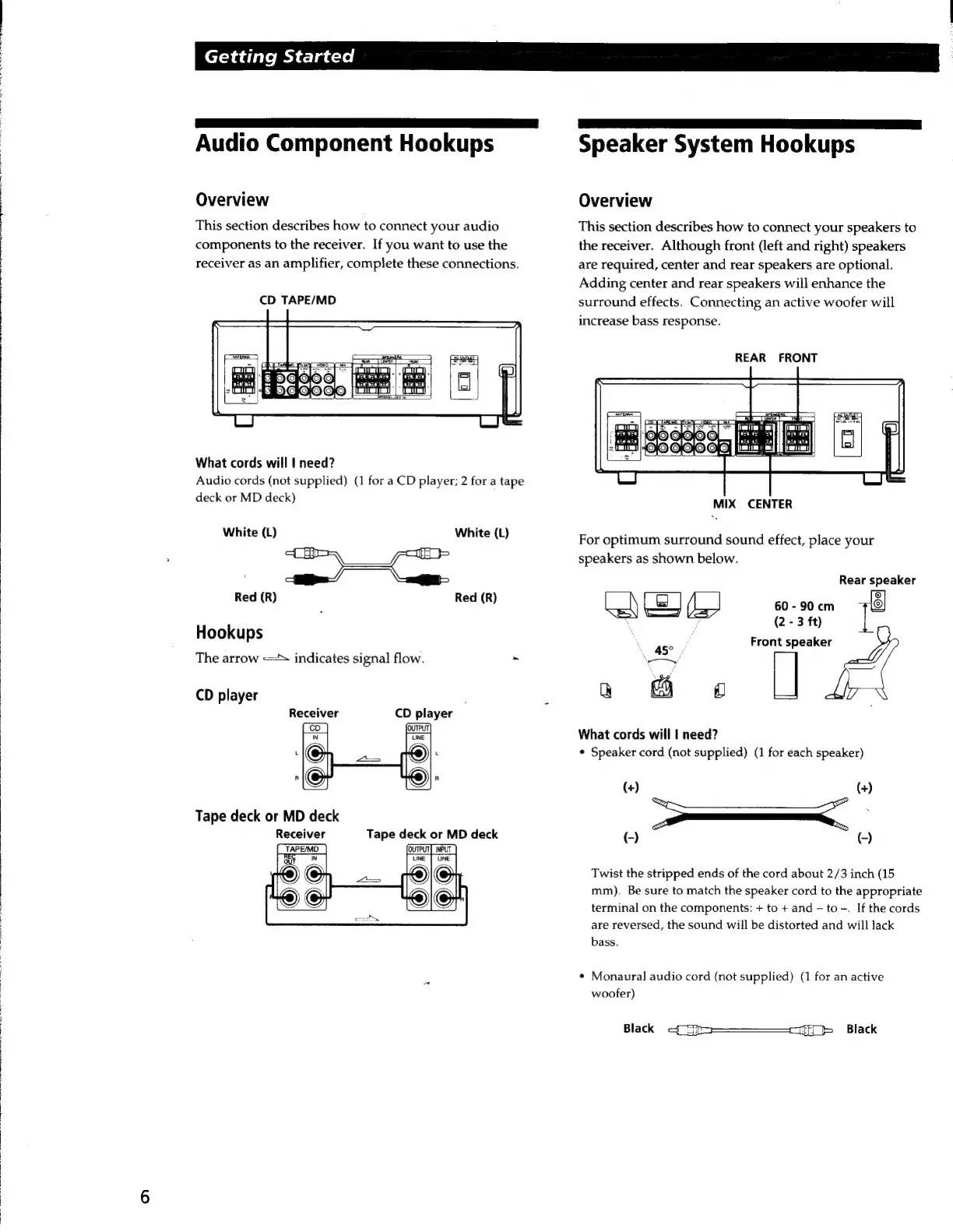
Audio
Component
Hookups
Overview
This
section
describes
how
to
connect
your
audio
components
to
the
receiver.
If
you
want
to
use
the
receiver
as
an
amplifier,
complete
these
connections.
CD
TAPE/MD
What
cords
will
|
need?
Audio
cords
(not
supplied)
(1
for
a
CD
player;
2
for
a
tape
deck
or
MD
deck)
White
(L)
White
(L)
ae.
Red
(R)
Red
(R)
Hookups
The
arrow
<=
indicates
signal
flow.
-
CD
player
Receiver
CD
player
Tape
deck
or
MD
deck
Receiver
Tape
deck
or
MD
deck
©
@
5
Speaker
System
Hookups
Overview
This
section
describes
how
to
connect
your
speakers
to
the
receiver.
Although
front
(left
and
right)
speakers
are
required,
center
and
rear
speakers
are
optional.
Adding
center
and
rear
speakers
will
enhance
the
surround
effects.
Connecting
an
active
woofer
will
increase
bass
response.
REAR
FRONT
MIX
CENTER
For
optimum
surround
sound
effect,
place
your
speakers
as
shown
below.
‘45°
a
@
oo
What
cords
will
|
need?
¢
Speaker
cord
(not
supplied)
(1
for
each
speaker)
Rear
speaker
60
-
90
cm
i
(2
-
3
ft)
Front
speaker
(+)
(+)
——
(-)
C)
Twist
the
stripped
ends
of
the
cord
about
2/3
inch
(15
mm).
Be
sure
to
match
the
speaker
cord
to
the
appropriate
terminal
on
the
components:
+
to
+
and
-
to
-.
If
the
cords
are
reversed,
the
sound
will
be
distorted
and
will
lack
bass.
¢
Monaural
audio
cord
(not
supplied)
(1
for
an
active
woofer)
Black
qo
St
cif}
Black

Related product manuals