KD-27FS170/32FS170/36FS170
KD-27FS170/32FS170/36FS170
9
4
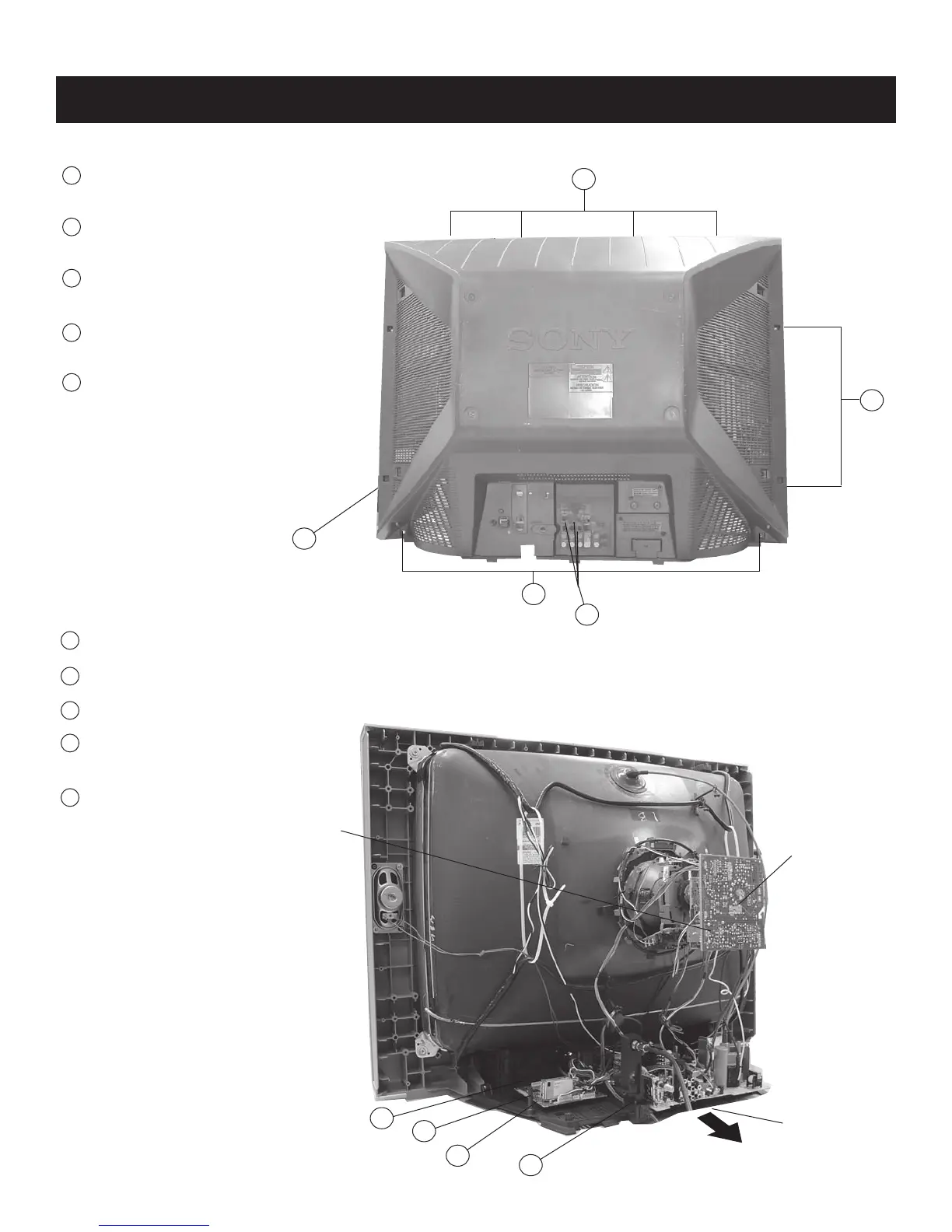
1-1. REAR COVER REMOVAL
SECTION 1: DISASSEMBLY
1-2. CHASSIS ASSEMBLY REMOVAL
1
Remove screws from top of cover.
4 Screws
SCREW +BVTP 4X16 TYPE2 TT (B)
2
Remove screws from sides of cover.
4 Screws
SCREW +BVTP 4X16 TYPE2 TT (B) - 2
each side
3
Remove screws from bottom of cover.
2 Screws
SCREW +BVTP 4X16 TYPE2 TT (B)
4
Remove screws from back of cover.
3 Screws
SCREW +BVTP 3X12 TYPE2 TT (B)
5
Remove rear cover
5
2
1
1
Release the M Board.
2
Release the A Board wires from Clip Holder.
3
Press on catch tab to release the A Board.
4
Remove Power Cable Holders by gently
rocking to release clips.
5
Gently pull the chassis forward.
CV Board
Chassis Assembly
1
2
VD Board
3
4
3






 To Next Page