EasyManua.ls Logo

Sony Trinitron KV-20FV10 - Using the Remote Control; Basic Remote Control Functions

Sony Trinitron KV-20FV10
41 pages
Print Icon
To Next Page IconTo Next Page
To Previous Page IconTo Previous Page
Loading...
Using
the
Remote
Control and
Basic
Functions
This section
shows you
how to use
more
advanced buttons on
the remote
control and
how to use
the on-screen
menus.
VTFVWD SAT CAB! F
/C-Os
0
CD CD
(B
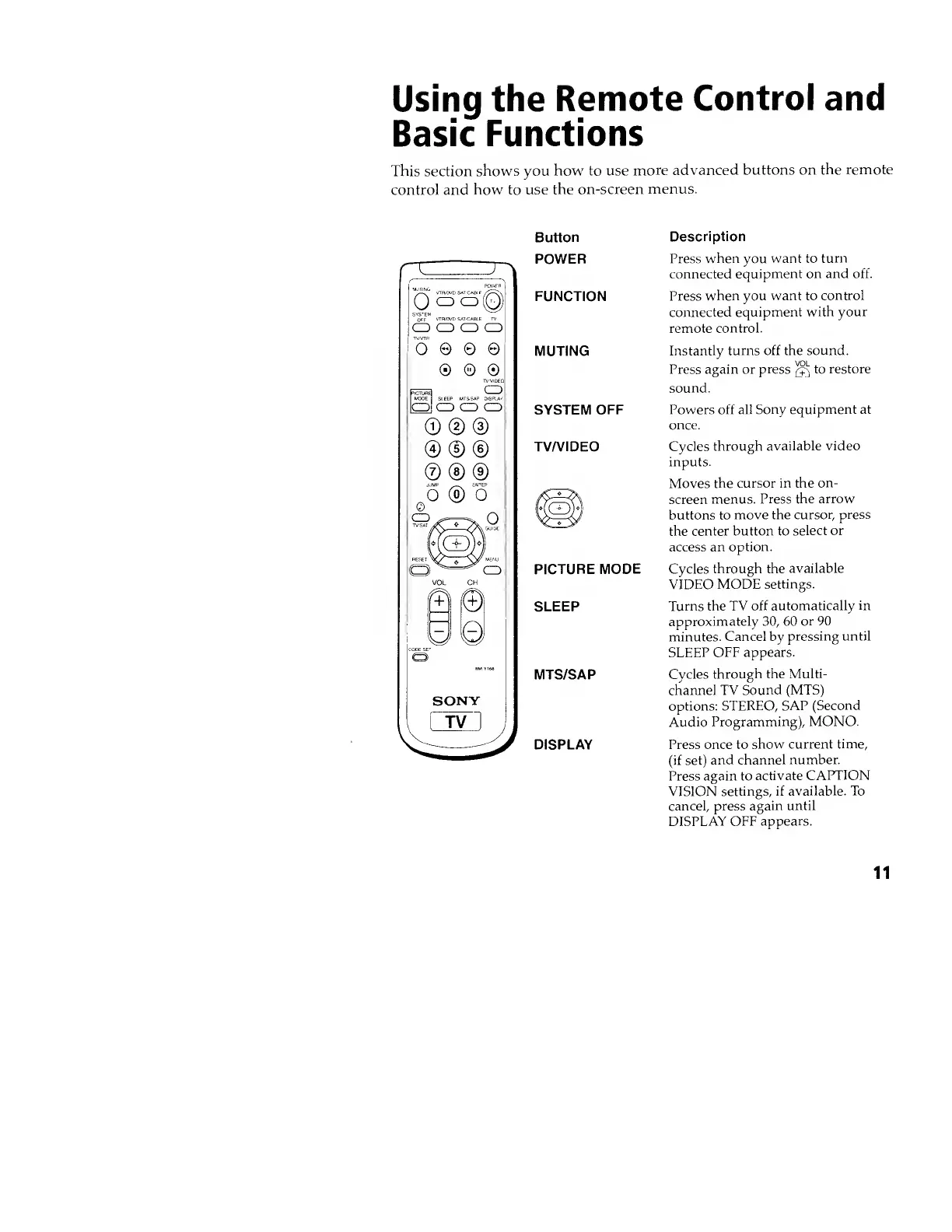
Button
POWER
FUNCTION
MUTING
SYSTEM
OFF
TV/VIDEO
PICTURE
MODE
SLEEP
MTS/SAP
DISPLAY
Description
Press
when
you
want to
turn
connected
equipment on and off.
Press
when you want to
control
connected equipment
with your
remote
control.
Instantly turns off the sound.
Press again or
press to restore
sound.
Powers off all
Sony equipment at
once.
Cycles through
available video
inputs.
Moves
the cursor in the
on-
screen
menus.
Press the arrow
buttons to
move the
cursor, press
the
center button to
select or
access an
option.
Cycles
through the
available
VIDEO MODE
settings.
Turns the TV
off automatically
in
approximately
30,
60
or 90
minutes.
Cancel by
pressing until
SLEEP OFF appears.
Cvcles
through the Multi-
channel TV
Sound (MTS)
options:
STEREO, SAP
(Second
Audio
Programming), MONO.
Press once to
show current
time,
(if set)
and
channel number.
Press again to
activate
CAPTION
VISION
settings, if
available. To
cancel, press
again until
DISPLAY OFF
appears.
11