EasyManua.ls Logo

Sony Trinitron KV-20FV10 - Navigating On-Screen Menus; Quick Start to Menu Navigation

Sony Trinitron KV-20FV10
41 pages
Print Icon
To Next Page IconTo Next Page
To Previous Page IconTo Previous Page
Loading...
User Guide
Quick Start
to the
Menus
The
following settings
are available
in
your on-screen
menus:
Menu
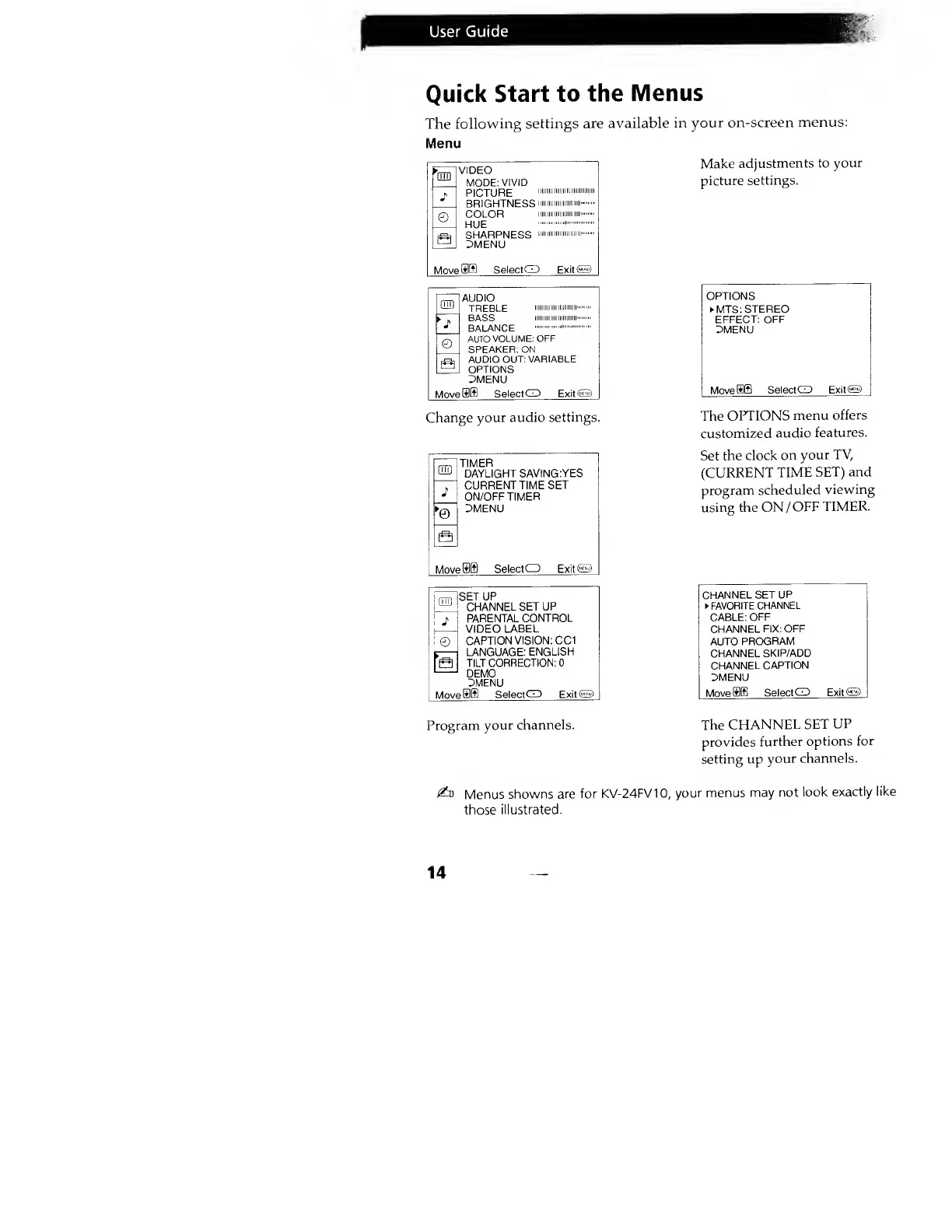
Make
adjustments to
your
picture
settings.
am
©
VIDEO
MODE:
VIVID
PICTURE
BRIGHTNESS
COLOR
HUE
SHARPNESS
3MENU
iiiiiiiiiiiiiiiiii
iiiniiiiii
minimi
Movefflffl
Select
G3
ExitO
ED
©
Move
AUDIO
TREBLE
>""«'
BASS
iiiiiiiiiiiiiiiiiiiinii
BALANCE
AUTO
VOLUME: OFF
SPEAKER: ON
AUDIO
OUT: VARIABLE
OPTIONS
Z5MENU
Select
CD ExitO
Change
your audio
settings.
QTD
1
TIMER
DAYLIGHT
SAVING:YES
CURRENT TIME
SET
ON/OFF
TIMER
DMENU
MoveU
Select
O
Exit©
ED
©
Move
SET UP
CHANNEL
SET UP
PARENTAL
CONTROL
VIDEO
LABEL
CAPTION
VISION: CC1
LANGUAGE:
ENGLISH
TILT
CORRECTION: 0
DEMO
DMENU
SelectCZD Exit<5~>
OPTIONS
MTS:
STEREO
EFFECT: OFF
DMENU
MoveBffl
SelectGJ Exit€5>
The
OPTIONS
menu
offers
customized
audio
features.
Set the
clock
on
your TV,
(CURRENT
TIME
SET) and
program
scheduled
viewing
using the ON
/
OFF
TIMER.
CHANNEL SET
UP
FAVORITE
CHANNEL
CABLE:
OFF
CHANNEL
FIX: OFF
AUTO
PROGRAM
CHANNEL
SKIP/ADD
CHANNEL
CAPTION
DMENU
Movefflffl
SelectCD Exit
65)
Program
your
channels.
The
CHANNEL
SET
UP
provides
further
options
for
setting up
your
channels.
i&)
Menus
showns are for
KV-24FV1
0,
your menus
may not
look
exactly
like
those
illustrated.
14