EasyManua.ls Logo

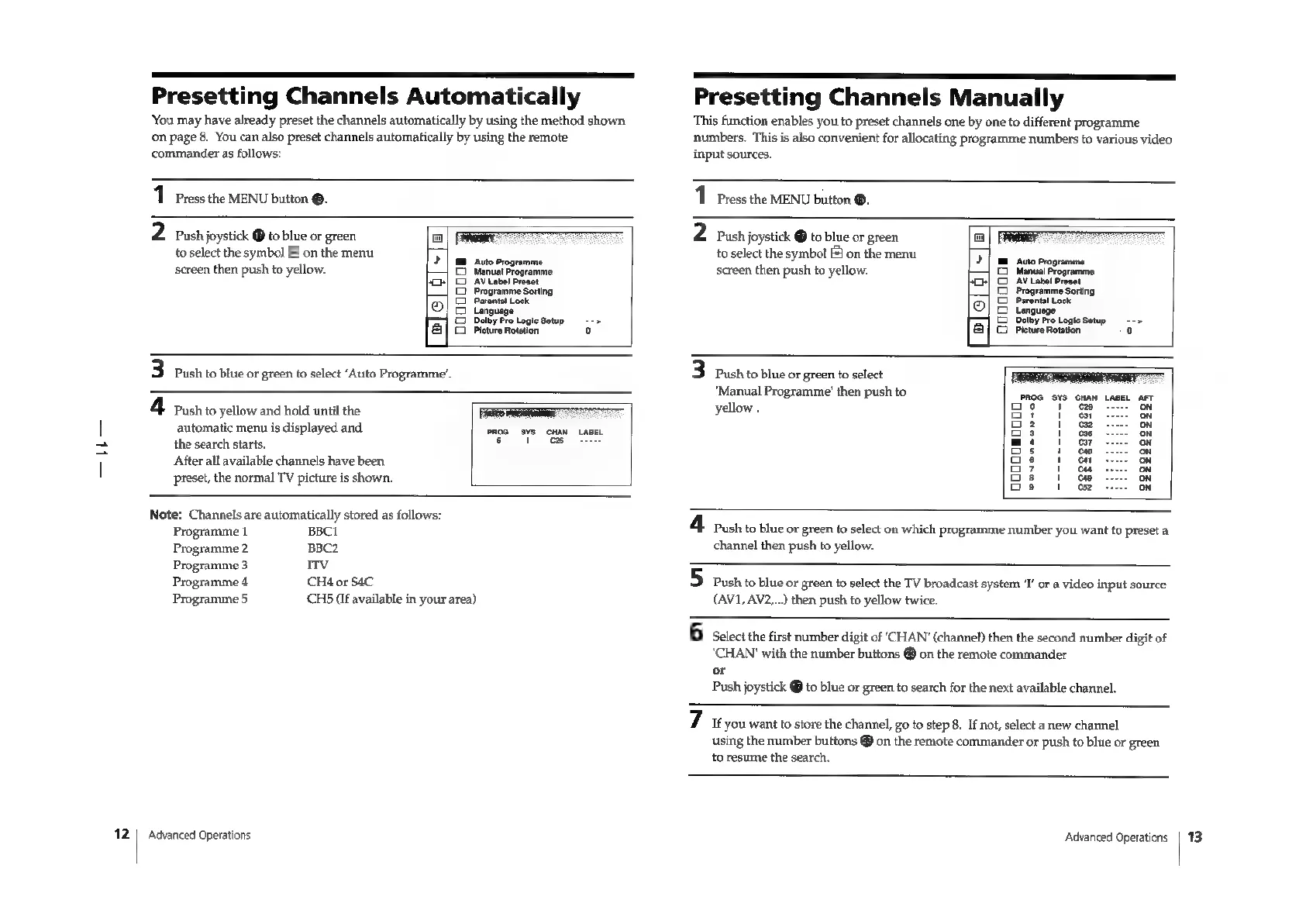
Sony Trinitron KV-29F3A - CHANNEL MANAGEMENT FEATURES; Manual Channel Presetting; Automatic Channel Presetting (Menu Method)

Sony Trinitron KV-29F3A
58 pages
Print Icon
To Next Page IconTo Next Page
To Previous Page IconTo Previous Page
Loading...
fr
12
Presetting
Channels
Automatically
You
may
have
already
preset
the
channels
automatically
by
using
the
method
shown
on
page
8.
You
can
also
preset
channels
automatically
by
using
the
remote
commander
as
follows:
11
Press
the
MENU
bution
®.
2
Push
joystick
®
to
blue
or
green
to
select
the
symbol
&
on
the
menu
screen
then
push
to
yellow.
Auto
Programme
Manual
Programme
Gi
AV
Label
Preset
Programme
Sorting
i
Parental
Lock
Leola]
-[e
Language
Dolby
Pro
Logic
Setup
-->
Picture
Rotation
°
3
Push
to
blue
or
green
to
select
‘Auto
Programme’.
4
Push
to
yellow
and
hold
until
the
has
automatic
menu
is
displayed
and
the
search
starts.
After
all
available
channels
have
been
PROG
SYS
CHAN
LABEL
6
1
preset,
the
normal
TV
picture
is
shown.
Note:
Channels
are
automatically
stored
as
follows:
Programme
1
BBCI
Programme
2
BBC2
Programme
3
ITv
Programme
4
CH4
or
S4C
Programme
5
CHS
(If
available
in
your
area)
Advanced
Operations
a
Presetting
Channels
Manually
This
function
enables
you
to
preset
channels
one
by
one
to
different
programme
numbers.
This
is
also
convenient
for
allocating
programme
numbers
to
various
video
input
sources.
1
Press
the
MENU
button
®.
2
Push
joystick
@
to
blue
or
green
to
select
the
symbol
[#]
on
the
menu
screen
then
push
to
yellow.
‘Auto
Programme
Manual
Programme
AV
Label
Preset
Programme
Sorting
Parental
Lock
guage
Lan
Dolby
Pro
Logic
Setup
©
--
>
[2]
i
Pleture
Rotation
el
al[<e
coooos
3
Push
to
blue
or
green
to
select
"Manual
Programme’
then
push
to
yellow
.
goooosooo00
4
push
to
blue
or
green
to
select
on
which
programme
number
you
want
to
preset
a
channel
then
push
to
yellow.
5
push
to
blue
or
green
to
select
the
TV
broadcast
system
‘T’
or
a
video
input
source
(AV1,
AV2,...)
then
push
to
yellow
twice.
6
Select
the
first
number
digit
of
‘CHAN’
(channel)
then
the
second
number
digit
of
‘CHAN’
with
the
number
buttons
®
on
the
remote
commander
or
Push
joystick
@
to
blue
or
green
to
search
for
the
next
available
channel.
7
6
you
want
to
store
the
channel,
go
to
step
8. If
not,
select
a
new
channel
using
the
number
buttons
®
on
the
remote
commander
or
push
to
blue
or
green
to
resume
the
search.
Advanced
Operations
13

Related product manuals