EasyManua.ls Logo

Sony Trinitron KV-29F3A - PICTURE AND SOUND ADJUSTMENTS; Picture Control Settings; Sound Control Settings

Sony Trinitron KV-29F3A
58 pages
Print Icon
To Next Page IconTo Next Page
To Previous Page IconTo Previous Page
Loading...
—ZzZ—
14
8
Press
the
joystick
@.
9
Repeat
steps
4
to
8
to
preset
other
channels.
1
0
Press
the
MENU
button
®
to
restore
the
normal
TV
picture.
Advanced
Operations
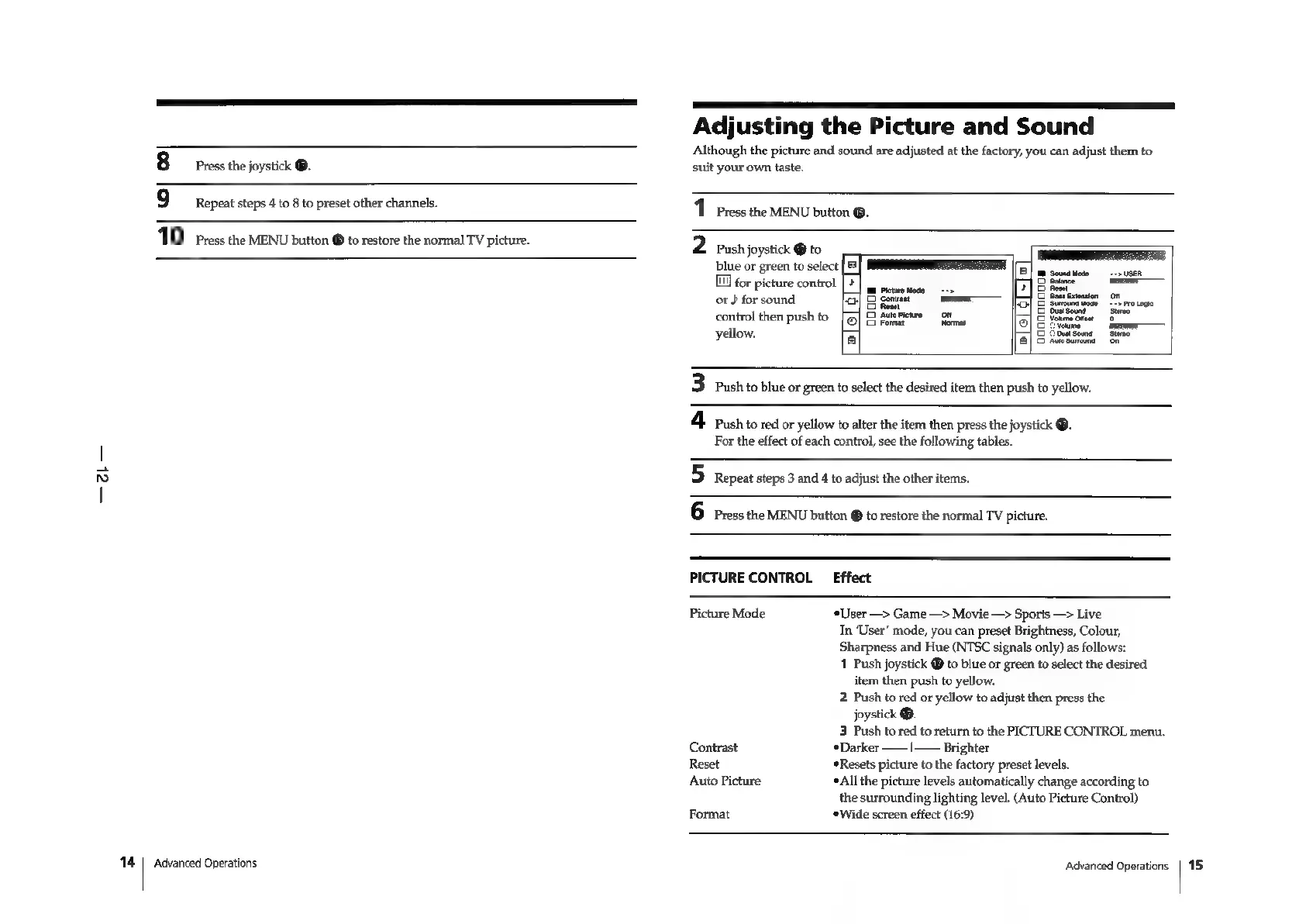
Adjusting
the
Picture
and
Sound
Although
the
picture
and
sound
are
adjusted
at
the
factory,
you
can
adjust
them
to
suit
your
own
taste.
1
Press
the
MENU
button
®.
2
Push
joystick
@
to
ES
blue
or
green
to
selec
wie.
cvues
11]
for
picture
control
|
&
Bales
———
dorsound
of
aa
EE
xa
5
or
}
for
soun
or]
S
gone
Fo]
5
Stroundtiose
°°
Protene
ope
control
then.
push
to
©
5
ene:
bal
@
Youre
Onvet
o
yellow,
a
aoa
&"
3
Push
to
blue
or
green
to
select
the
desired
item
then
push
to
yellow.
4
ash
to
red
or
yellow
to
alter
the
item
then
press
the
joystick
@.
For
the
effect
of
each
control,
see
the
following
tables.
5
Repeat
steps
3
and
4
to
adjust
the
other
items.
6
Press
the
MENU
button
@
to
restore
the
normal
TV
picture.
PICTURE
CONTROL
Effect
Picture
Mode
“User
—>
Game
—>
Movie
—>
Sports
—>
Live
In
‘User’
mode,
you
can
preset
Brightness,
Colour,
Sharpness
and
Hue
(NTSC
signals
only)
as
follows:
1
Push
joystick
@
to
blue
or
green
to
select
the
desired
item
then
push
to
yellow.
2
Push
to
red
or
yellow
to
adjust
then
press
the
joystick
®.
3
Push
to
red
to
return
to
the
PICTURE
CONTROL
menu.
Contrast
Darker
——|—
Brighter
Reset
#
Resets
picture
to
the
factory
preset
levels.
*All
the
picture
levels
automatically
change
according
to
the
surrounding
lighting
level.
(Auto
Picture
Control)
Format
*Wide
screen
effect
(16:9)
Advanced
Operations
|
15

Related product manuals