EasyManua.ls Logo

Sony Trinitron KV-29F3A - PROGRAMME AND CONTENT MANAGEMENT; Parental Lock Functionality

Sony Trinitron KV-29F3A
58 pages
Print Icon
To Next Page IconTo Next Page
To Previous Page IconTo Previous Page
Loading...
—pr—
18
ee
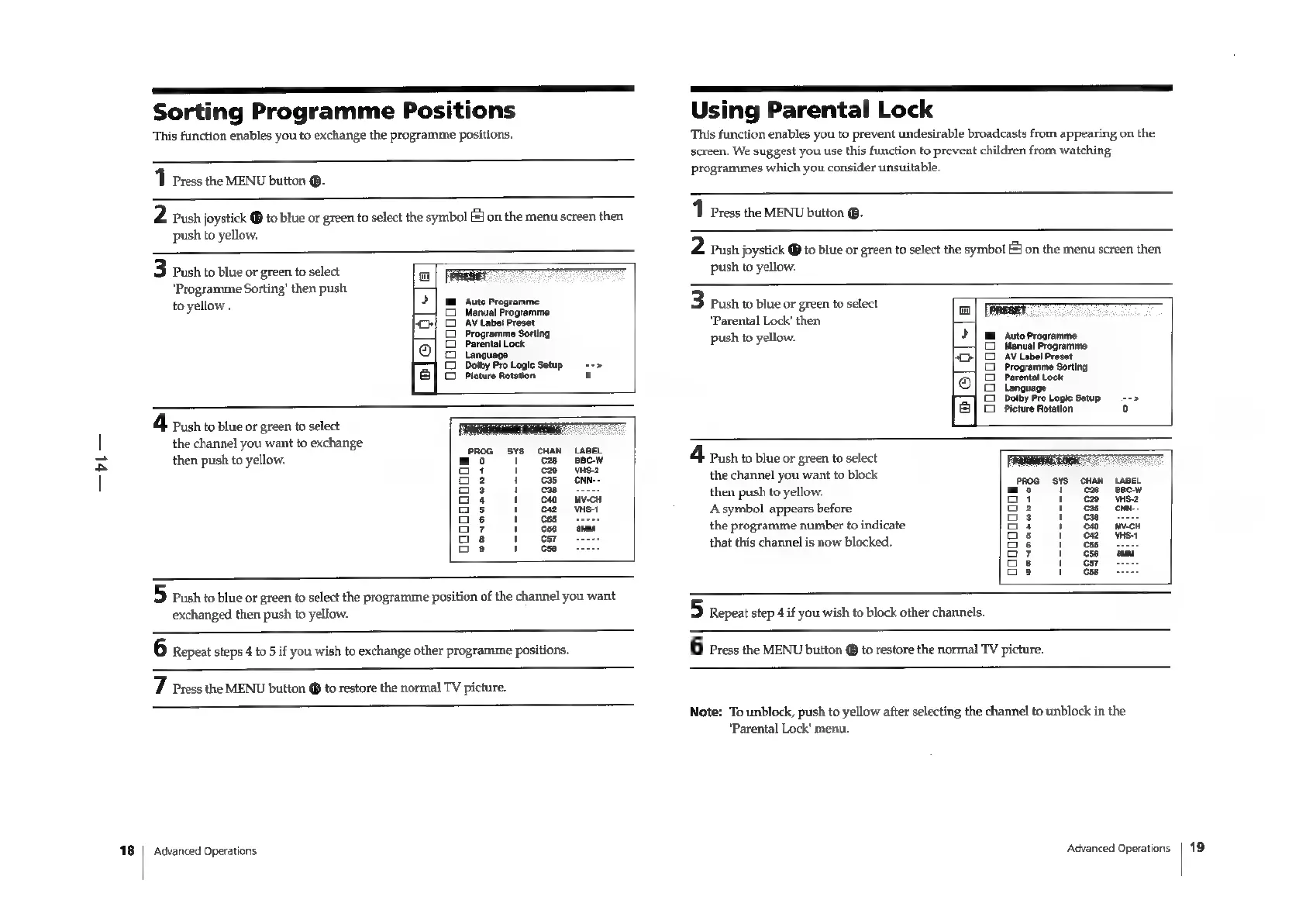
Sorting
Programme
Positions
This
function
enables
you
to
exchange
the
programme
positions.
1
Press
the
MENU
button
®.
2
Push
joystick
®
to
blue
or
green
to
select
the
symbol
f
on
the
menu
screen
then
push
to
yellow.
3
Push
to
blue
or
green
to
select
"Programme
Sorting’
then
push
to
yellow
.
(ae
manana”
a
2
|
mm
Auto
Programme
(2
Manual
Programme
Ch}
Co
AV
Labet
Preset
(2)
Programme
Sorting
Parental
Lock
Language
©
Dolby
Pro
Logie
Setup
«+>
[|
©
Picture
Rotation
0
4
push
to
blue
or
green
to
select
the
channel
you
want
to
exchange
PROG
SYS
then
push
to
yellow.
“oo
YT
oi
1
oe
1
o3
1
aa
1
Gs
1
Get
o7
4
oes
4
oe
4
5
push
to
blue
or
green
to
select
the
programme
position
of
the
channel
you
want
exchanged
then
push
to
yellow.
Using
Parental
Lock
This
function
enables
you
to
prevent
undesirable
broadcasts
from
appearing
on
the
screen,
We
suggest
you
use
this
function
to
prevent
children
from
watching
programmes
which
you
consider
unsuitable.
1
Press
the
MENU
bution
®.
2
Push
joystick
@
to
blue
or
green
to
select
the
symbol
[$j
on
the
menu
screen
then
push
to
yellow.
3
Push
to
blue
or
green
to
select
‘Parental
Lock’
then
push
to
yellow.
|
‘Auto
Programme
Manual
Programme
AV
Label
Preset
Programme
Sorting
Par
el
al
-[e
coooooos
ui
8
juage
Dolby
Pro
Logic
Setup
=~
Picture
Rotation
4
Pash
to
blue
or
green
to
select
the
channel
you
want
to
block
then
push
to
yellow.
Asymbol
appears
before
the
programme
number
to
indicate
that
this
channel
is
now
blocked.
PROG
SYS
ooooooooos
5
Repeat
step
4
if
you
wish
to
block
other
channels.
6
Repeat
steps
4
to
5
if
you
wish
to
exchange
other
programme
positions.
6
Press
the
MENU
button
@
to
restore
the
normal
TV
picture.
7
Press
the
MENU
button
@
to
restore
the
normal
TV
picture.
Advanced
Operations
Note:
To
unblock,
push
to
yellow
after
selecting
the
channel
to
unblock
in
the
‘Parental
Lock’
menu.
Advanced
Operations
|
19

Related product manuals