EasyManua.ls Logo

Sony Trinitron KV-29F3A - TV SETTINGS AND FEATURES; Picture Rotation Adjustment

Sony Trinitron KV-29F3A
58 pages
Print Icon
To Next Page IconTo Next Page
To Previous Page IconTo Previous Page
Loading...
—s
20
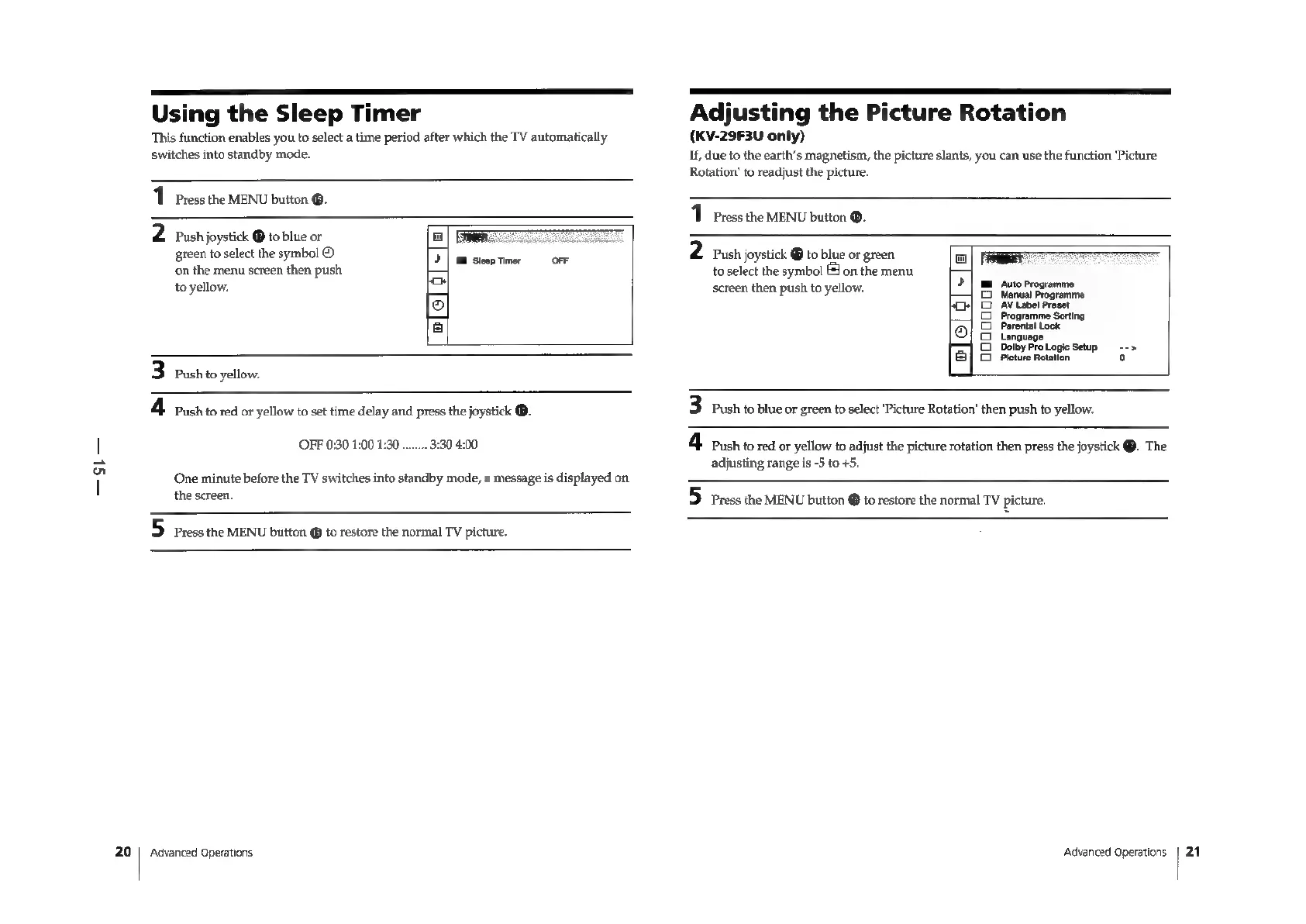
Using
the
Sleep
Timer
This
function
enables
you
to
select
a
time
period
after
which
the
TV
automatically
switches
into
standby
mode.
1
Press
the
MENU
button
@.
2
rush
joystick
®
to
blue
or
a
green
to
select
the
symbol
©
21]:
busep
tine:
oeF
‘on
the
menu
screen
then
push
to
yellow.
han
&
3
Push
to
yellow.
4
Push
to
red
or
yellow
to
set
time
delay
and
press
the
joystick
®.
3:30 4:00
OFF
0:30
1:00 1:30
..
One
minute
before
the
TV
switches
into
standby
mode,
a
message
is
displayed
on
the
screen.
5
Press
the
MENU
button
@
to
restore
the
normal
TV
picture.
‘Advanced
Operations
Adjusting
the
Picture
Rotation
(KV-29F3U
only)
If,
due
to
the
earth’s
magnetism,
the
picture
slants,
you
can
use
the
function
‘Picture
Rotation’
to
readjust
the
picture.
1
Press
the
MENU
button
®.
2
Push
joystick
@
to
blue
or
green
to
select
the
symbol
J
on
the
menu
screen
then
push
to
yellow.
ME
Auto
Programme
Manual
Programme
AV
Label
Preset
Programme
Sorting
Parental
Lock
G
Language
ao
29
Dolby
Pro
Logie
Setup
-->
}3|
Picture
Rotation
o
oo
a
>
+o
(9)
3
Push
to
blue
or
green
to
select
‘Picture
Rotation’
then
push
to
yellow.
4.
bush
to
red
or
yellow
to
adjust
the
picture
rotation
then
press
the
joystick
@.
The
adjusting
range
is
-5
to
+5.
5
Press
the
MENU
button
@
to
restore
the
normal
TV
picture.
Advanced
Operations
21

Related product manuals