EasyManua.ls Logo

Sony Trinitron KV-29F3A - Page 16

Sony Trinitron KV-29F3A
58 pages
Print Icon
To Next Page IconTo Next Page
To Previous Page IconTo Previous Page
Loading...
—9—
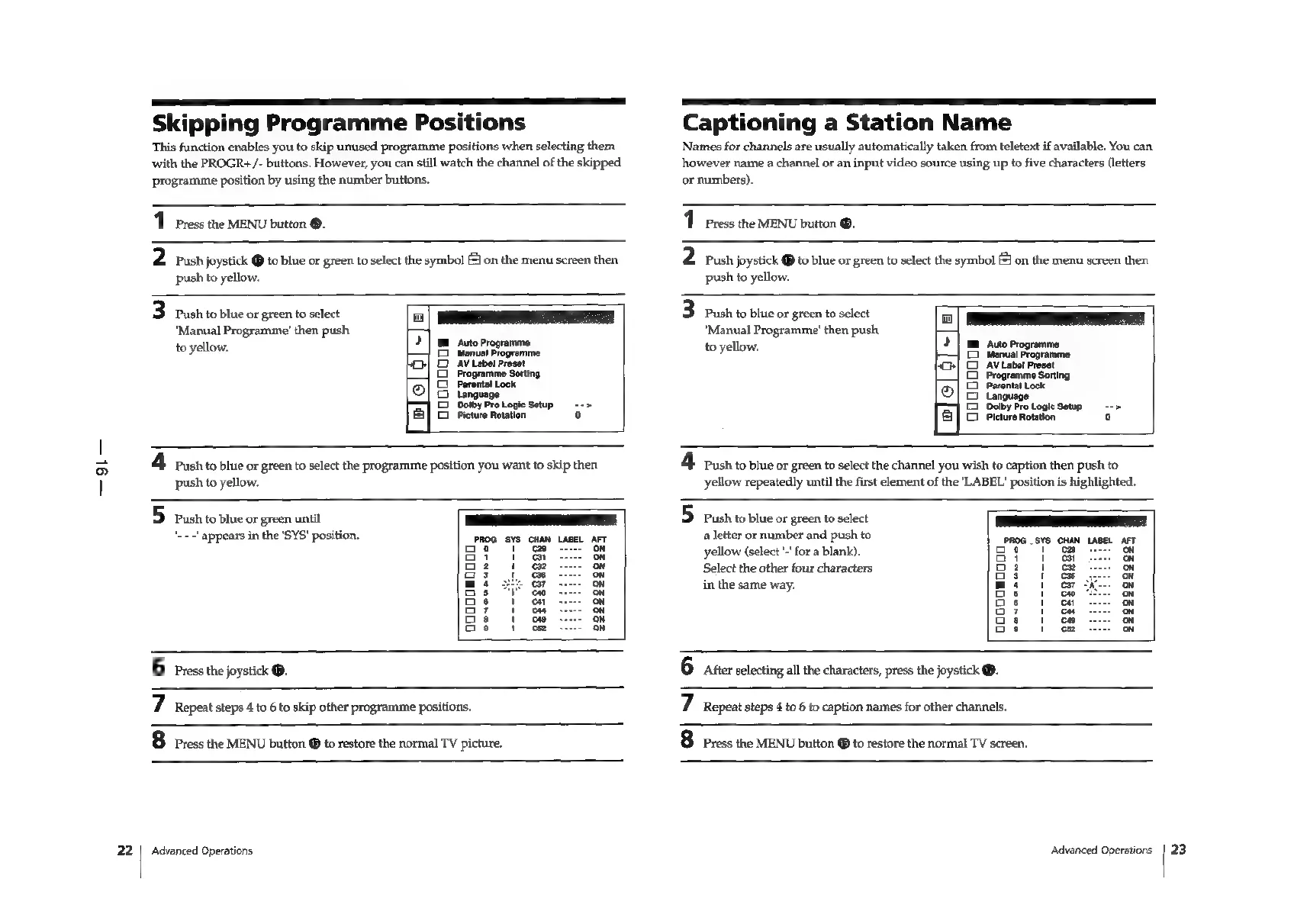
Skipping
Programme
Positions
This
function
enables
you
to
skip
unused
programme
positions
when
selecting
them
with
the
PROGR+/-
buttons.
However,
you
can
still
watch
the
channel
of
the
skipped
programme
position
by
using
the
number
buttons.
1
Press
the
MENU
button
®.
2
Push
joystick
@
to
blue
or
green
to
select
the
symbol
[=]
on
the
menu
screen
then
push
to
yellow.
3
Push
to
blue
or
green
to
select
0
eT
"Manual
Programme’
then
push
a
Auto
Pr
to
yellow.
Bi
heerereree
Programme
Sorting
i
Parente
Lock
|
C2
AV
Label
Preset
12)
4
Push
to
blue
or
green
to
select
the
programme
position
you
want
to
skip
then
push
to
yellow.
5
Push
to
blue
or
green
until
PEE
‘.--!
appears
in
the
'SYS'
position
Ea
a
Pi
x
a3
a
a2
on
a3
ou
a:
ou
a3
a
a3
a
as
a
a3
oy
as
oh
Captioning
a
Station
Name
Names
for
channels
are
usually
automatically
taken
from
teletext
if
available.
You
can
however
name
a
channel
or
an
input
video
source
using
up
to
five
characters
(letters
or
numbers).
1
Press
the
MENU
button
®.
2
rush
joystick
@
to
blue
or
green
to
select
the
symbol
(J
on
the
menu
screen
then
push
to
yellow.
3
Push
to
blue
or
green
to
select
"Manual
Programme’
then
push
o
to
yellow.
>
|
Mm
Auto
Programme
yom
©
Manual
Programme
ih}
CO
AV
Label
Preset
Programme
Sorting
©
Parental
Lock
2}
o
Language
D_ Dolby
Pro
Logic
Setup
a
©
Pleture
Rotation
4
Push
to
blue
or
green
to
select
the
channel
you
wish
to
caption
then
push
to
yellow
repeatedly
until
the
first
element
of
the
'LABEL'
position
is
highlighted.
5
Push
to
blue
or
green
to
select
ES
a
letter
or
number
and
push
to
aba.
6vo
AN
age
u
ae
1
yellow
(select
'-'
for
a
blank).
acat
)
ah
aeet
a
Select
the
other
four
characters
gh
1,
aca
in
the
same
way.
mst
oo
Os
1
co
Os
1
cH
O7
t
Cu
Ga
1
co
os
1
cs
6
Press
the
joystick
®.
6
aster
selecting
all
the
characters,
press
the
joystick
@.
7
Repeat
steps
4
to
6
to
skip
other
programme
positions.
8
Press
the
MENU
button
@
to
restore
the
normal
TV
picture.
Advanced
Operations
7
Repeat
steps
4
to
6
to
caption
names
for
other
channels.
8
Press
the
MENU
button
@
to
restore
the
normal
TV
screen.
Advanced
Operations
23

Related product manuals